[BUG] [alpha] GitSettingsPanel "Commit" section header uses "upload" icon — commit is a local operation, not a push/upload (GitSettingsPanel.tsx:293) #39618

Description

Project
ide
Description
In GitSettingsPanel.tsx line 293, the "Commit" section header uses <Icon name="upload" /> (an upward arrow icon representing uploading/pushing data to a remote server). However, a git commit is a local operation that saves changes to the local repository — it does not upload or push anything to a remote.
The icon creates a misleading visual association: Clone = download ↓ (correct — cloning downloads from remote), Commit = upload ↑ (wrong — commit is local, not an upload), Fetch = rotate ↻ (correct — fetching refreshes from remote).
The "upload" icon semantically implies pushing changes to a remote server, which is the git push operation, not git commit. The correct icon for commit would be check, circle-check, or code-commit to represent saving/confirming local changes.
Error Message
N/A
Debug Logs
N/A
System Information
- Cortex IDE alpha (latest)
- OS: Linux x86_64
- Browser engine: Chromium
Screenshots
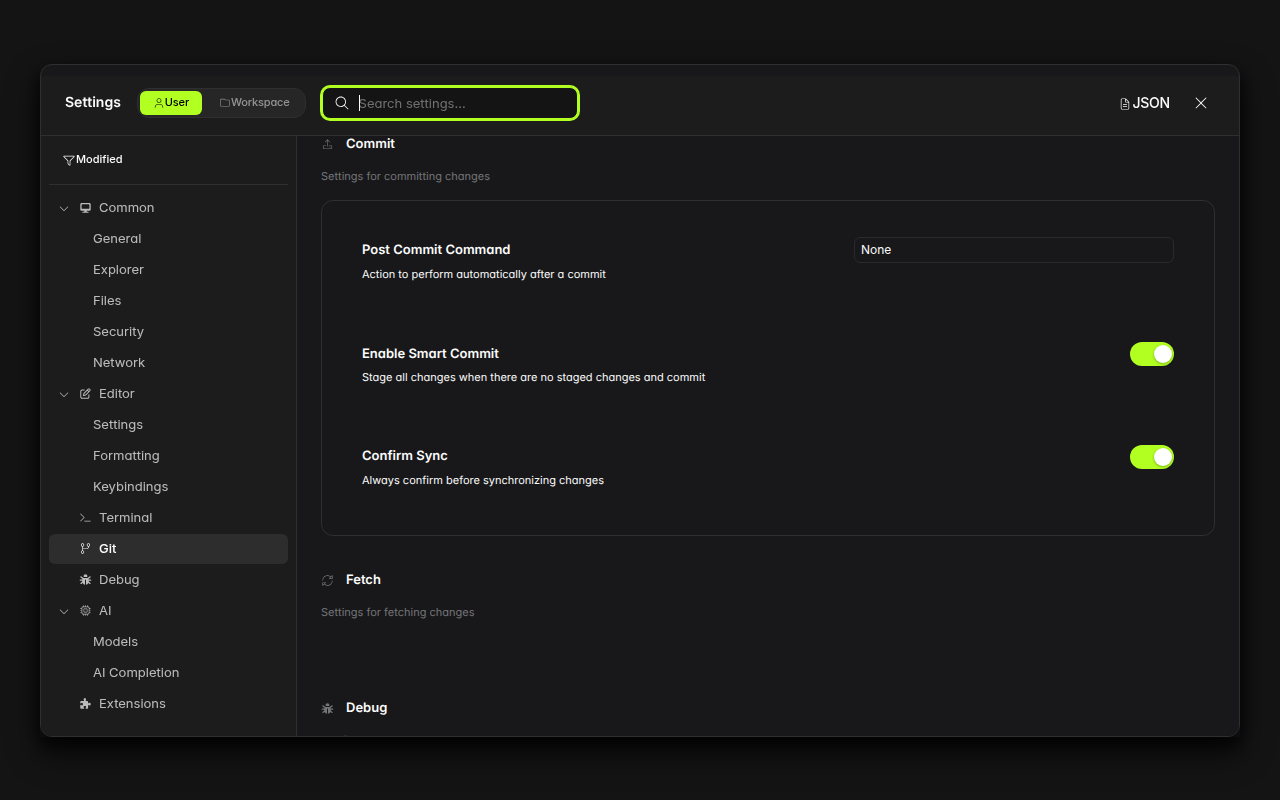
Steps to Reproduce
- Open Cortex IDE
- Open Settings (Ctrl+,)
- Navigate to Git section in the sidebar
- Scroll down to the "Commit" section header
- Observe the upload arrow icon next to "Commit"
Expected Behavior
The "Commit" section should use an icon that represents local change confirmation (e.g., checkmark, code-commit) — consistent with the git commit semantics of saving changes locally.
Actual Behavior
The "Commit" section uses the "upload" icon (upward arrow), which represents pushing/uploading to a remote server — semantically incorrect for a local git commit operation. This is inconsistent with the "Clone" section which correctly uses a "download" icon.