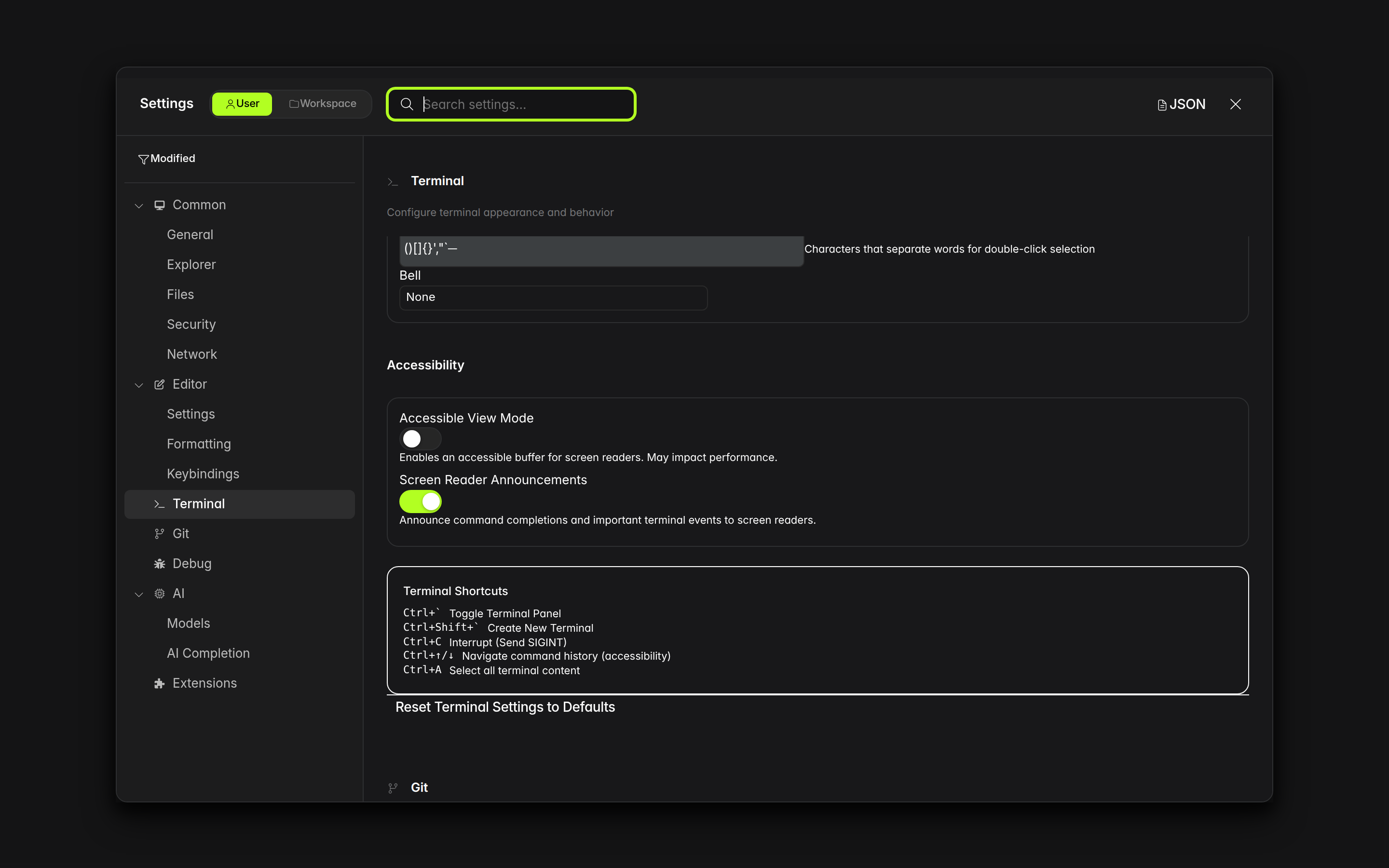
[BUG] [alpha] TerminalSettingsPanel shortcuts info box lists Ctrl+A = "Select all terminal content" and Ctrl+↑/↓ = "Navigate command history" but neither keybinding exists — both are non-functional (TerminalSettingsPanel.tsx:505-510) #39619

Description

Project
ide
Description
The Terminal Settings panel (TerminalSettingsPanel.tsx, lines 490-515) displays a "Terminal Shortcuts" info box listing keyboard shortcuts. Two of the listed shortcuts do not exist in the terminal keybinding system and are non-functional:
-
Line 509-510:
Ctrl+A = Select all terminal content— No keybinding for Ctrl+A exists inTerminalEventHandlers.ts. In a terminal, Ctrl+A sends ASCII SOH to the shell (readline: go to beginning of line). Theterminal.selectAllcommand is only accessible via the command palette, not via Ctrl+A. -
Line 505-506:
Ctrl+↑/↓ = Navigate command history (accessibility)— ThegoToNextCommand/goToPrevCommandmethods exist but are only triggered via custom events (terminal:go-to-next-command). No Ctrl+Arrow keybinding is registered inTerminalEventHandlers.ts. The only Ctrl bindings are Ctrl+F (find), Ctrl+L (clear), and Ctrl+Shift+L (scroll lock).
The shortcuts that DO work are correctly listed: Ctrl+`` (toggle panel), Ctrl+Shift+`` (new terminal), Ctrl+C (interrupt).
Error Message
N/A
Debug Logs
N/A
System Information
- Cortex IDE alpha (latest)
- OS: Linux x86_64
- Browser engine: Chromium
Screenshots
Steps to Reproduce
- Open Settings (Ctrl+,)
- Navigate to Terminal section
- Scroll down to "Terminal Shortcuts" info box
- Read the listed shortcuts:
Ctrl+AandCtrl+↑/↓ - Open a terminal and try pressing Ctrl+A — cursor jumps to line start (shell behavior), does NOT select all
- Try pressing Ctrl+↑ — sends escape sequence to shell, does NOT navigate commands
Expected Behavior
The shortcuts listed in the info box should be functional keyboard bindings registered in the terminal event handler. If they are not implemented, they should not be documented as available shortcuts.
Actual Behavior
Ctrl+A and Ctrl+↑/↓ are listed as working shortcuts but have no keybinding registered. Pressing them triggers default terminal/shell behavior instead of the documented action.