- Computer network refers to connected computing devices like (Laptops, desktops, servers, smartphones, and tablets) and several IOT devices. That communicate with one another.
- A client is a computer hardware device or software that accesses a service made available by a server. The server is often (but not always) located on a separate physical computer.
- A server is a physical computer dedicated to run services to serve the needs of other computers. Depending on the service that is running, it could be a file server, database server, home media server, print server, or web server.
-
A host is a computer, connected to other computers for which it provides data or services over a network. In theory, every computer connected to a network acts as a host to other peers on the network.
-
A host must have an assigned IP address. Therefore, modems, hubs, and switches are not considered hosts because they do not have assigned IP addresses.
- A server can be located inside or outside of your LAN. Accessibility to the server is determined by whether or not it has a public IP address or private IP address. If the server has a public IP address, it can be accessed from the web. If it has a private IP address, it can only be accessed from inside of your LAN (unless you setup port forwarding for remote access).

-
A server:
-
Can be a physical device or software program.
-
Installed on a host computer.
-
Provides specific services.
-
Serves only clients.
-
A host:
-
Is always a physical computer or device.
-
Can run both server and client programs.
-
Provides specific services.
-
Serves multiple users and devices.
- In networking, a peer is a node that provides the same functionality as another. For example, two desktop PCs in a network are peers. A desktop PC and a server are not peers as they perform different operations.
- Network bandwidth is a measurement indicating the maximum capacity of a wired or wireless communications link to transmit data over a network
connection in a given amount of time. - Typically, bandwidth is represented in the number of bits, kilobits, megabits or gigabits that can be transmitted in 1 second. {bandwidth describes data
transfer rate.} - Note: Bandwidth is not a measure of network speed -- a common misconception.
- Information is transported from your computer in data packets across the internet. They are usually sent at regular intervals and take a set amount of time. Jitter is when there is a time delay in the sending of these data packets over your network connection.
- This is often caused by network congestion, and sometimes route changes.
- In networking, a packet is a small segment of a larger message. Data sent over computer networks, such as the Internet, is divided into packets. These packets are then recombined by the computer or device that receives them.
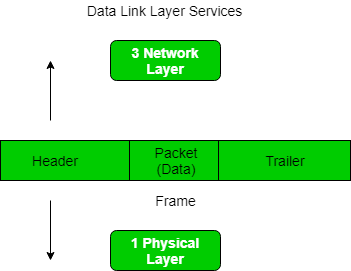
- Frames are the units of digital transmission particularly in computer networks and telecommunications.
- When you call an IP address on your computer, you try to contact another computer on the internet but when you call the IP address 127.0.0.1 then you are
communicating with the localhost. Localhost is always your own computer. - For eg: If you access “http://localhost” in the browser, the request will not be forwarded to the internet through the router. It will instead remain in your
own system. Localhost has the IP address 127.0.0.1. This refers back to your own server.
- Network connections can send bits very fast. We measure that speed using the bit rate, the number of bits of data that are sent each second.
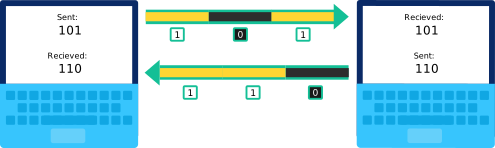
- Noise is any undesired signal in a communication circuit. Another definition calls noise unwanted disturbances superimposed on a useful signal, which tends to alter its information content.
- Noise can diminish transmission strength and disturb overall communication efficiency.
- Attenuation is the loss of signal strength in networking cables or connections. This typically is measured in decibels (dB) or voltage and can occur due to a variety of factors. It may cause signals to become distorted or indiscernible.
- For eg: An example of this is Wi-Fi signal and strength getting noticeably weaker the further that your device is from the router.
- Distortion is a term used to describe an interruption of transmitting signals that cause an unclear reception. Distortion is commonly found in sound generated or received by a computer, video or display signals and data cables such as network cables.
- The Internet is a global network of networks while the Web, also referred formally as World Wide Web (www) is collection of information which is accessed via the Internet.
- The Internet can be viewed as a big book-store while the Web can be viewed as collection of books on that store. At a high level, we can even think of the Internet as hardware and the Web as software!
- Web applications use Http protocol which is a layer over TCP protocol. Whereas internet application can use either TCP or UDP protocol.
- To visualize the difference think of it as internet is a network of many computers connected together so you can use any port say 90 to send or receive data whereas in web port is fixed as http uses port 80 to communicate and also the data which is sent is html , CSS and JavaScript.
-
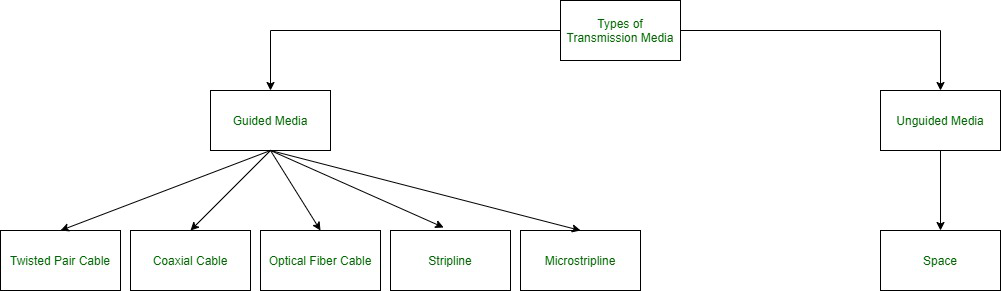
In data communication terminology, a transmission medium is a physical path between the transmitter and the receiver i.e it is the channel through which data is sent from one place to another. Transmission Media is broadly classified into the following types:
-
1. Hubs:
-
Hub is one of the basic icons of networking devices which works at physical layer and hence connect networking devices physically together.
-
Hubs are fundamentally used in networks that use twisted pair cabling to connect devices.
-
They are designed to transmit the packets to the other appended devices without altering any of the transmitted packets received.
-
They act as pathways to direct electrical signals to travel along. They transmit the information regardless of the fact if data packet is destined for the device connected or not.
-
Hub falls in two categories:
-
Active Hub: They are smarter than the passive hubs. They not only provide the path for the data signals infact they regenerate, concentrate and strengthen
the signals before sending them to their destinations. Active hubs are also termed as ‘repeaters’. -
Passive Hub: They are more like point contact for the wires to built in the physical network. They have nothing to do with modifying the signals.
-
-
2. Ethernet Hubs:

-
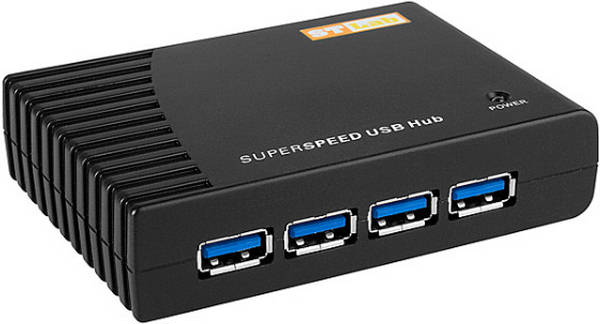
It is a device connecting multiple Ethernet devices together and makes them perform the functions as a single unit.
-
They vary in speed in terms of data transfer rate. Ether utilizes Carrier Sense Multiple Access with Collision Detect (CSMA/CD) to control Media access. Ethernet hub communicates in half-duplex mode where the chances of data collision are inevitable at most of the times.
-
3. Switches:
-
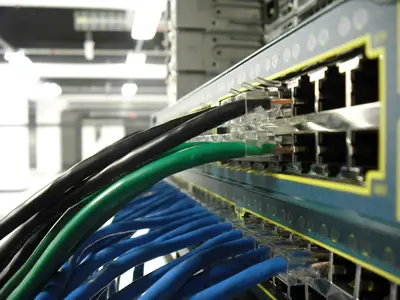
Switches are the linkage points of an Ethernet network. Just as in hub, devices in switches are connected to them through twisted pair cabling.
-
But the difference shows up, Hub works by sending the data to all the ports on the device whereas a switch transfers it only to that port which is connected to the destination device.
-
A switch does so by having an in-built learning of the MAC address of the devices connected to it. Since the transmission of data signals are well defined in a switch hence the network performance is consequently enhanced.
-
Switches operate in full-duplex mode where devices can send and receive data from the switch at the simultaneously.
-
The transmission speed in switches is double than in Ethernet hub transferring a 20Mbps connection into 30Mbps and a 200Mbps connection to become 300Mbps.
-
4. Bridges:
-
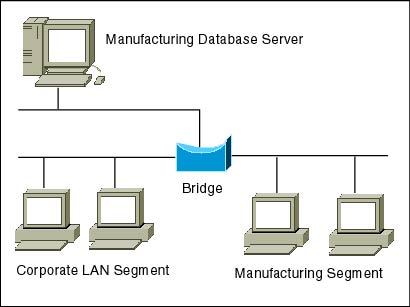
A bridge is a computer networking device that builds the connection with the other bridge networks which use the same protocol. It works at the Data Link
layer of the OSI Model and connects the different networks together and develops communication between them. -
It connects two local-area networks; two physical LANs into larger logical LAN or two segments of the same LAN that use the same protocol.
-
5. Routers:
-
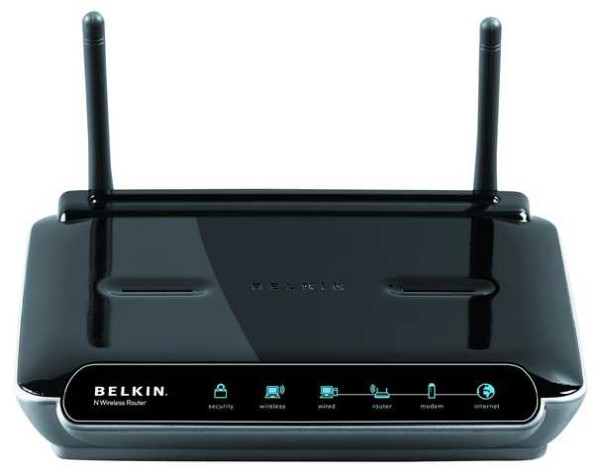
Routers are network layer devices and are particularly identified as Layer- 3 devices of the OSI Model. They process logical addressing information in the Network header of a packet such as IP Addresses.
-
Router is used to create larger complex networks by complex traffic routing. It has the ability to connect dissimilar LANs on the same protocol.
-
It also has the ability to limit the flow of broadcasts.
-
A router primarily comprises of a hardware device or a system of the computer which has more than one network interface and routing software.
-
6. Gateways:
-
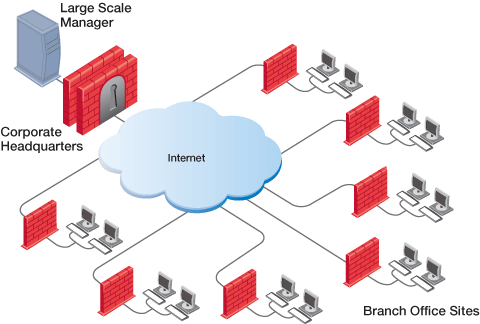
A gateway, as the name suggests, is a passage to connect two networks together that may work upon different networking models.
-
They basically work as the messenger agents that take data from one system, interpret it, and transfer it to another system.
-
Gateways are also called protocol converters and can operate at any network layer. Gateways are generally more complex than switches or routers.
-
Gateway is also called a protocol converter.
-
7. Brouters:
-
It is also known as the bridging router is a device that combines features of both bridge and router.
-
It can work either at the data link layer or a network layer. Working as a router, it is capable of routing packets across networks, and working as the bridge, it is capable of filtering local area network traffic.
-
8. NIC:
-
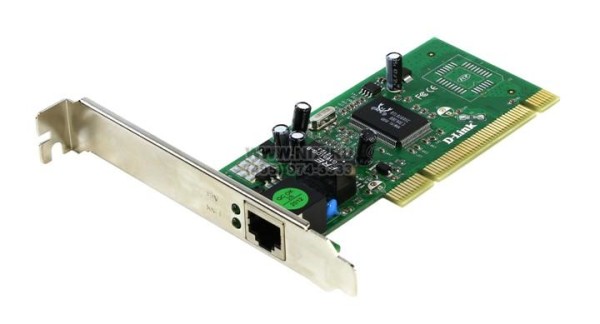
NIC or network interface card is a network adapter that is used to connect the computer to the network.
-
It is installed in the computer to establish a LAN. It has a unique id that is written on the chip, and it has a connector to connect the cable to it.
-
The cable acts as an interface between the computer and router or modem. NIC card is a layer 2 device which means that it works on both physical and data link layer of the network model.
-
9. Modems:


- Modem is a device which converts the computer-generated digital signals of a computer into analog signals to enable their travelling via phone lines.
- The ‘modulator-demodulator’ or modem can be used as a dial up for LAN or to connect to an ISP.
- Modems can be both external, as in the device which connects to the USB or the serial port of a computer, or proprietary devices for handheld gadgets and other devices, as well as internal; in the form of add-in expansion cards for computers and PCMCIA cards for laptops.