You signed in with another tab or window. Reload to refresh your session.You signed out in another tab or window. Reload to refresh your session.You switched accounts on another tab or window. Reload to refresh your session.Dismiss alert
OOPs used to create objects, that can contain data and functions both. OOPs have following features:
Abstraction
Encapsulation
Inheritance
polymorphism
2. How is OOPs related to real world?
For an eg: We have different varieties of cars with different names. In OOP these are called as Objects and logic for these objects are done by classes. i.e features of cars and it's functionalities will come inside a class.
3. Why we need OOPs in Programming language?
OOP is faster and easier to execute.
provides a clear structure for the programs.
helps to make the code easier to maintain, modify and debug.
makes it possible to create full reusable applications with less code and shorter development time.
4. What are limitations of OOPs?
Larger program size: Object-oriented programs typically involve more lines of code than procedural programs.
Slower programs: Object-oriented programs are typically slower than procedurebased programs, as they typically require more instructions to be executed.
Some of the key programming techniques, such as inheritance and polymorphism, can be challenging to comprehend initially.
5. When did you say that 'X' language is object oriented programming language?
It mean you designed language with 4 features. which are Abstraction, Encapsulation, Inheritence and polymorphism. these all four if you include in any programming language that language designed as OOP language.
6. What is a Class?
A class means a user-defined template from which objects are created at runtime. i.e It is like a blueprint or a set of instructions to build a specific type of object
7. Structure vs class in C++?
In C++, a structure is the same as a class except for a few differences. A Structure is not secure and cannot hide its implementation details from the end-user while a class is secure and can hide its programming and designing details. Members of a class are private by default and members of a structure are public by default.
Eg
// Program 1
#include <stdio.h>

class Test {
	int x; // x is private
};
int main()
{
Test t;
t.x = 20; // compiler error because x is private
getchar();
return 0;
}
// Program 2
#include <stdio.h>

struct Test {
	int x; // x is public
};
int main()
{
Test t;
t.x = 20; // works fine because x is public
getchar();
return 0;
}
8. What are similarities between a class and a structure?
Access specifiers, such as public, private, and protected, are identically used in structures and classes to restrict the access of their data and methods outside their body.
The access level for class members and struct members, including nested classes and structs, is private by default. Private nested types are not accessible from outside the containing type.
Both can have constructors, methods, properties, fields, constants, enumerations, events, and event handlers.
Both structures and classes can implement interfaces to use multiple-inheritance in code.
Both structures and classes can have constructors with parameter.
Both structures and classes can have delegates and events.
9. Access Specifiers?
Access modifiers are used to implement an important aspect of Object-Oriented Programming known as Data Hiding.
Public: All the class members declared under the public specifier will be available to everyone. The data members and member functions declared as public can be accessed by other classes and functions too. The public members of a class can be accessed from anywhere in the program using the direct member access operator (.) with the object of that class.
// C++ program to demonstrate public
// access modifier

#include<iostream>
using namespace std;

// class definition
class Circle
{
	public:
		double radius;

		double compute_area()
		{
			return 3.14*radius*radius;
		}

};

// main function
int main()
{
	Circle obj;

	// accessing public datamember outside class
	obj.radius = 5.5;

	cout << "Radius is: " << obj.radius << "\n";
	cout << "Area is: " << obj.compute_area();
	return 0;
}
Private: The class members declared as private can be accessed only by the member functions inside the class. They are not allowed to be accessed directly by any object or function outside the class. Only the member functions or the friend functions are allowed to access the private data members of a class.
// C++ program to demonstrate private
// access modifier

#include<iostream>
using namespace std;

class Circle
{
	// private data member
	private:
		double radius;

	// public member function
	public:
		double compute_area()
		{ // member function can access private
			// data member radius
			return 3.14*radius*radius;
		}

};

// main function
int main()
{
	// creating object of the class
	Circle obj;

	// trying to access private data member
	// directly outside the class
	obj.radius = 1.5;

	cout << "Area is:" << obj.compute_area();
	return 0;
}
Protected: Protected access modifier is similar to private access modifier in the sense that it can’t be accessed outside of it’s class unless with the help of friend class, the difference is that the class members declared as Protected can be accessed by any subclass(derived class) of that class as well.
Note: This access through inheritance can alter the access modifier of the elements of base class in derived class depending on the
// C++ program to demonstrate
// protected access modifier
#include <bits/stdc++.h>
using namespace std;

// base class
class Parent
{
	// protected data members
	protected:
	int id_protected;

};

// sub class or derived class from public base class
class Child : public Parent
{
	public:
	void setId(int id)
	{

		// Child class is able to access the inherited
		// protected data members of base class

		id_protected = id;

	}

	void displayId()
	{
		cout << "id_protected is: " << id_protected << endl;
	}
};

// main function
int main() {

	Child obj1;

	// member function of the derived class can
	// access the protected data members of the base class

	obj1.setId(81);
	obj1.displayId();
	return 0;
}
10. Friend Functions?
Properties of friend functions:
Not in the scope of class.
since it is not in the scope of the class, it cannot be called from the object of that class. c1.sumComplex() == Invalid.
Can be invoked without the help of any object.
Usually contains the objects as arguments.
Can be declared inside public or private section of the class.
It cannot access the members directly by their names and need object_name.member_name to access any member.
include<iostream>
using namespace std;

class Complex{
    int a, b;
    friend Complex sumComplex(Complex o1, Complex o2);
    public:
        void setNumber(int n1, int n2){
            a = n1;
            b = n2;
        }

        // Below line means that non member - sumComplex funtion is allowed to do anything with my private parts (members)
        void printNumber(){
            cout<<"Your number is "<<a<<" + "<<b<<"i"<<endl;
        }
};

Complex sumComplex(Complex o1, Complex o2){
    Complex o3;
    o3.setNumber((o1.a + o2.a), (o1.b+o2.b))
    ;
    return o3;
}

int main(){
    Complex c1, c2, sum;
    c1.setNumber(1, 4);
    c1.printNumber();

    c2.setNumber(5, 8);
    c2.printNumber();

    sum = sumComplex(c1, c2);
    sum.printNumber();

    return 0;
}
11. Member Functions?
Simple functions.
Static functions - These functions cannot access ordinary data members and member functions, but only static data members and static member functions can be called inside them.
Const functions - Const keyword makes variables constant, that means once defined, there values can't be changed. When used with member function, such member functions can never modify the object or its related data members.
Inline functions.
Friend functions.(Discuss above)
Simple functions - All the general member functions, which are of below given form, are termed as simple and basic member functions.
return_type functionName(parameter_list)
{
    function body;
}
Inline functions - Inline functions are actual functions, which are copied everywhere during compilation, like preprocessor macro, so the overhead of function calling is reduced. All the functions defined inside class definition are by default inline, but you can also make any non-class function inline by using keyword inline with them.
inline void fun(int a)
{
    return a++;
}
Some Important points about Inline Functions
We must keep inline functions small, small inline functions have better efficiency.
Inline functions do increase efficiency, but we should not make all the functions inline. Because if we make large functions inline, it may lead to code bloat, and might affect the speed too.
Hence, it is adviced to define large functions outside the class definition using scope resolution :: operator, because if we define such functions inside class definition, then they become inline automatically.
Inline functions are kept in the Symbol Table by the compiler, and all the call for such functions is taken care at compile time.
12. Constructors?
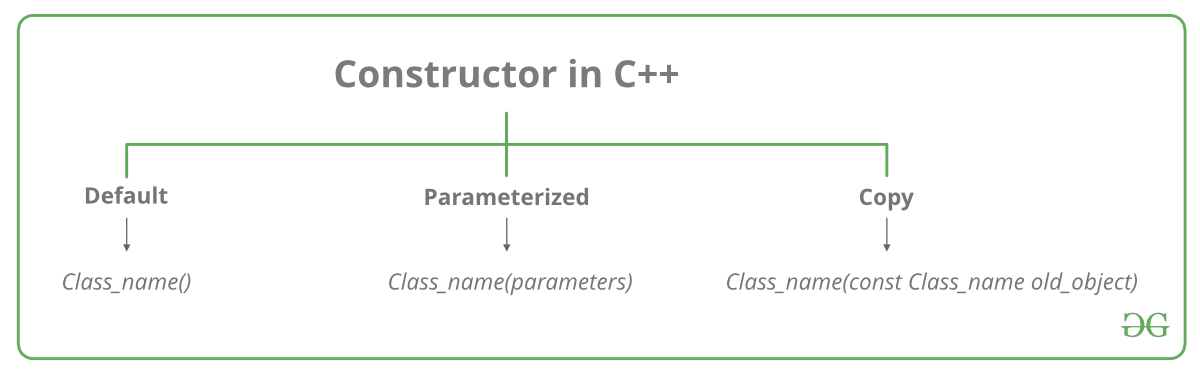
A constructor is a member function of a class which initializes objects of a class. A constructor is different from normal functions in following ways:
Constructor has same name as the class itself.
Constructors don’t have return type.
A constructor is automatically called when an object is created.
If we do not specify a constructor, C++ compiler generates a default constructor for us (expects no parameters and has an empty body).
Real World Example: Let us understand the types of constructors in C++ by taking a real-world example. Suppose you went to a shop to buy a marker. When you want to buy a marker, what are the options? The first one you go to a shop and say give me a marker. So just saying give me a marker mean that you did not set which brand name and which color, you didn’t mention anything just say you want a marker. So when we said just I want a marker so whatever the frequently sold marker is there in the market or in his shop he will simply hand over that. And this is what a default constructor is! The second method you go to a shop and say I want a marker a red in color and XYZ brand. So you are mentioning this and he will give you that marker. So in this case you have given the parameters. And this is what a parameterized constructor is! Then the third one you go to a shop and say I want a marker like this(a physical marker on your hand). So the shopkeeper will see that marker. Okay, and he will give a new marker for you. So copy of that marker. And that’s what copy constructor is!
Types of Constructors:
Default Constructors: Default constructor is the constructor which doesn’t take any argument. It has no parameters.
// Cpp program to illustrate the
// concept of Constructors
#include <iostream>
using namespace std;

class construct
{
public:
	int a, b;

	// Default Constructor
	construct()
	{
		a = 10;
		b = 20;
	}
};

int main()
{
	// Default constructor called automatically
	// when the object is created
	construct c;
	cout << "a: " << c.a << endl
		<< "b: " << c.b;
	return 1;
}
Note: Even if we do not define any constructor explicitly, the compiler will automatically provide a default constructor implicitly.
Parameterized Constructors: It is possible to pass arguments to constructors. Typically, these arguments help initialize an object when it is created.
// CPP program to illustrate
// parameterized constructors
#include <iostream>
using namespace std;

class Point
{
private:
	int x, y;

public:
	// Parameterized Constructor
	Point(int x1, int y1)
	{
		x = x1;
		y = y1;
	}

	int getX()
	{
		return x;
	}
	int getY()
	{
		return y;
	}
};

int main()
{
	// Constructor called
	Point p1(10, 15);

	// Access values assigned by constructor
	cout << "p1.x = " << p1.getX() << ", p1.y = " << p1.getY();

	return 0;
}
Uses of Parameterized constructor:
It is used to initialize the various data elements of different objects with different values when they are created.
It is used to overload constructors.
Copy Constructor: A copy constructor is a member function which initializes an object using another object of the same class. A copy constructor has the following general function prototype:
ClassName (const ClassName &old_obj);
#include<iostream>
using namespace std;

class Point
{
private:
	int x, y;
public:
	Point(int x1, int y1) { x = x1; y = y1; }

	// Copy constructor
	Point(const Point &p1) {x = p1.x; y = p1.y; }

	int getX()		 { return x; }
	int getY()		 { return y; }
};

int main()
{
	Point p1(10, 15); // Normal constructor is called here
	Point p2 = p1; // Copy constructor is called here

	// Let us access values assigned by constructors
	cout << "p1.x = " << p1.getX() << ", p1.y = " << p1.getY();
	cout << "\np2.x = " << p2.getX() << ", p2.y = " << p2.getY();

	return 0;
}
13. Can we have more than one constructor in a class?
Yes, It is called Constructor Overloading.
14. Destructors in C++?
Destructor is a member function which destructs or deletes an object. Properties of Destructor:
Destructor function is automatically invoked when the objects are destroyed.
It cannot be declared static or const.
The destructor does not have arguments.
It has no return type not even void.
An object of a class with a Destructor cannot become a member of the union.
A destructor should be declared in the public section of the class.
The programmer cannot access the address of destructor.
class String {
private:
	char* s;
	int size;

public:
	String(char*); // constructor
	~String(); // destructor
};

String::String(char* c)
{
	size = strlen(c);
	s = new char[size + 1];
	strcpy(s, c);
}
String::~String() { delete[] s; }
15. When is destructor called?
A destructor function is called automatically when the object goes out of scope:
the function ends.
the program ends.
a block containing local variables ends.
a delete operator is called.
16. How destructors are different from a normal member function?
Destructors have same name as the class preceded by a tilde (~).
Destructors don’t take any argument and don’t return anything.
17. Can there be more than one destructor in a class?
No, there can only one destructor in a class with classname preceded by ~, no parameters and no return type.
18. When do we need to write a user-defined destructor?
If we do not write our own destructor in class, compiler creates a default destructor for us. The default destructor works fine unless we have dynamically allocated memory or pointer in class. When a class contains a pointer to memory allocated in class, we should write a destructor to release memory before the class instance is destroyed. This must be done to avoid memory leak.