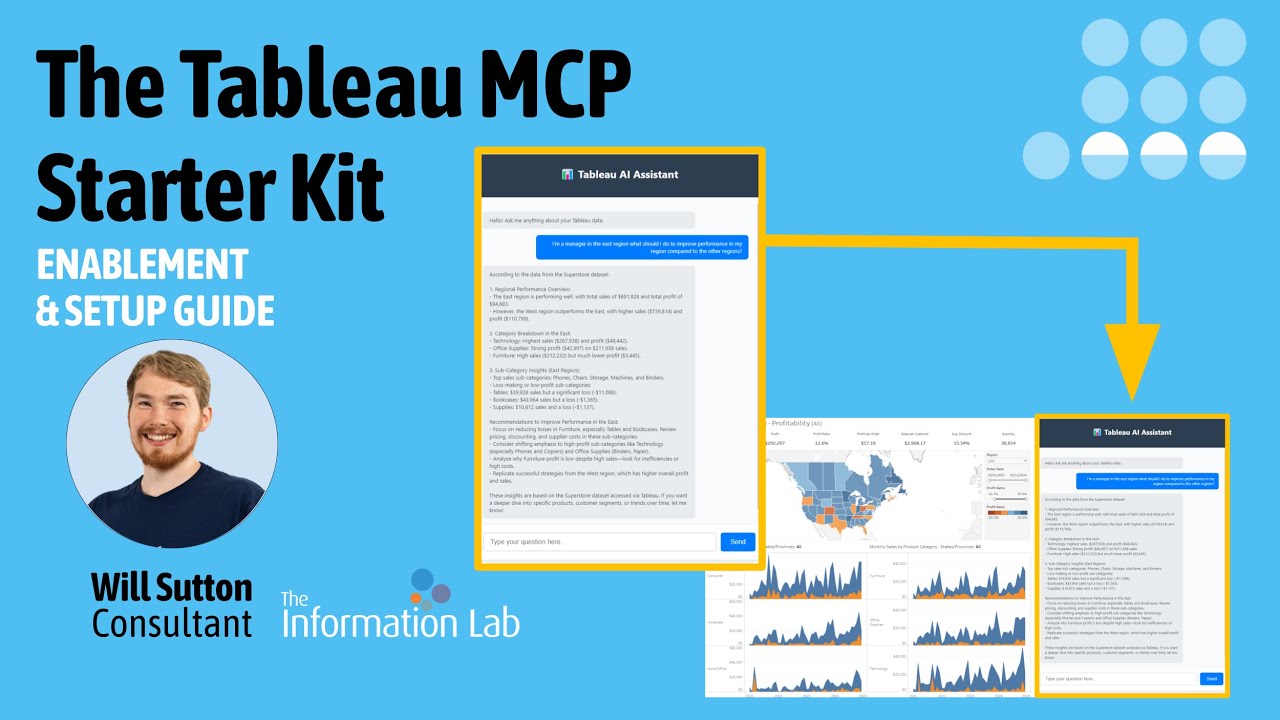
A powerful integration that brings AI functionality to Tableau Server or Tableau Cloud using MCP and LangChain, enabling natural language interactions with the data you trust in Tableau.
This repo is an implementation of tableau-mcp using the MCP tools with LangChain, building on the tableau_langchain_starter_kit.
- Natural language querying of Tableau data
- Available via Web interface or Dashboard extension
- Support for both Tableau Server and Tableau Cloud
Before you begin, ensure you have the following:
- Tableau Server Version 2025.1 or later OR Tableau Cloud, a free Tableau Cloud trial is available via the Tableau Developer Program
- Python 3.12+ - Download Python
- Git - Download Git
- API credentials for your chosen AI model (OpenAI, etc.)
When using this code, data from Tableau will be sent to an external AI model (by default, OpenAI). For learning and testing, it is strongly recommended to use the Superstore dataset included with Tableau.
If you need to process sensitive or proprietary information, consider configuring the tool to use a local AI model instead of an external service. This approach ensures your data remains within your organisation’s infrastructure and reduces the risk of data exposure.
If you haven't tried Tableau MCP yet I recommend testing it out using desktop applications like Claude Desktop and VSCode. You can find links to my quickstart tutorials below.
git clone https://github.com/tableau/tableau-mcp.git
cd tableau-mcp
From the Install Guide
Install Node.js (tested with 22.15.0 LTS)
npm install
npm run buildgit clone https://github.com/TheInformationLab/tableau_mcp_starter_kit.git
cd tableau_mcp_starter_kitCreating a virtual environment helps isolate project dependencies:
python -m venv .venvWindows:
.venv\Scripts\activatemacOS/Linux:
source .venv/bin/activate💡 Tip: You should see (.venv) at the beginning of your command prompt when the virtual environment is active.
pip install -r requirements.txtIf you encounter any installation issues, try upgrading pip first:
pip install --upgrade pip- Copy the template environment file:
cp .env_template .env- Open the
.envfile in your preferred text editor and configure the following variables:
# Tableau MCP Server Config
TRANSPORT='stdio'
SERVER='https://my-tableau-server.com'
SITE_NAME='TableauSiteName'
PAT_NAME='Tableau Personal Access Token (PAT) Name'
PAT_VALUE='Tableau Personal Access Token (PAT) Secret Key'

# Tableau MCP Server Optional Configs
DATASOURCE_CREDENTIALS=''
DEFAULT_LOG_LEVEL='debug'
INCLUDE_TOOLS=''
EXCLUDE_TOOLS=''
MAX_RESULT_LIMIT=''
DISABLE_QUERY_DATASOURCE_FILTER_VALIDATION=''

# Local Filepath Config
TABLEAU_MCP_FILEPATH='your/local/filepath/to/tableau-mcp/build/index.js'

# Model Providers
OPENAI_API_KEY='from OpenAI developer portal'

# Langfuse
LANGFUSE_PUBLIC_KEY = 'Public key from https://langfuse.com/'
LANGFUSE_SECRET_KEY = 'Secret key from https://langfuse.com/'
LANGFUSE_HOST = 'https://cloud.langfuse.com'

# Custom MCP Tool Extra Configs
# from: https://github.com/wjsutton/tableau-mcp-experimental
FIXED_DATASOURCE_LUID='unique identifier for a data source found via the graphql metadata API'
.env file to version control. It's already included in .gitignore.
Launch the full web application with dashboard extension support:
python web_app.pyOnce running, open your browser and navigate to:
- Local development:
http://localhost:8000 - The application will display the correct URL in the terminal
You will now be able to ask questions in natural language:
- "What are the trends in customer satisfaction?"
- "Compare revenue between Q1 and Q2"
- "Show me outliers in the sales data"
You can also run this web application with dashboard extension support.
Once running, open your Tableau workbook, or the Superstore Dashboard
On a dashboard page, in the bottom left menu, drag a dashboard extension, local extension, and select tableau_langchain.trex from the dashboard_extension folder.
The script dashboard_app.py is configured to use only a single datasource, using custom tools from https://github.com/wjsutton/tableau-mcp-experimental.
To do
- Install the custom tools:
git clone https://github.com/wjsutton/tableau-mcp-experimental.git
cd tableau-mcp-experimental- With Node.js (tested with 22.15.0 LTS) execute:
npm install
npm run build- Return to the Tableau MCP Starter Kit:
cd ..
cd tableau_mcp_starter_kit
-
In dashboard_app.py, update:
Line 36: mcp_locationto the local file path of tableau-mcp-experimental -
Find your datasource luid, you can use the utilities/find_datasource_luid.gql to query your Tableau Server / Cloud's Metadata API.
-
In .env add your datasource luid to the FIXED_DATASOURCE_LUID environment variable.
-
Run the dashboard_app script
python dashboard_app.pyVerify the app is running, open your browser and navigate to:
- Local development:
http://localhost:8000 - The application will display the correct URL in the terminal
Once running, open your Tableau workbook, or the Superstore Dashboard
On a dashboard page, in the bottom left menu, drag a dashboard extension, local extension, and select tableau_langchain.trex from the dashboard_extension folder.
This project is licensed under the MIT License - see the LICENSE file for details.
- Check out the Tableau MCP repo for further developments
- Join the #tableau-ai-solutions conversation on Slack. Sign up to the DataDev Slack channel here.
- Tableau MCP the team developing the tools
- The Tableau LangChain Starter Kit the prequel to this project
- LangChain for the AI framework
- Tableau for the visualisation platform
- All contributors who have helped improve this project
⭐ If you find this project helpful, please consider giving it a star!