This document contains some HTML best practices that you should follow while writing HTML to keep your HTML documents organized and consistent.
The proper document structure should be used, even if your code would still work without it. But some browsers might not display the pages properly.
Best Practice:
<!DOCTYPE html>
<html>
    <head>
        <title>Page title</title>
    </head>
    <body>
        <!-- page content -->
    </body>
</html>When writing HTML, the doctype is the first thing you have to write. This will let the browser know what standards you're using to render markup correctly. The doctype tag precedes the <html> tag at the top of the page.
<!DOCTYPE html>
<html>
    <head>
        <title>Page title</title>
    </head>
    <body>
        <!-- page content -->
    </body>
</html>Screen readers will be able to select the appropriate language to announce if you specify the language of your website. Additionally, it helps browsers decide whether or not to translate your website automatically.
<!DOCTYPE html>
<html lang="en">
<head>
<title>Page title</title>
</head>
<body>
<!-- page content -->
</body>
</html>To avoid validation errors, always remember that every tag you write needs a closing tag.
<h1>Heading 1</h1>
<p>Paragraph Text</p>
<img src="example.jpg" alt="Example Image" />It might seem easier to style with the inline code rather than creating an external style file. Inline styles are not a suggested coding technique, though, as they make websites more challenging to manage and update.
<!DOCTYPE html>
<html>
   <head>
     <title>Page title</title>
     <link rel="stylesheet" href="styles.css">
    </head>
    <body>
     <!-- page content -->
    </body>
</html>Since an alt attribute is not required for images, it is easy to ignore it. But, it's important to have a meaningful alt attribute for accessibility and validation reasons. Screen readers rely on the alt element for context, therefore it ought to explain what the image contains..
<img src="image.jpg" alt="a descriptive text">Validate your code often while you work rather than waiting until your HTML document is complete.The sooner you identify errors, especially if your work is comprehensive, the more time you will save. One popular HTML validator to use is W3C Markup Validator.
The tag is the best place for external style sheets even though they can be included anywhere in an HTML document. It speeds up the loading of the page.
<!DOCTYPE html>
<html>
 <head>
   <title>Page title</title>
   <link rel="stylesheet" href="styles.css">
 </head>
 <body>
 <!-- page content -->
 </body>
</html>Keep your comments to a minimum. Do not randomly write comments; only write them when they are necessary.
<!DOCTYPE html>
<html>
<head>
  <title>Page Title</title>
</head>
<body>
  <h1>Heading 1</h1>
  <!-- This is a comment that is not needed -->
  <p>Paragraph Text</p>
</body>
</html>When building web forms, it's important to use the HTML <fieldset> and <label> elements for better structure, organization, and accessibility.
<form>
<fieldset>
  <legend>Personal Details</legend>
  <label for="name">Name:</label>
  <input type="text" id="name" name="name">
  <label for="email">Email:</label>
  <input type="email" id="email" name="email">
  <label for="message">Message:</label>
  <textarea id="message" name="message"></textarea>
</fieldset>
</form>Although HTML permits uppercase markup as well, using lowercase markup for tags and attributes is recommended for consistency, compatibility, and accessibility reasons.
<h1>Heading 1</h1>
<p>Paragraph Text</p>
<img src="example.jpg" alt="Example Image">The term refers to things that have meanings. There are countless semantic elements available. Search engines will value your content more when it is written with semantic tags, which will improve your SEO.
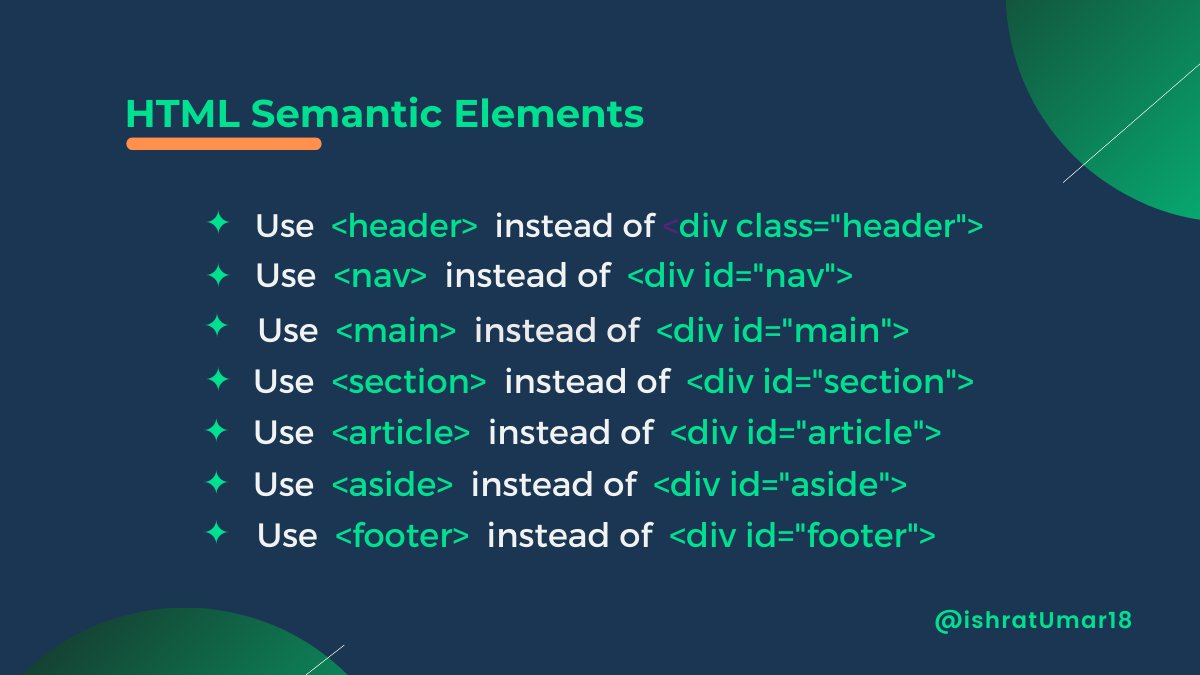
Meaningful HTML tags properly identify the data they contain, making the code easy to understand and read for both humans and search engines.
<header>
<h1>Page Title</h1>
</header>
<nav>
<ul>
  <li><a href="#">Link 1</a></li>
  <li><a href="#">Link 2</a></li>
  <li><a href="#">Link 3</a></li>
</ul>
</nav>
<main>
<article>
  <h2>Article Title</h2>
  <p>Article Text</p>
</article>
<section>
  <h2>Section Title</h2>
  <p>Section Text</p>
</section>
</main>
<footer>
<p>Footer Text</p>
</footer>SEO is important for HTML content. It is possible to boost a website's SEO and make it easier for search engines to understand the content of the page's structure and tags.
Read this detailed thread on SEO tags for HTML.
Always have a responsive website. Now that users may request a desktop or mobile experience via their browser, the least you can do is make your site flexible, but responsiveness is a requirement.
<meta name="viewport" content="width=device-width, initial-scale=1">Lazy loading images make them load faster, as only the images within the viewport are initially loaded.
<img src="image.jpg" loading="lazy">Use the address tag to include any information about how people can contact you, such as your mailing address, phone number, email address, website, and social network links (if applicable).
Use <figcaption> along with <figure> element to add captions to your images.
<figure>
  <img src="image.jpg" alt="A beautiful landscape">
  <figcaption>A beautiful landscape</figcaption>
</figure>Use <figcaption> along with <figure> element to add captions to images. As, this is important for accessibility and search engine optimization.
    <figure>
     <img src="example-image.jpg" alt="Example image">
     <figcaption>This is an example image</figcaption>
</figure>To add emphasis to text in HTML, it is discouraged to use the <b> and <i> tags as they lack semantic meaning. Instead, the recommended practice is to utilize the font-weight CSS property, or employ the <strong> and <em> tags which have a semantic significance.
<p>Did you <em>really</em> think that was a good idea? You <strong>shouldn't</strong> have done that.</p>⭐Check out the Isobar Front-end Code Standards and the HTML Best Practises if you want to learn more.