
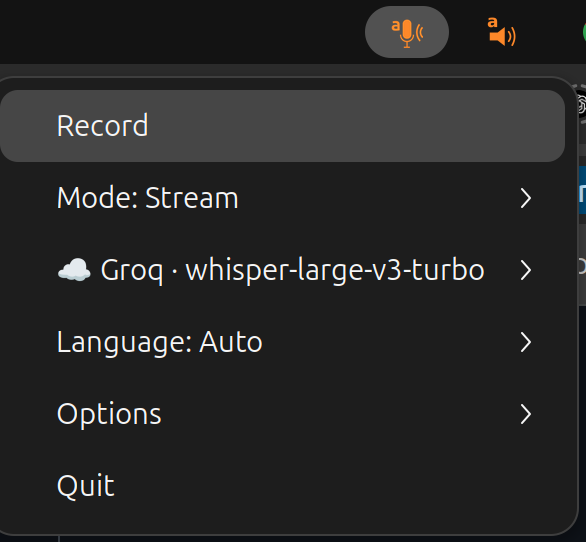
Tray mode is the default — running scribe with no arguments launches
the system tray icon. If you'd rather use the interactive terminal
menu, pass --frontend terminal:
scribe                       # tray (default)
scribe --frontend terminal   # interactive TUI
From inside the TUI menu you can toggle to tray mode at any time. The scribe icon shows Record, Cancel (discards an in-flight recording without transcribing), and other options. The icon changes based on what the app is doing.
For streaming models (Vosk; OpenAI gpt-realtime-whisper) the
icon has two states: recording-and-transcribing or idle. For batch
models (Whisper, OpenAI gpt-4o-*, Groq) the icon has three states:
recording / waiting, transcribing, and idle.
Transcription and API errors are surfaced as a pop-up dialog instead of just crashing the tray.
The tray uses pystray, which is a base dependency — it ships with
the plain pip install scribe-cli, so the default tray works on Windows
and macOS with no extras. On Linux the AppIndicator backend additionally
needs PyGObject plus the appindicator system libs; install those via
[app] or [all] (see installation.md).
Click behaviour differs by platform. On Windows, a single click on the tray icon fires the default action (Record), because pystray's Win32 backend can activate the default menu item. On Ubuntu the AppIndicator backend doesn't support a click-to-default action, so a click only opens the menu. This is a pystray backend difference, not a scribe bug.
You can predefine which models appear in the tray menu with
--vosk-models, --whisper-models, and --whisper-futo-models:
scribe --vosk-models vosk-model-fr-0.22 \
--whisper-models small large-v3-turboBoth the tray and terminal frontends share the same menu tree (dynamic
tray labels shown after :; the terminal frontend renders the static
fallback to the left of the :):
Record                          start recording (default tray action)
Stop / Cancel                   end or discard an in-flight recording
Mode: Stream / Clip ▶           toggle live-chunk transcription on batch
                                  backends (whisper, whisper-futo,
                                  openai gpt-4o-*, groq). Reads as
                                  "Mode: Stream (native)" on native
                                  streamers (vosk, gpt-realtime-whisper),
                                  where the Clip radio is hidden.
Model: <vendor · model> ▶       per-vendor submenus, ordered (🏠 local /
                                  ☁️ cloud prefix, '(stream)' suffix on
                                  streaming models):
    🏠 Whisper FUTO ▶             models via --whisper-futo-models
    🏠 Whisper ▶                  models via --whisper-models — 'small (recommended)'
    🏠 Vosk (stream)              leaf — picks the vosk model mapped to
                                  the currently-selected Language
    ☁️ OpenAI ▶                   gpt-4o-transcribe, gpt-4o-mini-transcribe,
                                    gpt-realtime-whisper (stream)
    ☁️ Groq ▶                     whisper-large-v3-turbo
Language: <🇬🇧 en | Auto> ▶     curated languages (en / fr / de / it)
                                  plus Auto. Auto on vosk reads as
                                  'Auto (🇬🇧 en)' to advertise the
                                  concrete fallback.
Options ▶
    Stream (advanced) ▶           visible iff Mode=Stream
        Chunk min: 1.5s             batch backends only; minimum buffer before
                                    a silence-cut is allowed
        Chunk max: 10s              batch backends only; force-cut threshold
        Silence break: 0.6s         batch backends only; special values:
                                    Auto (longest silence in window),
                                    Max (force-cut only, no silence trigger)
        Context reset: 3× silence   batch backends only; greyed when silence-
          (= 1.8s)                  break is Auto or Max
        Stream timeout: Always On   always visible when Mode=Stream
        Stream: Live / Offline      visible iff gpt-realtime-whisper; unifies
          after Xs                  --realtime-gate and --realtime-commit-silence
    Clip timeout: 2 min ▶         visible iff Mode=Clip
    Output: Keyboard ▶            radio: Keyboard / Clipboard / Terminal / File
                                    (mirrors --mode). File is greyed in the tray
                                    until --output-file is configured.
    Keyboard (paste | pynput) ▶   visible iff Output=Keyboard
        Input mode: paste ▶         radio: keystroke (raw keystrokes,
                                    --type-direct) | paste (Ctrl+V from
                                    clipboard, default)
        Backend: pynput ▶           radio over typers compatible with this OS
                                    (eitype / pynput / ydotool / wtype); hidden
                                    entirely when no typer is compatible.
    Toggle tray app mode          (terminal frontend only)
    VAD ▶                         VAD mode toggle (silero ↔ dB), per-mode
                                    VAD knobs (silero: speech-probability
                                    threshold, min silence duration; dB:
                                    silence threshold — only the active
                                    mode's knobs are shown)
Quit
Vendor submenus only appear for backends whose dependency / API key is present; missing ones are listed at the bottom of the Model menu in a disabled " — " row so you know what's missing.
In tray / app mode scribe runs a built-in global-hotkey listener (via
pynput, a base dependency). Defaults are OS-specific so they land on
chords that are normally free on each platform:
| Action | Linux (X11) | Windows / macOS |
|---|---|---|
| toggle record | Super+C |
Ctrl+Alt+C |
| cancel | Super+Z |
Ctrl+Alt+Z |
On Windows the Win-key chords are avoided on purpose: Win+C (Copilot)
and Win+Z (Snap Layouts) are claimed by the shell, and pynput's hook
doesn't suppress the key, so both the OS action and scribe's callback
would fire. On macOS Cmd chords collide with copy/undo. The combos are
configurable either way:
scribe --hotkey-record "<cmd>+c" --hotkey-cancel "<cmd>+z"   # Super/Win/Cmd + C/Z
scribe --no-hotkeys # turn the listener off(<cmd> is the Super / Windows / Command key in pynput syntax.)
Platform support is uneven — this is why scribe also keeps the Unix signal mechanism below:
| Platform | In-app global hotkeys |
|---|---|
| Windows | Works out of the box (default Ctrl+Alt+C/Z). |
| Linux (X11) | Works out of the box (default Super+C/Z). |
| Linux (Wayland) | Doesn't work — the compositor blocks global key capture. Use the SIGUSR1/2 + custom-shortcut path below instead. |
| macOS | Needs Accessibility / Input-Monitoring permission (System Settings → Privacy & Security). |
The listener is best-effort: if the OS won't grant a global hook, scribe logs a line and keeps running (tray + signals still work).
scribe writes its PID to a pidfile and listens for two signals:
SIGUSR1— toggle recording (same as clicking Record / Stop).SIGUSR2— cancel an in-flight recording.
Bind these to keyboard shortcuts in your desktop environment to start
/ stop / cancel scribe from anywhere. The pidfile lives at
$XDG_RUNTIME_DIR/scribe.pid (/tmp/scribe.pid if unset):
kill -SIGUSR1 $(cat "${XDG_RUNTIME_DIR:-/tmp}/scribe.pid")  # toggle record
kill -SIGUSR2 $(cat "${XDG_RUNTIME_DIR:-/tmp}/scribe.pid")  # cancel
This is the recommended way to drive scribe from a keyboard shortcut (GNOME Settings → Keyboard → Custom Shortcuts, KDE's hotkey daemon, sxhkd, etc.) without the typer-backend complications of trying to intercept keys directly.