
A multi-purpose tool for Palia, written in C++ and C#. Open source for non-commercial usage, looking for contributors.
I will continue to maintain and update OriginPalia for as long as I can, permitted I have the time. Work and regular life still are a priority, I can't update it if I'm not living. OriginPalia comes packed with general enhancements like Instant Fishing, ESPs, Silent Aim, Teleport to and from any entities, and more. OriginPalia is still in active development, there may be a few bugs.
Note: I believe this only will work with the standalone client for Palia. I have not tested it on Steam or other platforms. If you'd like to test for that, be my guest! It may or may not work. I will look into compatibility down the line.
You will need to dump the SDK of the game yourself in order for this to work. Simply add the latest game SDK files into the PaliaSDK folder to reallocate the required SDK files.
I want to give a big thanks to @klukule for their Palia ESP DX11 / DX12 source on GitHub. Without that, I wouldn't have taken the time to build something unique of my own.
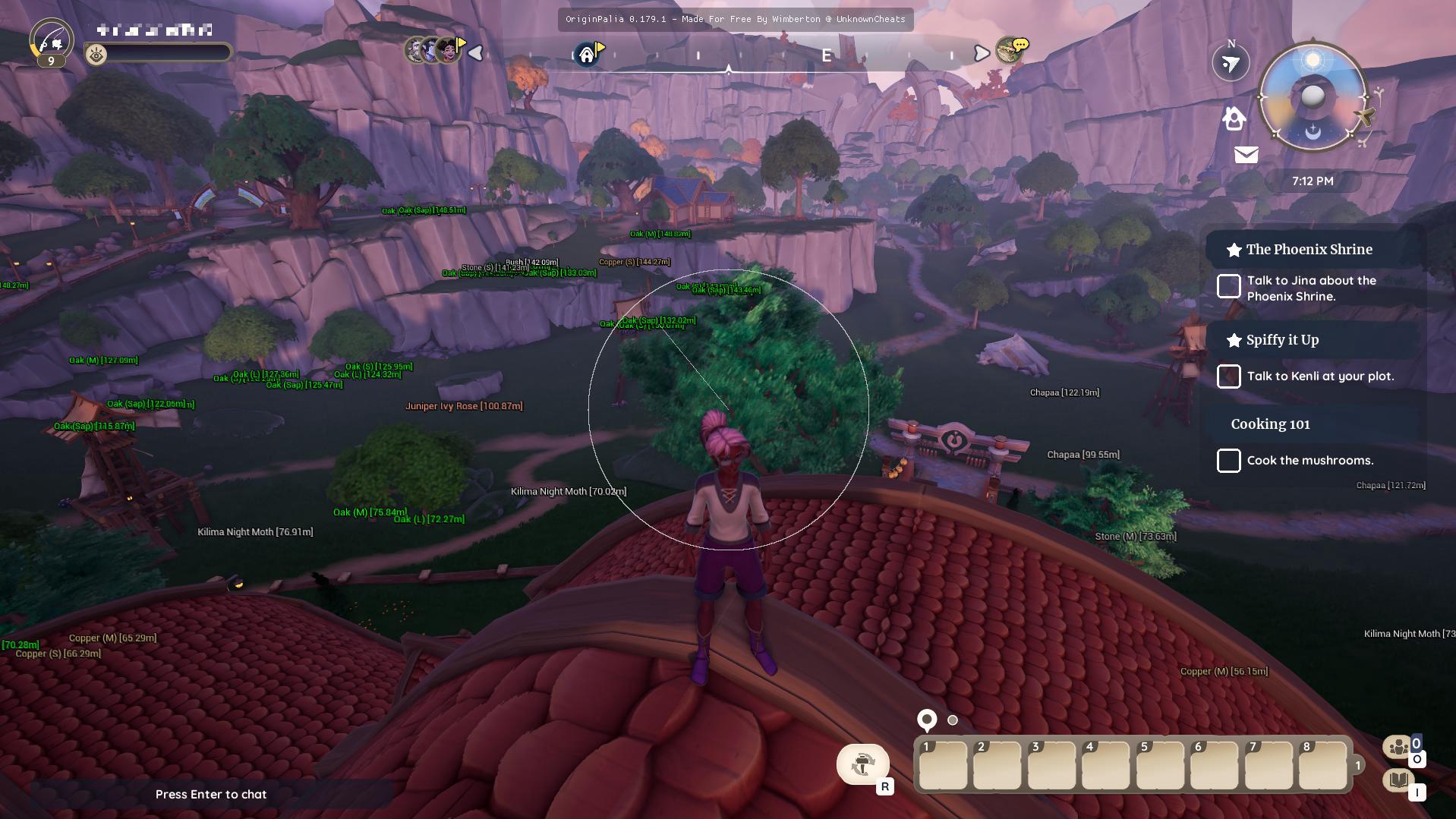
By accessing and using this software, you agree to the following terms:
- Non-Commercial Use: This software is provided under the condition that it is not to be used for commercial purposes. Commercial usage includes but is not limited to selling, licensing, or otherwise exploiting the software for financial gain.
- Educational Purposes Only: This software may be used for educational purposes only. Such usage includes learning, experimentation, and academic research. Any educational institution, student, or educator may use the software in accordance with their educational objectives.
- Attribution: If you modify or distribute this software, you must provide appropriate attribution, indicating any changes made and acknowledging the original creator.
- No Warranty: This software is provided "as is," without warranty of any kind, express or implied, including but not limited to the warranties of merchantability, fitness for a particular purpose, and non-infringement. In no event shall the authors or copyright holders be liable for any claim, damages, or other liability, whether in an action of contract, tort, or otherwise, arising from, out of, or in connection with the software or the use or other dealings in the software.
- Limitation of Liability: In no event shall the authors or copyright holders be liable for any special, incidental, consequential, or indirect damages of any kind, or any damages whatsoever resulting from loss of use, data, or profits, whether or not advised of the possibility of damage, and on any theory of liability, arising out of or in connection with the use or performance of this software.
- Governing Law: These terms shall be governed by and construed in accordance with the laws of United States of America, without regard to its conflict of law provisions.
If you do not agree to these terms, you are not permitted to use this software.
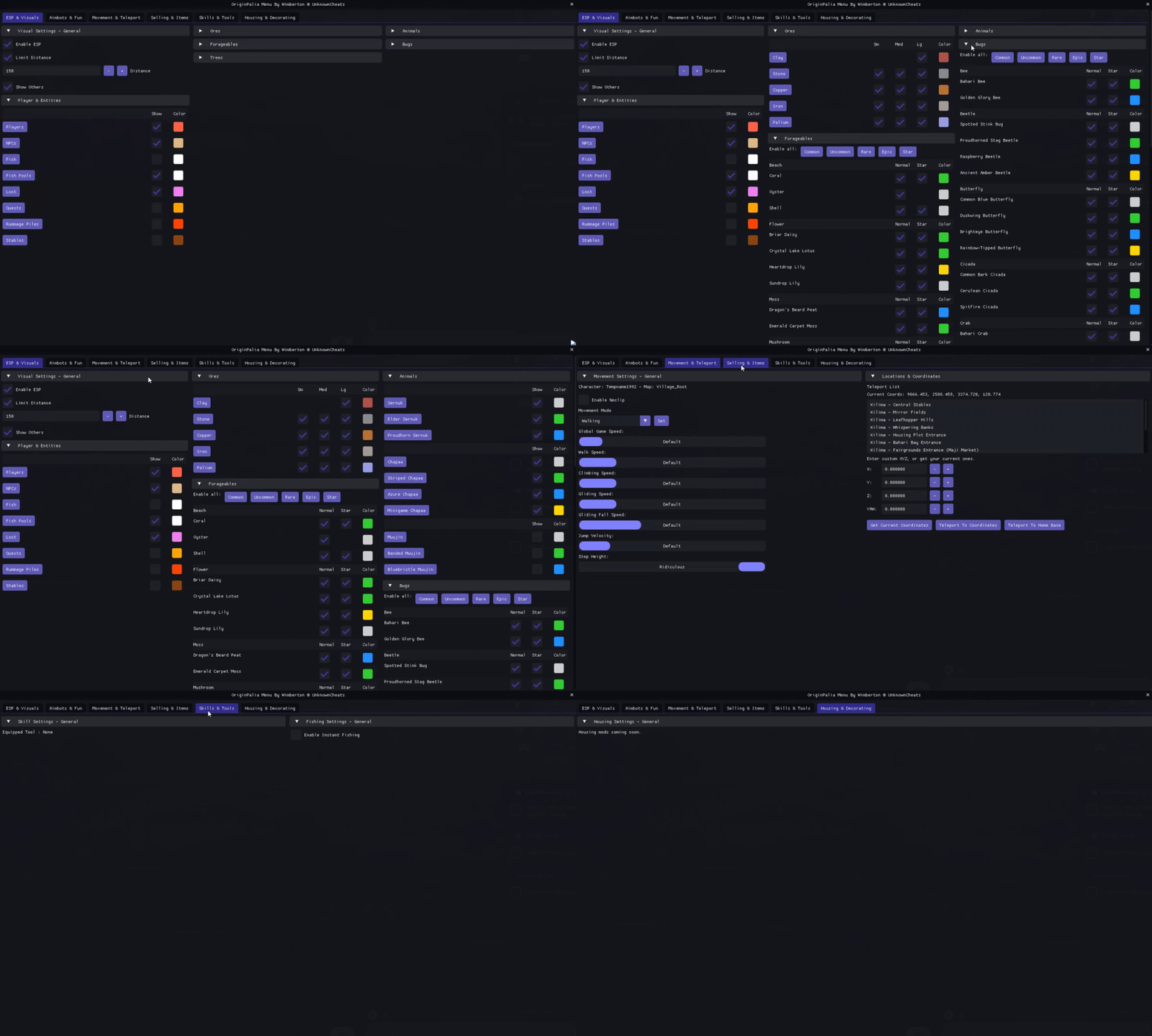
- Enable ESP (enable or disable drawing ESPs in-game)
- Limit ESP Distance (change the distance in which ESPs will show)
- Show unclassified entities (shows potentially unnamed or unmapped entities. Good for getting more from updates etc)
Players, NPCs, Fish, Fish Pools, Loot, Quests, Rummage Piles, and Stables.
Options to toggle visibility and color customization for various sizes (Small, Medium, Large) of ores like Clay, Stone, Copper, Iron, and Palium.
Toggle settings for various types of forageables, each with normal and starred versions. Coral, Oyster, Shells, various flowers, moss types, mushrooms, spices, and vegetables.
Control visibility and customize color settings for various types and sizes of trees, including Bush, Sapwood, Heartwood, and Flow-Infused types.
Quality tiers such as Sernuk, Chapaa, and Muujin, including special categories like minigame-specific animals.
Common, uncommon, rare, and epic qualities. Manage settings for bugs like Bees, Beetles, Butterflies, Cicadas, Crabs, Crickets, Dragonflies, Glowbugs, Ladybugs, Mantises, Moths, Pedes, and Snails.
- Enable Silent Aimbot (within ~25-30m or shots won't teleport and validate)
- Enable Legacy Aimbot (work-in-progress / camera boom angle changes when aiming. Working on predictive angle offsetting during this bow transition)
- Aim Smoothing slider (makes your aim less sticky. Easier to target other animals)
- Aim Offset Adjustment draggable grid (should help adjust the issue with bow aiming camera boom changes for now)
- Enable InteliAim Circle (FOV circle with advanced targeting functionality based on entity scoring)
- Teleport To Targeted entity (top mouse button)
- Teleport Target entity to you (bottom mouse button)
- Teleport Dropped Loot To Player (automatically teleport all dropped loot to your player to gather)
- Send Animals To Orbit Around Player (fun mod - work-in-progress / animals may invalidate animals. Working on disabling the AI brain component)
- Enable NoClip (fly around the map without restrictions. Hooks your WASD keys for movement)
- NoClip fly speed slider (change the speed of your NoClip flying)
- Selectable Movement Modes (Walking, Flying, Fly No Collision) (another way to mess with your movement types)
- Global Game Speed slider (changes your global game speed [timescale mod])
- Movement Velocity slider (work-in-progress / should help calculate your current player velocity and smoothly increase it as you move. Might end up bypassing movement validations.)
- Walk Speed slider (change the speed of your player walking. Has issues above "high")
- Climbing Speed slider (change the speed of your player climbing. Should work all the way)
- Gliding Speed slider (change the speed of your player gliding. Haven't noticed any issues)
- Gliding Fall Speed slider (set this to "none" for 1.0 gliding fall speed. Glide forever and get where you want)
- Jump Velocity slider (change the jump height of your player)
- Step Height slider (change the step height of your player. Step over massive walls and such)
- Sprint Speed Multiplier (work-in-progress / modify your sprint multiplier)
- You must open a shop in order for selling to work. Getting a pointer to the shop happens when you instantiate the component. I'm looking into a better way to instantiate it when loading into a main map world
- Quick Sell Items interface
- Select bag, slot, and quantity
- Custom quantity input
- Enable Instant Fishing (force end fishing when your bobber hits the water)
- Start and End Rod Health sliders (customize the total health of your fishing rod)
- Start and End Fish Health sliders (customize the total health of the fish when caught)
- Capture and override fishing spot options (capture and fish from any previous fishing pool)
- Perfect Catch option (choose whether your catch was perfect or not every time)
- Instant Sell (Slot 1) (automatically sell fish from your bag 1 slot 1. Open a shop once for this to work)
- Enable Network Smoothing (if you're having issues with speeds, try enabling smoothing)
- Smoothing Mode selection (dropdown selection of different network smoothing modes for your connected server)
- Zero Time Since Last Teleport option (force the tracker of your teleportation counts to 0)
- Always Skip Network Prediction option (may or may not do anything. Potentially forces the server to always skip replication predictions)
- Skip Network Prediction on Update (may or may not do anything. Potentially forces the server to skip replication predictions only on update)
- Disable Server Throttle Counter (disables the server from throttling your connection. May crash your client due to invalidating)
- Set Server Throttle Limit (set the throttle limit of data sent between your client to the server. Changing this may crash your instances)
- Display current coordinates (use these coordinates to perform certain actions)
- List of teleport locations (a good list of easily teleportable locations to efficiently perform tasks such as shopping, repairing, etc)
- Custom coordinate input (enter or get custom coordinates to perform certain actions)
- Buttons for teleport actions (teleport home, to locations, and other actions)
Note: Some of the features provided may or may not work such as Network settings. These are things I use during testing, seeing what is allowed within their network throttling levels or not. If anyone is developing their own tool or would like to contribute, leave a message! I'm open to working with others or contributions. Leave a message below if you're having any errors or bugs. I'll squash them as quickly as possible.