Configuration WorldConfig.ini

The worldconfig contains settings which affect the entire world (biome specific settings can be found in the BiomeConfigs).
The file is located in the OpenTerrainGenerator/worlds/[world name] folder, this file controls biome registration, biome groupings, ocean and land sizes/rarities, river settings, cave and canyon distribution, minecraft structure spawning, sea level, dimension/portal settings and quite a bit more.
Note: To enable documentation (comments) in the worldconfig.ini file itself, change: SettingsMode: WriteWithoutComments to SettingsMode: WriteAll
Author of this world. When creating a new custom world the authors name can be placed here.
A short description of this world.
Each time OTG reads the config files, it can also write to them. With this setting you can change how OTG writes to the config files. Possible modes:
WriteAll --- Autoupdate settings from old versions, order them, add comments, reset invalid settings and remove custom comments.
WriteWithoutComments --- Same as WriteAll, but removes all comments, both the ones of Terrain Control and your own.
WriteDisable --- Don't write to the comment files. Errors are not corrected, old settings are read, but they are also not corrected. Custom comments won't be removed with this mode.
OTG can function in several different 'modes', such as deciding between 'random' and 'from image' biome generation, some debugging and testing modes and others.
Normal --- Use all features (the standard option)
TerrainTest --- Generate only terrain without any resources (trees, ores, etc)
NotGenerate --- Generate empty chunks
Default --- Use default Minecraft world type / terrain generator (not fully working)
OldGenerator --- Minecraft Beta 1.7.3-like land generator
Normal --- Use all features
FromImage --- Get biomes from image file
Default --- use default Minecraft biome generator (for use with Default Terrain Mode)
BeforeGroups --- Minecraft 1.0 - 1.6.4 biome generator, (only supports the biome groups NormalBiomes and IceBiomes)
OldGenerator --- Minecraft Beta 1.7.3 biome generator
You need to register your custom biomes here. This setting will make Terrain Control generate and read the setting files for them. However, it won't place them in the world automatically. See the settings for your BiomeMode below on how to add them to the world.
Syntax: CustomBiomes:BiomeName:id[,AnotherBiomeName:id[,...]]
Example: CustomBiomes:DesertMountains:80,DesertOasis:71
This will add two biomes and generate the BiomeConfigs for them. All changes here need a server restart.
Due to the way Mojang's loading code works, all biome ids need to be unique on the server. If you don't do this, the client will display the biomes just fine, but the server can think it is another biome with the same id. This will cause saplings, snowfall and mobs to work as in the other biome.
The available ids range from 0 to 1023, inclusive. Minecraft uses IDs between the ranges of 0-39 and 129-167. Using those IDs is not possible.
Note: IDs above 255 can NOT be saved to the map due to Minecraft's biome ID limit. You will need to add a ReplaceToBiomeName setting to those biomes to make sure that they are saved to the world files using an id below 256.
The values in this section only work when BiomeMode is set to Normal or BiomeMode is FromImage and ImageMode is ContinueNormal
Value for deciding biome size limits. Bigger values 'zoom in', so that the biomes get larger:
All size settings such as Biome Group Size, RiverSize, LandSize (in the WorldConfig.ini), and BiomeSize (in Biome Configs) must be between 0 (largest) and GenerationDepth (smallest).
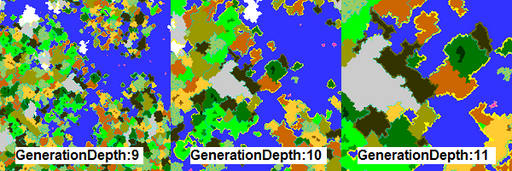
For a full explanation of Generation Depth, go here: GenerationDepth NOTE: NEED TO LINK l8er
Max biome rarity from 1 to infinity. By default this is 100, but you can raise it for fine-grained control, or to create biomes with a chance of occurring smaller than 1/100.
This allows you to group similar biomes together so that they spawn next to each other.
Note: If you're using BiomeMode: BeforeGroups, only the biomes listed in groups named NormalBiomes and IceBiomes and the size and rarity of the group named IceBiomes will be used. Other groups are ignored. The size and rarity of the NormalBiomes group is ignored as well, use LandSize and LandRarity instead.
Syntax: BiomeGroup(Name, Size, Rarity, BiomeName[, AnotherName[, ...]])
Name --- It is wise to choose something descriptive
Size --- From 0 to GenerationDepth, all biomes in the group must have a BiomeSize higher than or equal to this value
Rarity --- relative spawn chance
BiomeName --- Names of the biome that spawn in the group, case sensitive
Example:
BiomeGroup(NormalBiomes, 0, 98, Forest, Roofed Forest, Extreme Hills, Plains, Birch Forest, Swampland, Flower Forest, Roofed Forest M, Extreme Hills+, Sunflower Plains, Birch Forest M, Swampland M)
BiomeGroup(IceBiomes, 2, 40, Ice Plains, Cold Taiga, Ice Plains Spikes, Cold Taiga M)
BiomeGroup(HotBiomes, 1, 98, Desert, Savanna, Plains, Desert M, Savanna M, Sunflower Plains)
BiomeGroup(ColdBiomes, 0, 98, Forest, Extreme Hills, Taiga, Plains, Flower Forest, Extreme Hills+, Taiga M, Sunflower Plains)
BiomeGroup(MesaBiomes, 2, 40, Mesa)
BiomeGroup(JungleBiomes, 1, 40, Jungle, Jungle M)
BiomeGroup(Mega TaigaBiomes, 1, 40, Mega Taiga, Mega Spruce Taiga)
Not all biomes spawn as part of a group. Some biomes spawn as isles in other biomes, or as borders on other biomes.
Isle Biomes
IsleBiomes: Deep Ocean, MushroomIsland, Ice Mountains, DesertHills, ForestHills, Forest, TaigaHills, JungleHills, Cold Taiga Hills, Birch Forest Hills, Extreme Hills+, Mesa Plateau, Mesa Plateau F, Mesa Plateau M, Mesa Plateau F M, Mesa (Bryce), Mega Taiga Hills, Mega Spruce Taiga Hills
Isle biomes are biomes which spawn inside another biome. Biome name is case sensitive. Inside the biome config of each isle biome you can decide in which biome this isle should spawn, it's rarity and size.
Note: Isle biomes' sizes must be smaller (higher BiomeSize number) than the biome they are inside.
Border Biomes
Border biomes are biomes which are used as borders. In the biome config of the biome you can specify on which biome this border should spawn. You can also set which biome this border should not spawn near. Biome name is case sensitive.
LandRarity
Land rarity from 1 to 100. Higher numbers result in more land:
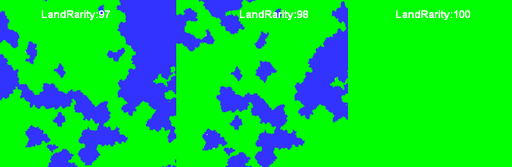
Land size from 0 to GenerationDepth. Higher LandSize numbers will make the size of the land smaller.
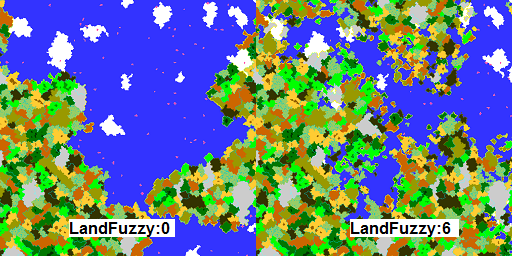
LandFuzzy
Generates more lakes (via small ocean biomes) at the edges of continents. As a side effect, the continent will also get a bit larger. Must be from 0 to GenerationDepth minus LandSize. Map of the edge of a continent:
FrozenOcean
Can be true or false, makes the water of the oceans near a cold biome frozen. The definition of 'cold' is controlled by the next setting.
OceanFreezingTemperature
This is the maximum biome temperature when a biome is still considered cold. Water in oceans nearby cold biomes freezes if FrozenOcean is set to true. Temperature reference from vanilla Minecraft: < 0.15 for snow, 0.15 - 0.95 for rain, or > 1.0 for dry.
FreezeAllBiomesInColdGroup
If the average of all biome temperatures in a biome group is less than "OceanFreezingTemperature", when this setting is true, all biomes in the group will have frozen oceans. When this setting is false, only individual biomes with a temperature below "OceanFreezingTemperature" will have frozen oceans.
RiverRarity
Controls the rarity of rivers. Must be from 0 to GenerationDepth. A higher number means more rivers, to define which rivers flow through which biomes see the individual biome configs.
RiverSize
Controls the size of rivers. Can range from 0 to GenerationDepth minus RiverRarity. Making this larger will make the rivers larger, without affecting how much rivers will spawn.
RandomRivers
When this setting is false rivers follow the biome borders most of the time. Set this setting to true to disable this behaviour.
ImprovedRivers
Normally rivers use technical biomes (defined in each biome config) to generate. With the default settings the biomes River and FrozenRiver are used. If you set this setting to true, the technical biomes won't be used anymore in the world. This causes the rivers to look exactly like the biome they are flowing through: no more sudden changes of grass color. The height settings of the river can now be found in the biome the river is flowing through.