


Rename anime/TV/movie files using TMDB metadata. Works with Infuse, Plex, Emby, Jellyfin, Kodi, and other media players that follow standard naming conventions.
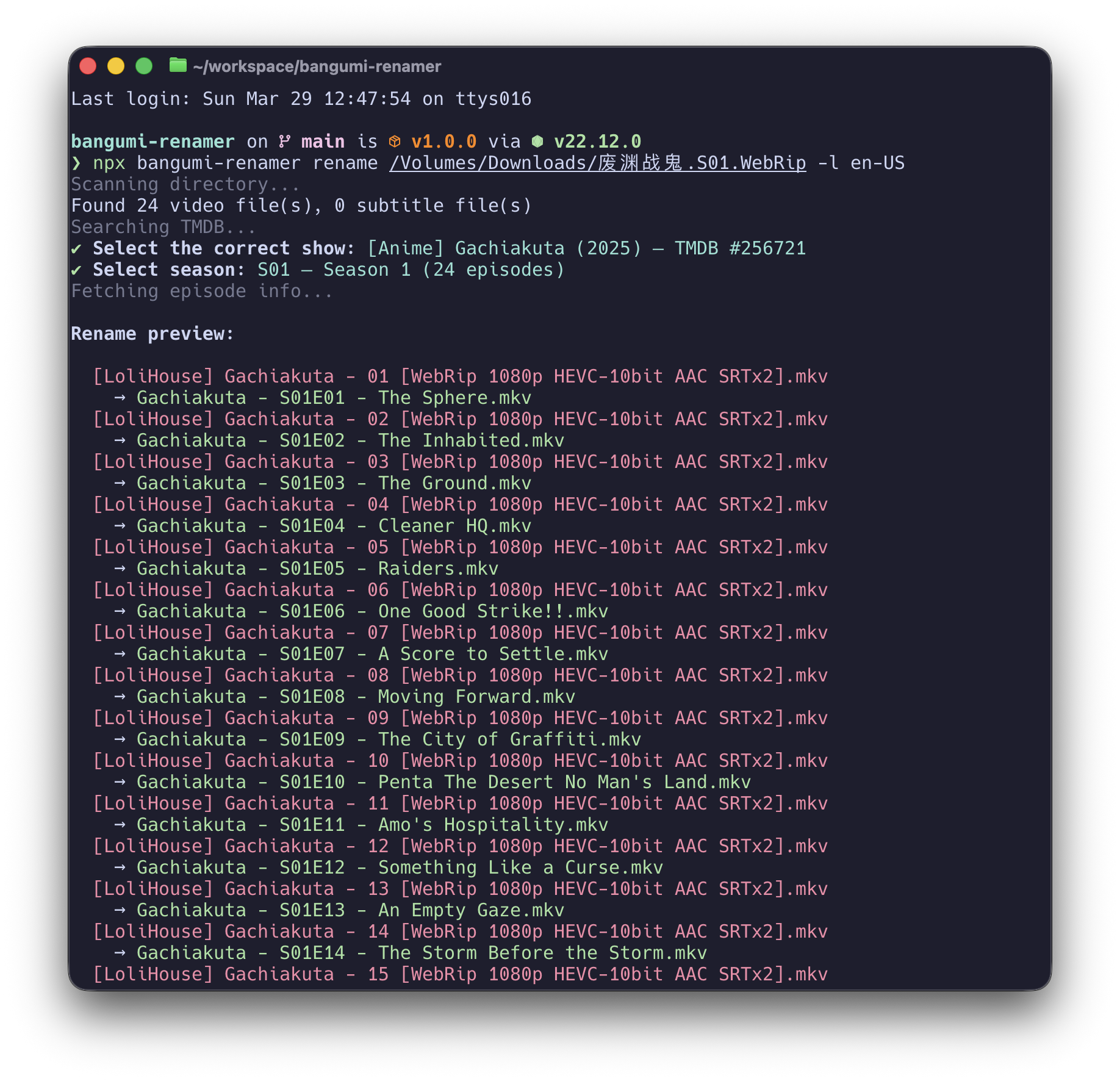
npx bangumi-renamer rename ./Frieren.S01.1080pThat's it. The tool auto-detects the show name from the directory, searches TMDB, and lets you pick the right match.
Before:                                              After:
[SubGroup] Frieren - 01 [1080p].mkv           →  Frieren - S01E01 - The Journey's End.mkv
[SubGroup] Frieren - 01 [1080p].zh-cn.ass     →  Frieren - S01E01 - The Journey's End.zh-cn.ass
[SubGroup] Frieren - 02 [1080p].mkv           →  Frieren - S01E02 - It Didn't Have to Be Magic....mkv
Argo.2012.BluRay.mkv                          →  Argo (2012).mkv
- TV/Anime: Renames to
Show Name - S01E01 - Episode Title.ext - Movies: Renames to
Movie Name (2024).ext - Subtitles: Follows video naming with language suffix preserved (
.zh-cn.ass,.en.srt) - Smart search: Searches TV and movies simultaneously, distinguishes anime from live-action
- Auto-detect: Extracts search query from directory name, detects system language
- Nested directories: Handles download tools that wrap files in same-named folders
- Dry-run: Preview all changes before executing
- Undo: Revert the last rename with full history
- Agent-friendly:
--yesand--jsonflags for non-interactive automation
npm install -g bangumi-renamerOr run directly with npx:
npx bangumi-renamer rename ./pathRequires Node.js >= 20.
Get a free TMDB API key at https://www.themoviedb.org/settings/api
export TMDB_API_KEY=your_key_hereOr let the CLI prompt you on first run — it can save to ~/.config/bangumi-renamer/config.json.
# Interactive: auto-searches TMDB from directory name
bangumi-renamer rename ./Frieren.S01.1080p

# Specify search query
bangumi-renamer rename ./path -q "frieren" -s 1

# Use TMDB ID directly (skip search)
bangumi-renamer rename ./path --tmdb-id 209867 -s 1

# Preview only
bangumi-renamer rename ./path -n

# Episode offset (file #1 = TMDB episode #13)
bangumi-renamer rename ./path --offset 12

# Rename a movie
bangumi-renamer rename ./Argo.2012.BluRay.mkvbangumi-renamer undo ./pathTMDB_API_KEY=xxx bangumi-renamer rename ./path -q "frieren" -s 1 -y
bangumi-renamer rename ./path --tmdb-id 209867 -s 1 -y --json| Option | Description |
|---|---|
-q, --query <query> |
Search TMDB with this title |
--tmdb-id <id> |
Use TMDB ID directly (skip search) |
-s, --season <number> |
Season number |
-n, --dry-run |
Preview only, do not rename |
--offset <number> |
Episode number offset (default: 0) |
-m, --movie |
Treat as movie (use with --tmdb-id) |
-y, --yes |
Skip confirmation prompts |
--json |
Output as JSON (implies --yes) |
-l, --lang <lang> |
Language for TMDB results and CLI (default: auto-detect) |
| Option | Description |
|---|---|
-y, --yes |
Skip confirmation |
--json |
Output as JSON |
-l, --lang <lang> |
Language for CLI output |
When using --json, the tool outputs structured JSON to stdout:
Rename success:
{
  "command": "rename",
  "success": true,
  "mediaType": "tv",
  "tmdbId": 209867,
  "showName": "Frieren: Beyond Journey's End",
  "filesRenamed": 12,
  "entries": [
    { "old": "[SubGroup] Frieren - 01.mkv", "new": "Frieren - S01E01 - The Journey's End.mkv" }
  ]
}
Dry-run:
{
  "command": "rename",
  "dryRun": true,
  "mediaType": "tv",
  "tmdbId": 209867,
  "showName": "Frieren: Beyond Journey's End",
  "entries": [...]
}
Error:
{ "command": "rename", "success": false, "error": "No video files found" }| Type | Format |
|---|---|
| TV/Anime | Show Name - S01E01 - Episode Title.mkv |
| Movie | Movie Name (2024).mkv |
| Subtitle | Show Name - S01E01 - Episode Title.zh-cn.ass |
| Specials | Show Name - S00E01 - Special Title.mkv |
Video: .mkv, .mp4, .avi, .ts, .flv, .wmv, .webm, .m4v, .mov
Subtitle: .ass, .ssa, .srt, .sub, .sup, .vtt
Language suffixes: zh-cn, zh-tw, zh-hans, zh-hant, zh, en, ja, ko, fr, de, es, it, pt, ru, default, forced, sdh, cc
| Code | Meaning |
|---|---|
| 0 | Success |
| 1 | User cancelled |
| 2 | Error |
- Scans directory for video and subtitle files (including nested download-tool directories)
- Pairs subtitles with videos by filename matching
- Searches TMDB (TV + Movie simultaneously), lets you pick the correct result
- For TV: selects season, fetches episodes, maps files 1:1; for movies: uses title and year
- Previews the rename plan
- On confirmation, saves undo history and renames (flattening nested files to the target directory)
MIT
This product uses the TMDB API but is not endorsed or certified by TMDB.
