Work on this project is currently ON HALT.
This is a simple python program that uses PyGame to render an accurate F-16CM Block 50 radar MFD page. It is not 100% complete (yet).
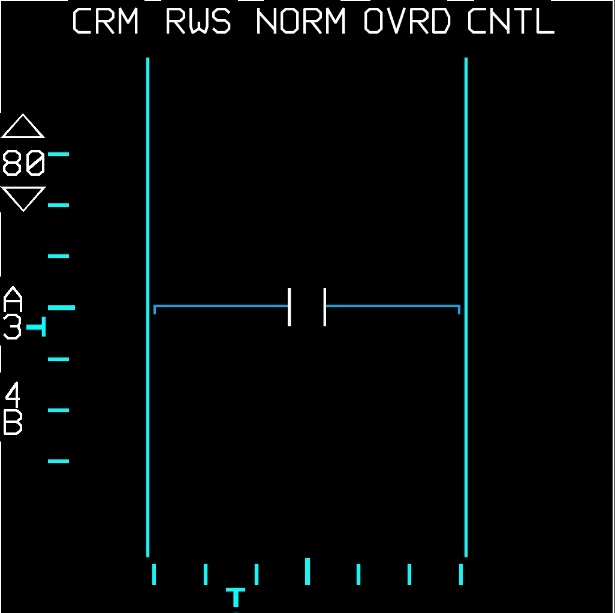
Above is a screenshot of the simulated radar display on February 13. It's look may or may not have changed since then (but should mostly look the same).
There are currently no targets/enemies to lock on, but they are planned. Also planned is an OpenGL implementation to integrate a 3D representation of the radar coverage in front of the aircraft. This will come after a serious restructuring of the simulator.
Current functionality:
- CRM Mode
- RWS Mode
- TWS Mode
- ACM Mode
- GM, GMT, SEA, BCN Modes
- STBY and OVRD
- Changing Azimuth, Elevation and Range
- CNTL menu
- Expand and DBS Modes
- Locking targets (radar model)
The top row of buttons functionality is currently in the works. The radar mode selection button (far left) is working. After the ACM radar is 100% complete, work will begin on the CRM Mode selection button (reading RWS in the above screenshot). This will also include Track-While-Scan (TWS) mode. Then the next buttons. After all buttons and menus are done, work will begin on adding lockable targets.
*GM, GMT and SEA modes may or may not be implemented too at a later date.
It supports both mobile and desktop. If it is running on mobile,the MOBILE_MODE variable in radar.py must be set to True. There is a somewhat working automatic device detection built in, but it only works for detecting Android or Windows/OSX. If you run it on Linux, it will activate mobile mode.
There are plans to release native Windows and Android builds of this app, however this will happen in the future when the app will be in a better shape. An iOS native app is currently out of the question due to the high costs for publishing an app to the App Store. You can run it on iOS if you use an IDE like Python3IDE that has PyGame installed by default.