Using this boilerplate repo will generate everything necessary to deploy a full-stack JavaScript app to AWS. This is a simple full-stack app designed for a single enviornment where you typically only need a few API endpoints and Lamdba functions.
AWS, Bash, Terraform, JavaScript/TypeScript, React, Vite, and Tailwind.
Requires an AWS account and an IAM role with an Access Key that has AdministratorAccess.
Download the AWS CLI or install using Homebrew brew install awscli
Download Node.js or install using Homebrew brew install node
Download Terraform or install using Homebrew
brew tap hashicorp/tap
brew install hashicorp/tap/terraform
brew update
brew upgrade hashicorp/tap/terraform
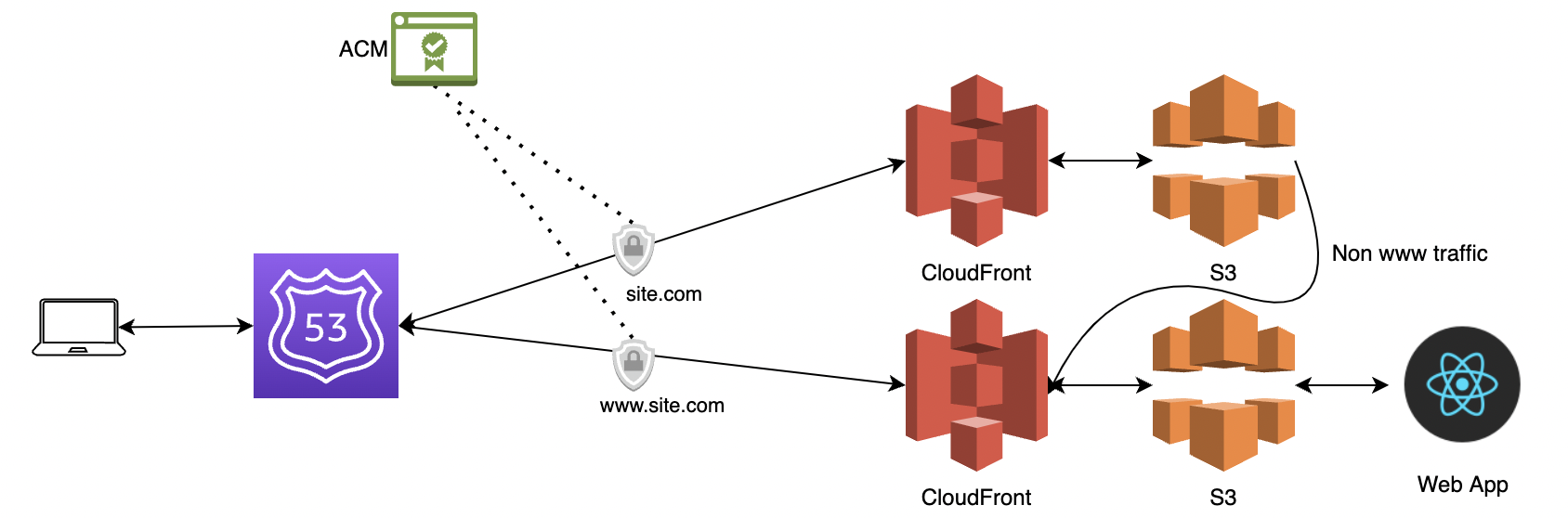
The apex domain (domain-name.com for example) is redirected to the www version (www.your-domain.com) of the site. The API will be at api.your-domain.com.
Give the scripts execute permissions:
chmod +x ./infra/setup.sh ./api/api.sh ./infra/deploy.sh ./infra/web.sh
Change into your infra folder to continue:
cd infra
Run the setup using the below ONE TIME:
./setup.sh your-domain-name.com
After this you may run ./deploy.sh to run changes to both API and Web.
Only deploy the web app by running ./web/web.sh
Only deploy the API by running ./api/api.sh
The scripts should import your Hosted Zone into terraform state seemlessly. If there are any issues you can reference the Hosted Zone Id of your domain in infra/config/aws-hosted-zone-id.txt.
If you need to manually import your domain run terraform import aws_route53_zone.hosted_zone YOUR_HOSTED_ZONE_ID.
If you need to destroy Terraform state run terraform state rm aws_route53_zone.hosted_zone prior to terraform destroy and comment out the hosted_zone in infra/main.tf