Integrate SSLCOMMERZ with Android
Here I am sharing the steps to incorporate with SSLCOMMERZ. It is the faster and hassle free one -
Step 1 : Create a Sandbox / Test Account or get the API/Guidelines from this link - https://developer.sslcommerz.com/ also you may check our ready Payment Plugin and Libraries (opencart, magento, php, java, laravel, SDK - Android, IOS etc) from this link - https://github.com/sslcommerz
Step 2 : Integrate Test ID to your system/website (you'll get all the credentials instantly over your registered email) After successfully integrated in Test Environment then you need live/Production ID.
Step 1 : Create a live account from this link with Filling-up info - http://signup.sslcommerz.com/register (after fill up the form you’ll be asked for upload Required Document: Trade License copy, NID copy, Incorporation Certificate (if any) eTIN copy etc.
Step 2 : Replace live credential to sandbox account and change environment to live account (you'll get all the credentials instantly over your registered email). After successfully replace live ID you are in Live Environment! Now user can pay by their VISA, MASTER and Mobile/Internet banking.
implementation 'com.android.support:support-compat:28.0.0'
implementation 'com.android.support:appcompat-v7:28.0.0'
implementation 'com.android.support:support-v4:28.0.0'
implementation 'com.android.support:design:28.0.0'
implementation 'com. google. code. gson: gson:2.8.5'
implementation 'androidx.core:core:1.0.0'
implementation 'androidx.appcompat:appcompat:1.0.0'
implementation 'androidx.legacy:legacy-support-v4:1.0.0'
implementation 'com.google.android.material:material:1.0.0'
implementation 'com.google.code.gson:gson:2.8.5'
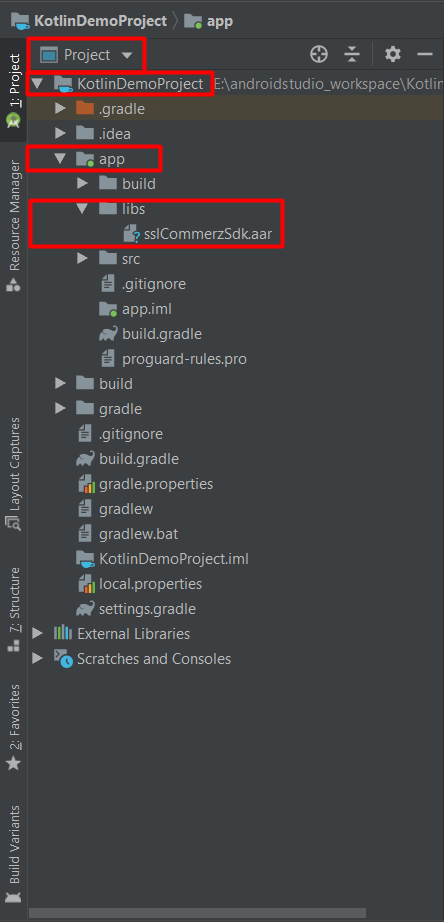
From top left corner of project pane, “Select” Project 🡪 app 🡪 libs 🡪 “Paste” sslCommerzSdk.aar in libs folder
Afterwards, users need to additional codes to the project after inserting sslCommerzSdk.aar in libs folder by following steps below:
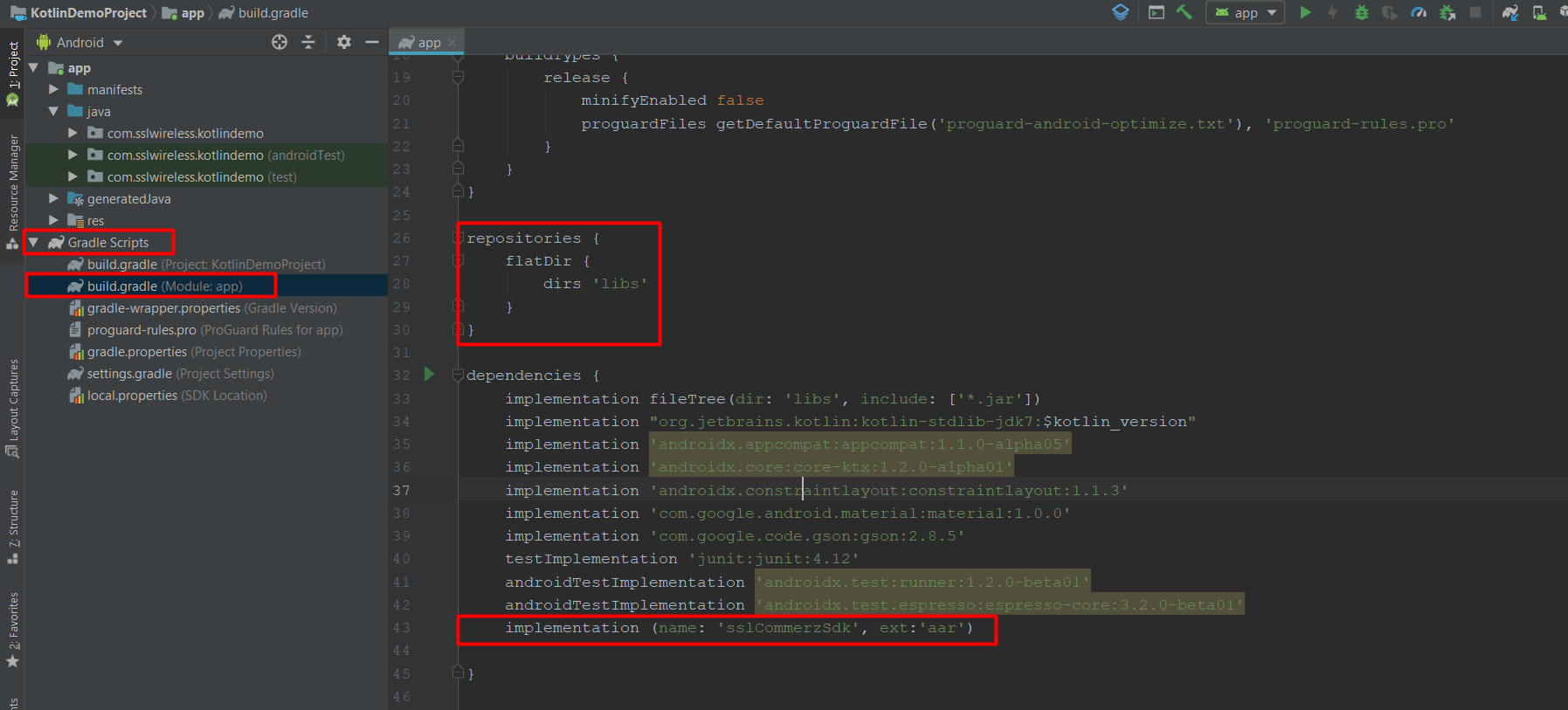
“Select” Project app 🡪 build.gradle (app module) and add below code and sync project:
repositories {
    flatDir {
     dirs 'libs'
    }
 }
implementation(name: 'sslCommerzSdk', ext: 'aar')
After successfully completing SDK integration, users can request for transaction. In order to commence transaction, users need to pass SSLCommerzInitialization.
    final SSLCommerzInitialization sslCommerzInitialization = new SSLCommerzInitialization
            ("Your Store ID","Your Store Password", total, SSLCCurrencyType.BDT,
                    "ajbdsncncvlk", "Fees", SSLCSdkType.TESTBOX);
    IntegrateSSLCommerz
            .getInstance(view.getContext())
            .addSSLCommerzInitialization(sslCommerzInitialization)
            .buildApiCall(this);