An unofficial CLI tool to display Codex CLI usage reset time. Ideal for statusline display. Can also be used as a display component for ccstatusline.
Unofficial project. Not affiliated with, endorsed by, or supported by OpenAI.
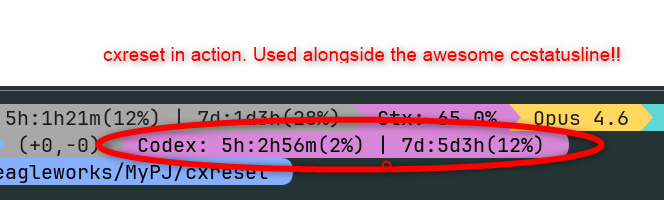
Red circle: cxreset in action. Used alongside the awesome ccstatusline
# Recommended: run without global install
bunx cxreset

# or with npx
npx cxreset

# or with pnpm
pnpm dlx cxresetbun add -g cxreset
# or
npm install -g cxresetbunx cxreset
# or
npx cxreset
# or
pnpm dlx cxresetnpm install
npm run build
node dist/cli.jsCodex: 5h:2h30m(5%) | 7d:3d12h(11%)
| Field | Description |
|---|---|
Codex: |
Prefix (distinguishes from ccreset) |
5h: |
5-hour reset window |
2h30m |
Time remaining until reset |
(5%) |
Current usage |
7d: |
7-day (weekly) reset window |
3d12h |
Time remaining until reset |
(11%) |
Current usage |
When the secondary window is not available, only the 5-hour window is shown:
Codex: 5h:2h30m(5%)
Add the following to ~/.claude/settings.json.
{
  "statusLine": {
    "type": "command",
    "command": "bunx cxreset"
  }
}{
"statusLine": {
"type": "command",
"command": "npx cxreset"
}
}When using cxreset as a ccstatusline addon, it is recommended to set the timeout to 2000ms. cxreset communicates with the Codex app-server via JSON-RPC, which may take longer than typical HTTP requests.
Launches the locally installed Codex CLI's app-server and communicates via JSON-RPC to fetch usage information.
- cxreset depends on the app-server interface exposed by your installed Codex CLI
codex app-serveris currently marked experimental in Codex CLI help output- Future Codex CLI updates may change the protocol or response fields and break compatibility
Release instructions have been moved to RELEASING.md.
MIT
The landing page (docs/) is deployed by .github/workflows/pages.yml. In GitHub Settings > Pages, set Source to GitHub Actions.