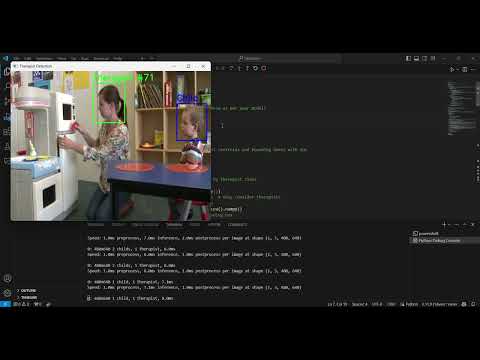
This project was done mainly using LabelImg Annotator to annotate the images , The images was taken from Youtube using the pytube library I managed to collect 93 images from the given test videos.txt file. After the annotation of the image, the image was trained on the YOLOV8n model using pytoch and ultralytics library which works best and is the fastet object detection model taking custom.yaml as its input that links to train and the validation dataset. After the training of the the the best model was saved and used to detect the Classes.
This project implements real-time detection and tracking of therapists and children using the YOLO (You Only Look Once) object detection model. The project is designed to assign unique, persistent IDs to therapists detected in video frames, ensuring that the therapist IDs remain consistent across frames, even if the therapist temporarily leaves and re-enters the frame.
Additionally, the system is capable of detecting children, though no IDs are assigned to them. The detection results are visualized in real-time, with therapists highlighted with unique IDs, and children marked with simple bounding boxes.
- Therapist Detection: Detect and assign a unique ID to each therapist present in the video frames.
- Stable ID Assignment: Ensure that the assigned therapist ID remains consistent across frames.
- No ID Reassignment: Even if only one therapist is detected, the assigned ID should not change across frames.
- Child Detection: Detect children in the video, but without assigning them any ID.
- Real-time Display and Output: Visualize the results in real-time and save the annotated video with bounding boxes and labels for therapists and children.
- OpenCV: For video processing, display, and saving output video files.
- Ultralytics YOLO: Pre-trained YOLO model for object detection.
- Pytorch: Training the model.
- Python: Used for implementing the detection, tracking, and visualization logic.
Ensure that Python is installed. Then, install the required libraries using pip:
pip install opencv-python opencv-python-headless ultralytics numpyYou can Either use the Pytorch cpu or gpu version, I would reccomened using the pytorch-gpu version
This project uses the YOLO model from Ultralytics. If you haven't installed it yet, you can do so via:
pip install ultralyticsYou will also need to download a YOLOv5/YOLOv8 model that is pre-trained or custom-trained for detecting therapists and children.
- YOLO Model: Place your pre-trained YOLO model weights (
.ptfile) in the project directory or specify the correct path. - Input Video: Place the video you want to process (in
.mp4format) in the specified directory, or update the path in the code accordingly.
therapist-detection/
│
├── Detect.py           # Main Python script for therapist and child detection
├── README.md              # Project documentation
├── requirements.txt       # Python dependencies (optional)
└── models/
    └── best.pt            # YOLO model weights (add your model here)
└── videos/
    └── input.mp4          # Input video file to process
└── output/
    └── annotated_video.mp4 # Output file with detection results
To run the project, execute the main script Detect.py. The script will:
- Load the YOLO model.
- Open the input video file.
- Perform therapist and child detection in real-time.
- Assign a unique, persistent ID to each therapist and display bounding boxes for both therapists and children.
- Display the video frames with the detection results and save the annotated output video.
python Detect.py- YOLO Model Path: Update the model path in
calculate.py:model = YOLO(r'models\best.pt')
- Input Video Path: Update the input video path:
cap = cv2.VideoCapture(r'input\ABA Therapy - Play.mp4')
- Output Video Path: The annotated video will be saved to this path:
out = cv2.VideoWriter(r'output\annotated_video.mp4', fourcc, 20.0, (640, 480))
-The Dataset was created using the test videos that was given in txt file, pytube was used to extract the random frames of the video and store it as dataset
-All the images was Annotated using the labelimg library the bounding labels were stored for further training
- The YOLO model detects objects in each video frame. It classifies detected objects as either "Therapist" or "Child" based on pre-trained model class IDs.
- Therapist Class ID is assigned to
1, and Child Class ID is assigned to be0.
- The program uses a centroid-based tracking approach to ensure that each therapist is assigned a unique, non-changeable ID.
- The position of the therapist in each frame is tracked using the centroid of their bounding box. If a therapist remains in the same general location, the ID remains the same across frames.
- Even if a therapist temporarily leaves the frame, their ID is remembered, and the same ID is reassigned when they reappear.
- The program detects children using YOLO but does not assign them any ID. Children are only labeled with "Child" in the video.
- The processed video is saved with the therapist IDs and bounding boxes for both therapists and children. The bounding boxes for therapists are green, and the bounding boxes for children are blue.
- Therapists: Identified by unique green bounding boxes and labeled as
Therapist #id, whereidis a stable ID assigned to the therapist. - Children: Identified by blue bounding boxes and labeled as
Child.
If you want to use a custom-trained YOLO model, replace the existing .pt model file with your own:
model = YOLO('path/to/your/custom/model.pt')The code uses a 50-pixel threshold to track therapists across frames based on the centroid of their bounding box:
if np.linalg.norm([ox - cx, oy - cy]) < 50:You can modify this threshold to increase or decrease the sensitivity of tracking.
If your model uses different class IDs for therapists and children, you can modify the following variables:
THERAPIST_CLASS_ID = 1  # Adjust this for therapist
CHILD_CLASS_ID = 0 # Adjust this for child- Additional Classes: If your model can detect additional object classes, you can extend the code to handle other entities.
- Advanced Tracking: For more complex tracking needs, you could integrate more advanced tracking algorithms like SORT or DeepSORT.
- Real-time Streaming: With minor adjustments, the script can be adapted for real-time streaming applications using webcams or networked video feeds.
This project provides a solid framework for detecting and tracking therapists and children in video footage using the YOLO object detection model. The focus is on maintaining stable and consistent therapist IDs across frames, even if only one therapist is present. It can be customized for various object detection tasks by updating the model and class configurations.