Please note the script does not check or validate the input, just use the help and follow the instructions
This script also assume the following:
- You have VirtualBox installed
- You have Multipass Installed
- You have set multipass local.driver to VirtualBox
- You have created a virtual network on VirtualBox
** you will be notified if you don't have any of the above
If you didn't do any of the following, please follow this steps:
To install VirtualBox please visit: VirtualBox Download
To install Multipass You can use brew install --cask multipass but i suggest to use Multipass PKG as it installs also a nice tool that seats in the Menu bar. Grab it here: Multipass Mac download
To set multipass driver to VirtualBox run
sudo multipass set local.driver=virtualbox
** the script can create one for you as well, just follow the prompt
Sudo VirtualBox
Click on:
File -->

        Host Network Manager -->

                                Create
Then
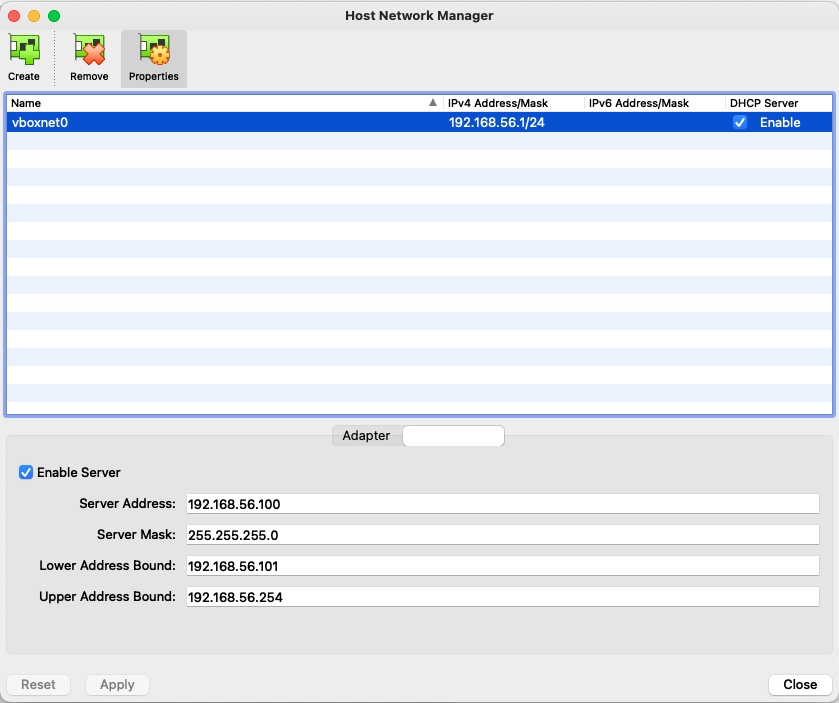
Click on DHCP Server Tab of the new network and check the Enable Server checkbox
It should look something like this:
Usage: sudo ./launch-vm [-h] [-v] -n name -f cloud-init.yaml -m 1GB -c 2 -l vboxnet0

Launch a multipass VM with cloud init

Available options:

-h, --help        Print this help and exit
-v, --verbose     Print script debug info
-n, --name        Name of the instance
-f, --cloud-init  cloud init file path
-m, --mem         memory for instance, defualt to 4GB if empty
-d, --hd          drive size for instance, defualt to 20GB if empty
-c, --cpu         number of vCPU, defualt to 2 if empty
-l, --vlan        name of the virtual network, defualt to vboxnet0 if empty
-t, --timeout     timeout for launch script, defualt to 900 if empty
Please run using sudo (sudo ./launch-vm)
For help run sh launch-vm -h
Example:
sudo ./launch-vm -n k8-kind -f cloud-init-k8-kind.yaml