AI toolkit for Obsidian. Transforms your static notes into an active knowledge base with insights, briefings, study aids, vault chat, and automated organization. Runs locally with Ollama or via NVIDIA NIM for cloud speed.
| Script | Description |
|---|---|
generate_insights.py |
Multi-lens weekly analysis with persistent AI memory |
morning_briefing.py |
Daily briefing with pending tasks and suggested focus |
study_recap.py |
Spaced repetition questions from your study notes |
txt_to_notes.py |
Converts any text into structured, linked Obsidian notes |
chat.py |
Persistent vault-aware conversation with SQLite memory |
auto_tagger.py |
Scans and injects missing tags without touching existing metadata |
moc_generator.py |
Builds Maps of Content to connect orphan notes |
Runs entirely on your machine. No data leaves your vault.
| Model | Best for |
|---|---|
deepseek-r1:8b |
Recommended default — best reasoning, lowest hallucination |
llama3.1:8b |
Faster, slightly less accurate |
llama3.2:3b |
Edge devices and systems without a dedicated GPU |
Not sure what your hardware can handle? Check the LLM Hardware Requirements Guide.
Offloads processing to NVIDIA's infrastructure. Useful if you don't have a GPU or want to run 70B+ models.
- Tested model:
meta/llama-3.3-70b-instruct - Requires an API key and internet connection
- Free tier has rate limits, but you're unlikely to hit them for normal vault use
- Python 3.10+
- Ollama installed (if running locally)
git clone https://github.com/paulobarb/vaultmind.git
cd vaultmind

python -m venv venv
source venv/bin/activate  # Windows: venv\Scripts\activate

pip install requests pyyamlOption A - Local (Ollama)
ollama pull deepseek-r1:latestIn config.py, set USE_NVIDIA_NIM = False and verify the model name matches.
Option B - Cloud (NVIDIA NIM)
In config.py, set USE_NVIDIA_NIM = True and paste your API key:
NVIDIA_API_KEY = "your_key_here"All settings live in config.py. The most important ones:
| Setting | Description |
|---|---|
USE_NVIDIA_NIM |
True for cloud, False for local Ollama |
VAULT_PATH |
Path to your Obsidian vault |
NUM_CTX |
Context window size — increase for larger models or long notes |
TEMPERATURE |
0.2 for factual output, 0.7 for creative insights |
EXCLUDED_FOLDERS |
Folders the AI should ignore (e.g. Templates, Archive) |
SAVE_CHAT_HISTORY |
True to persist chat history in SQLite, False for amnesiac mode |
If you upgrade to larger models (35B, 70B, or NVIDIA NIM), increase
NUM_CTXandMAX_NOTE_CHARSfor better results.
All prompts are in prompts.json.
Splits your recent notes into "Yesterday" (what you executed) and "Today" (what you planned). Finds unfinished checkboxes and generates a suggested focus so you never start the day cold.
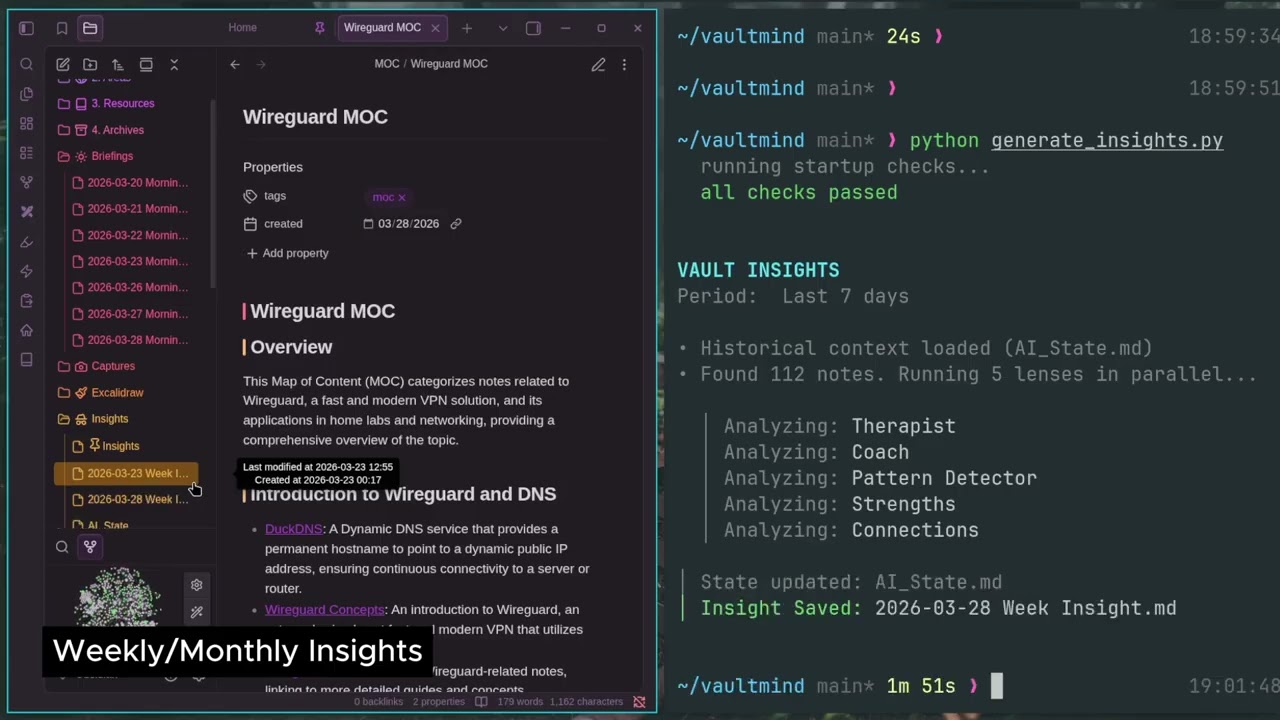
python morning_briefing.pyRuns your notes through parallel analysis lenses (Therapist, Coach, Pattern Detector, Strengths, Connections). Reads AI_State.md at startup, a compressed history of previous weeks, and compares it against your current notes to detect drift and track long-term progress. Updates the state file after each run.
python generate_insights.pyAuto-detects notes modified in your last study session and lets you refine the list. Cross-references them with your full vault to find hidden connections, then generates spaced repetition questions to fight the forgetting curve.
python study_recap.pyTwo-pass ingestion engine for messy data, transcripts, braindumps, articles.
- Pass 1 (Plan): AI reads the raw text and creates a blueprint - how many notes, what titles, which existing vault tags to reuse
- Pass 2 (Write): Writes the actual content with
[[Wikilinks]]to your existing knowledge base
python txt_to_notes.py my_transcript.txtConversation engine with access to your vault. Saves history to a local SQLite database so the AI maintains context across sessions. Commands:
/memories       list saved exchanges
/forget <id>    delete a specific exchange
/clear          wipe all history
/exit           quit
python chat.pyScans for notes missing tags and injects them without touching existing metadata. Supports non-English characters (á, ç, ú). Two modes:
- Vault-wide: finds all untagged notes automatically
- Targeted: force re-tag a specific file by name
python auto_tagger.pyBuilds a Map of Content for your vault in three modes:
- Tag/Keyword — finds all notes containing a specific tag or keyword (e.g.
#productivity) - Anchor Note — finds all notes that link to a specific note (e.g.
MyNote) - Folder Index — indexes all notes inside a specific folder (e.g.
Projects/MyProject)
Generates a structured index note with automatic [[Wikilinks]].
python moc_generator.pyAdd to crontab for automatic daily and weekly runs (machine must be on):
# Morning briefing — every day at 7am
0 7 * * * /path/to/vaultmind/venv/bin/python /path/to/vaultmind/morning_briefing.py

# Weekly insights — every Sunday at 8am
0 8 * * 0 /path/to/vaultmind/venv/bin/python /path/to/vaultmind/generate_insights.pyvaultmind/
├── core/ # Shared AI logic and backend routing
├── data/ # Local SQLite databases
├── config.py # All settings — start here
├── prompts.json # All AI prompts — edit to customize behavior
├── auto_tagger.py
├── chat.py
├── generate_insights.py
├── moc_generator.py
├── morning_briefing.py
├── study_recap.py
└── txt_to_notes.py
- AI variability: Output depends on your model. Always verify — especially the Pending section in briefings.
- Hardware: CPU-only machines will be slow on multi-pass scripts like
txt_to_notes.py. - Personal tool: Built for a specific workflow. Edit
prompts.jsonor the scripts to fit yours.
MIT