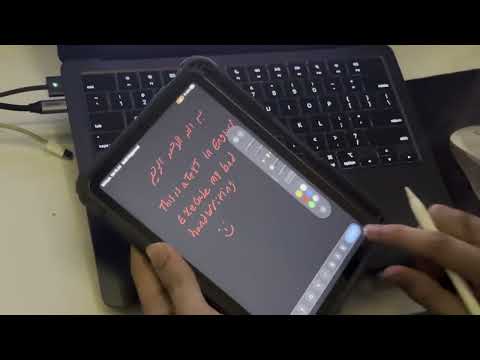
org-pad lets you draw on your iPad with Apple Pencil and have the result in your org-mode buffer as an inline figure.
- [iPadOS only, if you want native experience] On the iPad, install Swift Playgrounds from the App Store (it’s free). This is the only App-Store install required; the OrgPad app itself is never distributed through the App Store.
- In Emacs, run
M-x org-pad-setup. This starts the org-pad server, generates a fresh 6-digit pairing code, and opens a*org-pad setup*buffer listing one or more setup URLs, one per LAN network interface Emacs can see (e.g. =http://192.168.1.23:8777/setup=). - If you are using anything that is not iPadOS:
- Open the URL for web browser experience.
- In emacs, in an org-mode buffer, run
M-x org-pad-drawor use theorg-pad-menu.
- On the iPad, open Safari and visit the setup URL. The page lets you
download and open
OrgPad.swiftpmdirectly into Swift Playgrounds. - Inside Swift Playgrounds, tap Run. The app opens on a connect screen asking for a 6-digit code.
- Enter the code shown in the
*org-pad setup*buffer (you might need to paste it directly instead of typing it). On success the iPad is paired and remembers the server for future sessions (via a token persisted inorg-pad-token-fileon the Emacs side). The code is single-use and expires after 5 wrong attempts. Re-runM-x org-pad-setupto get a new one if that happens.
You only need to repeat this flow when pairing a new iPad, after
clearing org-pad-token-file, or if the code expires before you finish
entering it.
- Place point where you want a new figure and run
M-x org-pad-draw(or bind it to a key). Emacs starts the server if it isn’t already running and queues a “new drawing” request; a message tells you to open OrgPad on the iPad (or, if it’s already open and idle, it will pick the request up immediately via its long poll). When you finish drawing and tap done, the PNG comes back and org-pad inserts an[[file:...]]link to it at point. - Place point on an existing org-pad figure link and run
M-x org-pad-draw(orM-x org-pad-edit) to re-open it for editing. Because the original strokes are embedded in the PNG, the iPad app reconstructs your drawing exactly as you left it, this is the “self-contained PNG” format at work. Editing a plain PNG that wasn’t produced by org-pad (no embedded strokes) is refused with a clear error, since there is nothing to reconstruct from. org-pad-drawis DWIM: on a re-editable figure link it edits; anywhere else it creates a new figure at point.- The server keeps running across multiple draw requests; use
M-x org-pad-server-stopto shut it (and the Bonjour advertisement) down, e.g. before switching networks or ending your Emacs session. M-x org-pad-menuopens a transient menu with draw / edit / setup, the client toggle, the figure background, and server start/stopm a convenient single entry point if you don’t want to remember commands.
tldraw is loaded from a CDN, so the device needs internet access the first time it opens the page.
It works as a receiver, just like the native app’s Waiting screen:
- Set
org-pad-clienttoweb(orask). - Run
M-x org-pad-setup. Alongside the iPad instructions it lists a receiver URL (e.g. =http://192.168.1.23:8777/canvas=). - Open that URL once on the iPad (or any device) and, the first time, enter the same 6-digit code to pair, the browser stores its own token, right on the page. Leave the tab open.
- From then on, every
M-x org-pad-draw(withorg-pad-clientweb) is picked up by that open tab, it long-polls the server exactly like the native app, switches into drawing mode, and posts the figure back when you tap Done, then returns to waiting for the next one.
org-pad customization group
(M-x customize-group RET org-pad RET), or set them directly in your
init file:
org-pad-port(default8777)org-pad-directory(default"figures")org-pad-file-name-function(defaultorg-pad-default-file-name)org-pad-insert-attr-width(defaultnil) when set to an integer pixel width, org-pad inserts a#+ATTR_ORG: :width Nline above the link to a newly created figure, so it displays at a fixed width inline. Leave itnilto skip the ATTR line entirely.org-pad-token-file(default<user-emacs-directory>/org-pad-tokens)org-pad-figure-background(defaulttransparent) the default exported (result) background baked behind a figure’s ink.transparentkeeps true ink colors and alpha and shows the figure against your org buffer’s background (so a white pen shows in a dark theme and a black pen in a light theme); or set it towhite,dark, or a specific color string to bake that behind every figure. This is the default the client starts with; you can override it per-drawing in the app’s background menu. Note the app’s surface (what you see while drawing) is a separate, on-device choice and never affects the export.org-pad-client(defaultnative) which drawing surfaceorg-pad-drawuses for a new figure:native(iPad app),web(browser canvas), orask(prompt each time). Editing an existing figure always re-opens on whichever surface created it, regardless of this setting.org-pad-web-canvas-filepath to the web canvas HTML served at/canvas(defaults toweb/canvas.htmlshipped with the package).org-pad-web-open-function(defaultnil) when non-nil (e.g.browse-url),org-pad-draw.
With Snap shapes on, a rough freehand line, rectangle, ellipse, triangle, or arrow is cleaned up to crisp geometry the moment you lift the pencil; real handwriting is detected and left untouched (the recognizer is tuned to never snap cursive or scribbles). With Smooth on, raw ink is de-jittered without changing what you wrote.
org-pad-draw queues a drawing request that the iPad app picks up the
moment it’s foregrounded, the app long-polls the server, and
returning to it (from the Dock, the app switcher, or by tapping its
icon) delivers a pending request immediately, without waiting.
Every figure org-pad writes is a normal PNG with a private ancillary chunk
named orPd inserted before IEND, containing a version byte followed
by the original PencilKit drawing data (strokes, not pixels) and covered
by the standard PNG CRC32 like other chunk. This is for making reediting possible, org-pad-edit reads the orPd chunk back
out, ships it to the iPad, and PencilKit resumes exactly where you left
off. PNGs without an orPd chunk (screenshots, images from elsewhere)
are treated as non-editable and org-pad-edit an error.
Pending draw requests live in memory in the running Emacs process. If you restart Emacs (or it crashes) before the iPad has picked up and returned a queued drawing, that request is lost and you’ll need to run org-pad-draw again.
I tested with macOS, but Linux should work too (the mDNS advertisement uses avahi-publish (install avahi-utils and run avahi-daemon)), and everything else is platform-agnostic.