A spiffy lil' playlist maker for Spotify - swipe playlists to like and dislike tracks, create playlists with ease, check out tracks stats, and gain full control over your recommendations by customizing stats and genres:
| Swipe, preview, and like/dislike tracks in place to make new playlists | Check out stats and create new playlists from all your likes and top tracks | Create custom recommendations by hand-tuning stats and genres |
|---|---|---|
 |
 |
 |
One day I got frustrated with Discover Weekly and thought "why can't I just pluck out the one or two tracks I actually like??" and hence "tinder for spotify" was born. And then I added more screens so I wouldn't have to call it "tinder for spotify" 👍


This project was really an excuse for me to bite off more than I can chew and EXPLORE ALL THE THINGS!1!!, so it is an unholy amalgamation of:
- A Model-View-Intent "reactive" architecture, inspired by Redux's uni-directional data flow and viewstates as finite state machines
- Android Arch Components and Room
- Repository pattern
- RxJava/RxKotlin voodoo
- Lots of UI tidbits like shared element transitions and lottie animations
- Kotlin, in varying states of quality
What do we mean by MVI? There's a great outline in the unofficial boiler of the single flow:
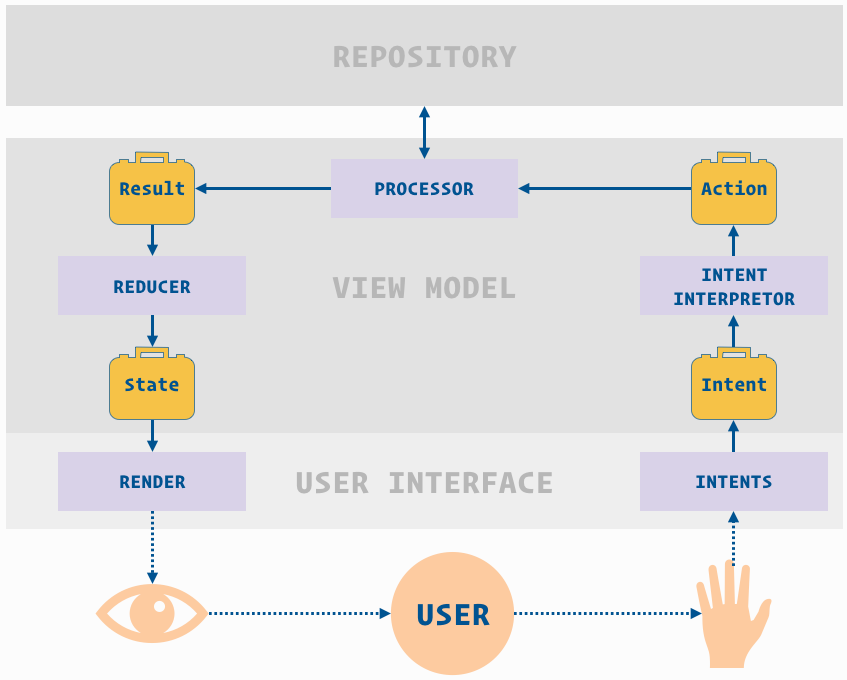
Each self-contained view - whether an activity, a fragment, or a widget - comprises its own MVI component, which is really just a function that transforms data through these actors:
Intents- events, whether user-driven like "opened playlist" or programmatic like a background fetchActions- the action to take for a intent, with all the necessary data (they are a separate layer from intents because multiple intents can go to a singleAction)Results- the result of the action's processing, includes success/failure status and the payload with all the necessary data for re-rendering- The
View- a dumb view layer that just renders a givenViewState, and emits a stream ofObservable<Intent>(user actions like "click" or "opened screen") for theViewModelto bind to:
interface MviView<out I : MviIntent, in S : MviViewState> {
    fun intents(): Observable<out I>
    fun render(state: S)
}- The
ViewModel- holds the data backing theViewand emits it as aObservable<ViewState>, which it gets by binding to the view'sintentsstream, hooking that up to the business logic, and listening toResultsto construct the nextViewState
interface MviViewModel<in I : MviIntent, S : MviViewState, in R: MviResult> {
    fun processIntents(intents: Observable<out I>)
    fun states(): Observable<S>
}
The core of MVI is the one-way data flow. There is only one place for events to go in, and one place for view states to come out:
Viewpipes inIntents(user click, app-initiated events etc) to theViewModel- Ex: ProfileFragment
ViewModeltransformsIntentstoActions-> pass toActionProcessorActionProcessortransformsActionstoResults-> pass theResultstoViewModel'sreducerreduceris a function that combines theResult+Previous ViewState=>New ViewStateNew ViewStatepipes through the states stream -> triggersView'srender(ViewState)
// Intents => Actions => Results => reducer (previous state + result) => new view state

// You can see most of the flow in a single observable in the ViewModel, like `ProfileViewModel` here:
val observable = intentsSubject
	// given events from the view's `intents()` stream
	.subscribeOn(schedulerProvider.io())
	// filter for relevant intents
	.compose(intentFilter)
	.map{ it -> actionFromIntent(it)}
 	// filter for relevant actions
	.compose(actionFilter<ProfileActionMarker>())
   	// do the business logic (hit repo etc) using other services, managers etc
	.compose(actionProcessor.combinedProcessor)
	// filter for relevant results
	.compose(resultFilter<ProfileResultMarker>())
   	// map previous state + result => new state
	.scan(currentViewState, reducer)
	.observeOn(schedulerProvider.ui())
	.distinctUntilChanged().subscribe({
	   	// publish the new state!
		viewState -> viewStates.accept(viewState)
	})

// ProfileFragment is subscribed to the ProfileViewModel's states stream, so it re-renders the new state:
viewModel.states().subscribe({ state ->
    this.render(state)
})Create a project over at Spotify developer to get a client key.
Create a secrets.properties file in the project root. Add two keys:
SPOTIFY_CLIENT_ID = 12345
SPOTIFY_REDIRECT_URI = soundbits://callback
If you have trouble with gradle, try:
- checking
ic_launcher_foreground.xmlisn't malformed, sometimes import cuts off the vector - deleting the project
.gradleandbuildSrc/buildfolders, then invalidate and restart
- Arch components + Room
- RxJava/RxKotlin/RxRelay
- Dagger2
- Retrofit + Gson + Glide
- kaaes's spotify api wrapper
- PlaceholderView for the tinder ui
- other UI libs - see Dependencies
- Spotify SDK integration to play tracks without preview urls
- "Add to existing playlist" functionality
- Pagination with DiffUtil + Paging library
- Bugfixes and unit tests
- https://github.com/oldergod/android-architecture/tree/todo-mvi-rxjava
- https://android.jlelse.eu/reactive-architecture-7baa4ec651c4
- https://android.jlelse.eu/reactive-architecture-deep-dive-90cbc1f2dfcb
- Ray Ryan on Reactive Workflows at Square
- https://engineering.udacity.com/modeling-viewmodel-states-using-kotlins-sealed-classes-a5d415ed87a7
- More on Finite State Machines:
- Redux on reducer composition: https://redux.js.org/docs/recipes/ReducingBoilerplate.html