Paper: https://dl.acm.org/doi/10.1145/3430524.3442457
Presentation video: https://www.youtube.com/watch?v=WulDmAd6fcY&feature=emb_logo&ab_channel=SciFri
TEI2021 Submission Appendix
In order to control the temperature of the 3D printer extruder via G-code that generated from the Inkscape, you need to add the following command on the head of the G-code, and the footer at the end of it. G-code can be editted by any notepad software or IDE You can find detailed information for the each command from here https://reprap.org/wiki/G-code
G1 Z5.5 F1200; Linear move of Z height to be 5.5mm, with speed 1200mm/min
M104 S160 ; set up the extruder temperature by changing the number next to the 'S'
M105
M109 S160 ; set up the extruder temperature by changing the number next to the 'S', and WAIT
M204 P500.00 R1000.00 T500.00 ;Setup Print/Retract/Travel acceleration
M205 X8.00 Y8.00 Z0.40 E5.00 ;Setup Jerk
G28 ; Move to origin(Home)
G90 E0 ; Set to Absolute Positioning
G0 Z20 ; Rapid move of Z height to be 20mm from the bed
G21 ;Set unit to [mm]G0 Z20
G28 X0 Y0
M18
M106 S0 ;Turn-off fan
M104 S0 ;Turn-off hotend
M140 S0 ;Turn-off bed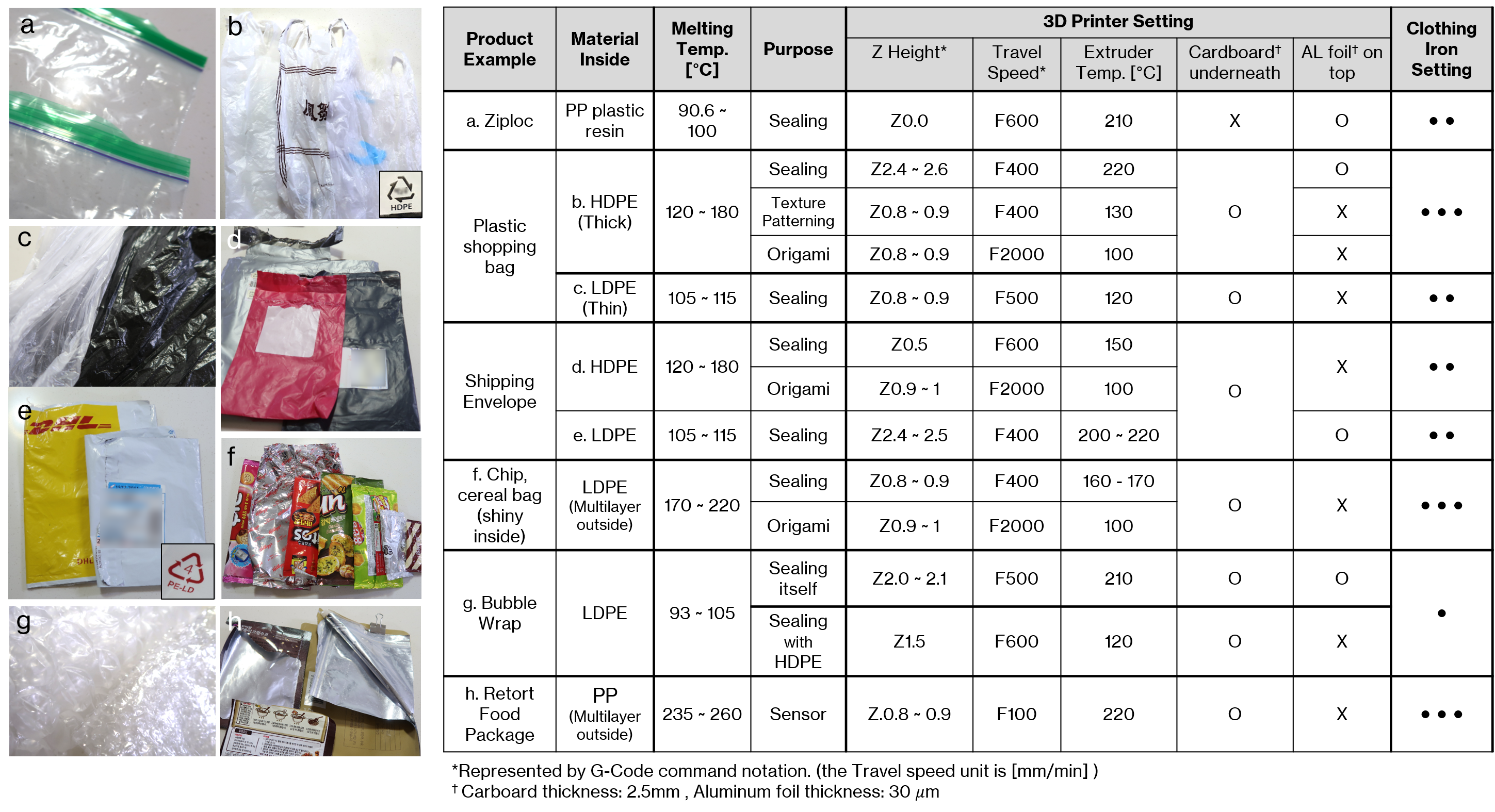
Putting a cardboard box underneath plastic bags/films is helpful for providing a damper with enough force to sandwisching the material when the extruder runs through the path. Aluminium foil is not necessary for the most of plastig bags like chip bag, shopping/shipping bag, but we found it is very helpful for heat-sealing a very thin plastic material like Zip-loc and bubble wrap since it is helpful for preventing any slice by extruder and also for distributing the extruder heat evenly.
Inkscape: https://inkscape.org/ Create Hatch Fill in Inkscape using Axidraw plug-in (download here): https://github.com/evil-mad/axidraw Create G-code using extra plug-in (to save time than using the Inskscape's built-in gcode tool extension) - J-Tech Laser tool Plug-in: https://jtechphotonics.com/?page_id=2012
- if you use the J-Tech Laser tool for generating the G-code, you can modify it to automaticly include the header and footer command shown below
- by modifying the default setup of 'laser.py' file in [Program Files\Inkscape\share\inkscape\extensions] (might be varied depending on your computer env.) as shown in below