
Overview • Getting started • How to use • License


This Python software allows you to extract certain frames from a video file and then save them as image files.
This tool is useful when you want to create a training dataset for image localization and object detection, for example, which must be identified manually, frame by frame.
The application's workflow consists of entering a video file, defining some extraction parameters and, if necessary, defining the output directory.
The software then starts to scan through the video frames, extract the ones that fit the established conditions and then save them. For this process, some features of the opencv-python package are used.
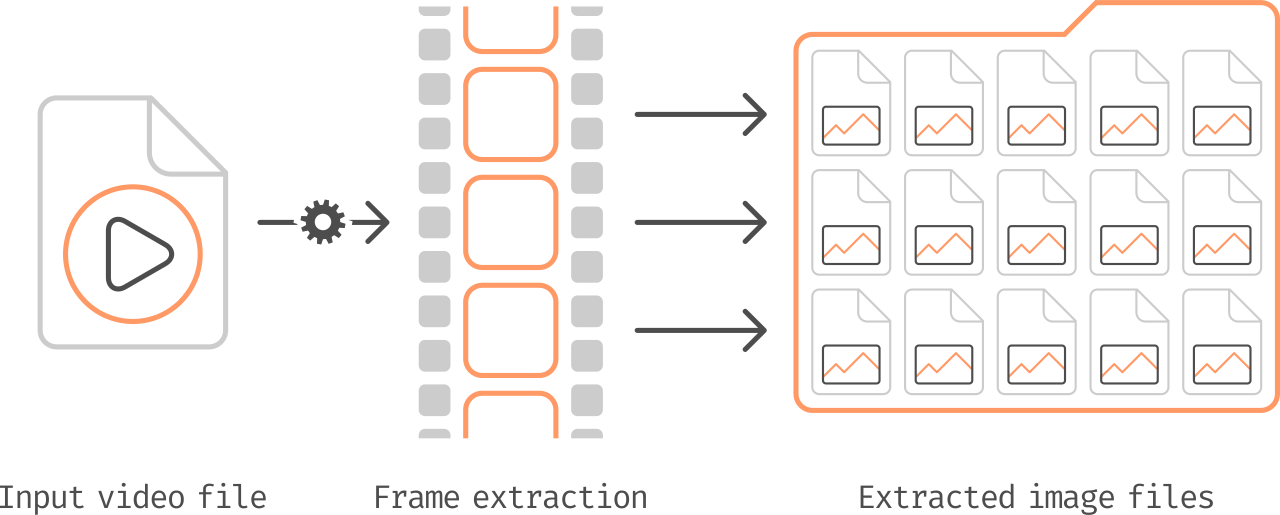
After the process is finished, the images must be available in the output directory previously defined.
This step consists of cloning this repository on your computer and, soon after, installing the required Python packages.
Before proceeding, make sure this is installed:
- A version of
python3, the newer the better, including PyPI. During development, version 3.7.9 was used. - And
git, the newer version the better.
For the following steps, it is strongly recommended to use a Python virtual environment, such as venv or virtualenv.
Since this project has a sub-module included, the Python Formatter, you must clone it recursively by running the following command in a terminal:
git clone --recurse-submodules https://github.com/mlc2307/video-frame-extractor.gitIf you want to know more about git submodules, it is worth checking out the book or reference in the official Git documentation.
In the newly cloned repository directory, run the command below to install the Python packages defined in the file requirements.txt in your environment:
pip install --upgrade -r requirements.txtAfter installing the packages, the setup is ready and you can proceed to the next step.
To use the tool, just run the video_frame_extractor.py file with Python, as in the following example:
python video_frame_extractor.pyThe application will first ask for the location of the input video file. As soon as you define it, some attributes of the video will be listed, such as resolution, frame rate, etc.
Then you must define the extraction parameters, which can be defined more clearly due to the listed attributes and are as follows:
- Extraction rate
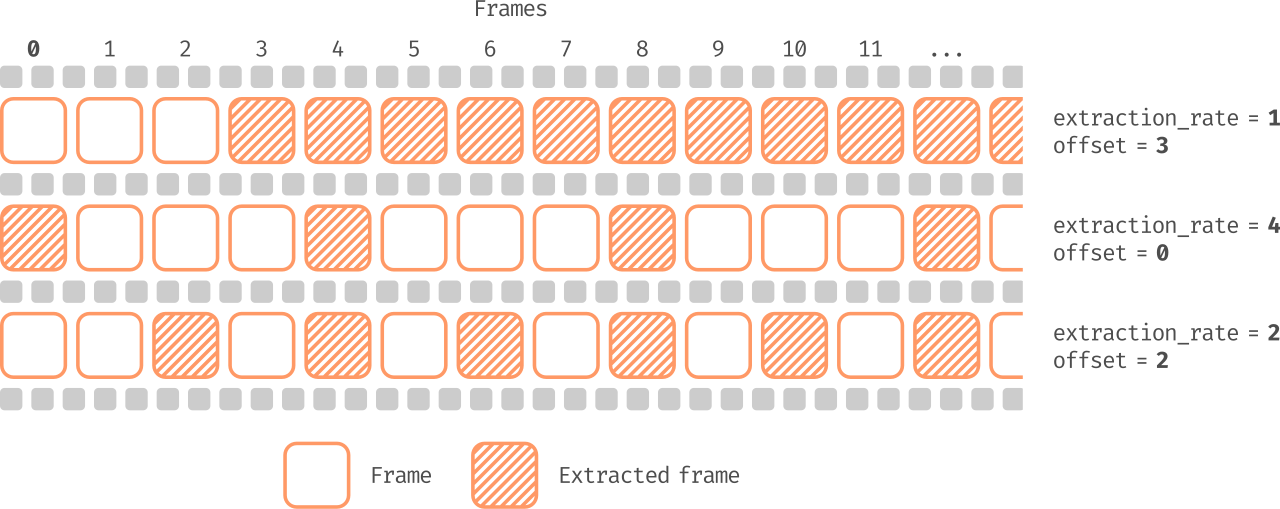
extraction_rate, where0 < extraction_rate– The frame interval between one extracted frame and another. For example: assuming there is no offset, if the extraction rate is equal to 5, frames 0, 5, 10, 15, ... will be extracted; if it is equal to 1, all frames will be extracted. - Offset
offset, where0 <= offset < frames_number, forframes_numberbeing the total number of frames – Shifts the start of the extraction, that is, it defines the index of the first frame to be extracted.
Optionally, you can also define the location of the image output directory. If you do not define it, the software will create a folder in the same directory as the video file, with the same name, without the extension, and with the suffix _images. For example: if the video name is path/to/video-file.mp4, the output directory will be path/to/video-file_images.
After all this, the extraction process will begin. When finished, if there were no errors, the images in .jpg format must be available in the defined output directory, which must have the same resolution as the input video.
It is worth remembering that you can stop the execution at any time by pressing Ctrl+C.
This application also provides some command line arguments during its execution, allowing you to directly assign the variables and parameters already mentioned, according to your needs.
The command syntax is as follows:
python video_frame_extractor.py [-h] [-i INPUT] [-r EXTRACTION_RATE]
                                [-o OFFSET] [-C [OUTPUT]]
And the arguments are as follows:
| Argument | Optional | Type | Allow empty | Description |
|---|---|---|---|---|
-h --help |
✔️ | ➖ | Show a help message and exit | |
-i --input |
✔️ | String | Path to the input video file | |
-r --extraction-rate |
✔️ | Integer | Extraction frame rate | |
-o --offset |
✔️ | Integer | Frame offset | |
-C --output |
✔️ | String | ✔️ | Output path for image files |
It is also possible to define only a few parameters using these arguments and the others during execution.
This software is available under the MIT license.