Releases: microsoft/SP-Server-Workflow-Scanner
SharePoint Workflow Scanner V1.0

The Zip file contains all the files needed to run Workflow scanner on SharePoint 2013 and higher. Word document, Instructions.docx contains the instructions on how to run the scan. There are additional steps to help gather sites to scan, which can be skipped if sites are already known.
Run SharePoint Workflow Scanner
In the SharePoint Workflow Scanner folder there is a subfolder with name 2.WorkFlowScanner.
It contains 8 files, most of them are Dynamic link library (DLL) and one PowerShell Script (Run_WF_Scan.ps1). To run the workflow scanner, please follow these steps:
- Download the folder to computer that has can navigate to SharePoint 2013 sites. The user that will run this scan needs to be a farm admin and have the admin privileges to web application of the sites that we are going to scan.
- Open Run_WF_Scan.ps1 in PowerShell ISE

a. Line 1 imports the Workflow scanner module that has the code to scan for workflows
b. Line 3 has the one of the ways to run the Workflow scanner.
The options selected are:
i. -SiteCollectionURLFilePath .\sites.csv (list of all the sites that needed to be scanned). Other options are: -SiteCollectionUrl for a single site, and no sites file is required.
ii. -DomainName in this case is contoso Provide the name of the domain
iii. -AssessmentOutputFolder .\Output Provide the output folder where the WorkflowDiscovery.csv file is created. - Executing the Workflow Scanner Utility
a. Run line 1

b. After the correct values are supplied for SiteCollectionURLFilePath, DomainName and -AssessmentOutputFolder, run the Get-WorkflowAssociationsForOnprem commandlet.

c. The following message will show, and press Y

d. You should see all the site collections print out as they are getting scanned for workflows

e. Once completed, you should see few folders created in the AssessmentOutputFolder path.
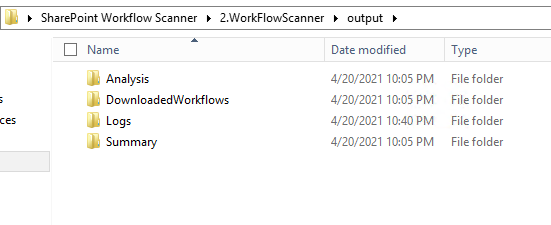
Output
Folders Review
This utility produces 4 folders, but only Logs and Summary have contents from this utility.
- Logs – contains the process logs for the utility and any errors.
- Summary – contains the WorkflowDiscovery.csv that has workflow information for all the site collections that were supplied in the sites.csv file.