Pushing notifications using cloud functions to Flutter app when app is launched, resumed, running and closed.
-
Add firebase_messaging plugin in pubspec.yaml.
-
Follow the instructions correctly from the README firebase_messaging in pub.dev page.
-
Copy the code from lib directory.
-
Now you have to select a folder in which you can write your cloud function before deploying.
-
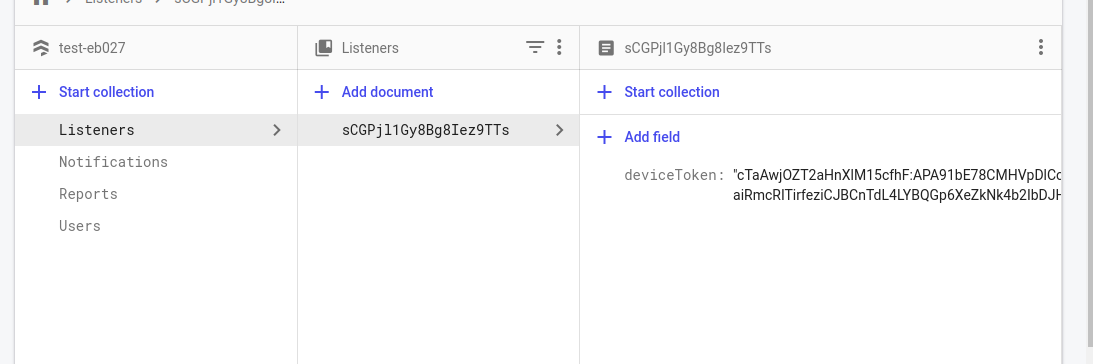
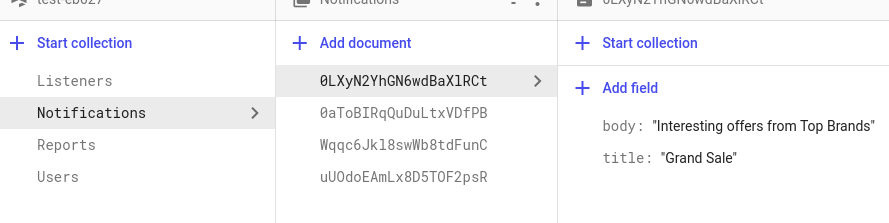
Now Structure your Firebase project like shown below
- Add Listeners by giving device token that is printed out in console when app opens.
- Add Notifications with title and body of notification
- Open the terminal(default shell) from the folder and run the follwing commands-
- $ npm install -g firebase-tools
- $ firebase login
-
$ firebase init
-
Select 'Functions: Configure and deploy Cloud Functions' using space bar.
-
Select your project or create one
-
Select Javascript
-
Confirm ESLint so that you can see bugs before deploying and is the fastest technique
-
Confirm to install npm with dependencies
-
Add the following line in functions/index.js
admin.initializeApp(functions.config().firebase);

var notificationDoc;

exports.notificationTrigger = functions.firestore.document(
    'Notifications/{autoId}'
).onCreate(async (snapshot, context) => {
    notificationDoc = snapshot.data();

    admin.firestore().collection('Listeners').get()
        .then((snapshots) => {
            var tokens = [];
            if (snapshots.empty) {
                return console.log('No Devices');
            }
            else {
                for (var token of snapshots.docs) {
                    tokens.push(token.data().deviceToken);
                }
                var payload = {
                    notification: {
                        title: "Title: " + notificationDoc.title,
                        body: "Body: " + notificationDoc.body,
                        sound: "default"
                    },
                    data: {
                        click_action: "FLUTTER_NOTIFICATION_CLICK",
                        sendername: "Nirmal",
                        message: notificationDoc.body
                    }
                };

                return admin.messaging().sendToDevice(tokens, payload)
            }
        })
        .then((response) => {
            return console.log("Succesfully pushed");
        })
        .catch((error) => {
            console.log(error);
        })
})
- Make sure the node version is minimum 10 in functions/package.json or change it as below
"engines": {
    "node": "10"
  }
- $ firebase deploy --only functions
-
In your Firestore add a new document in Notifications with body and title.
-
Now try sending notifications.