A TUI plugin that adds a status indicator to your terminal title bar, giving you a quick visual cue of what OpenCode is doing.
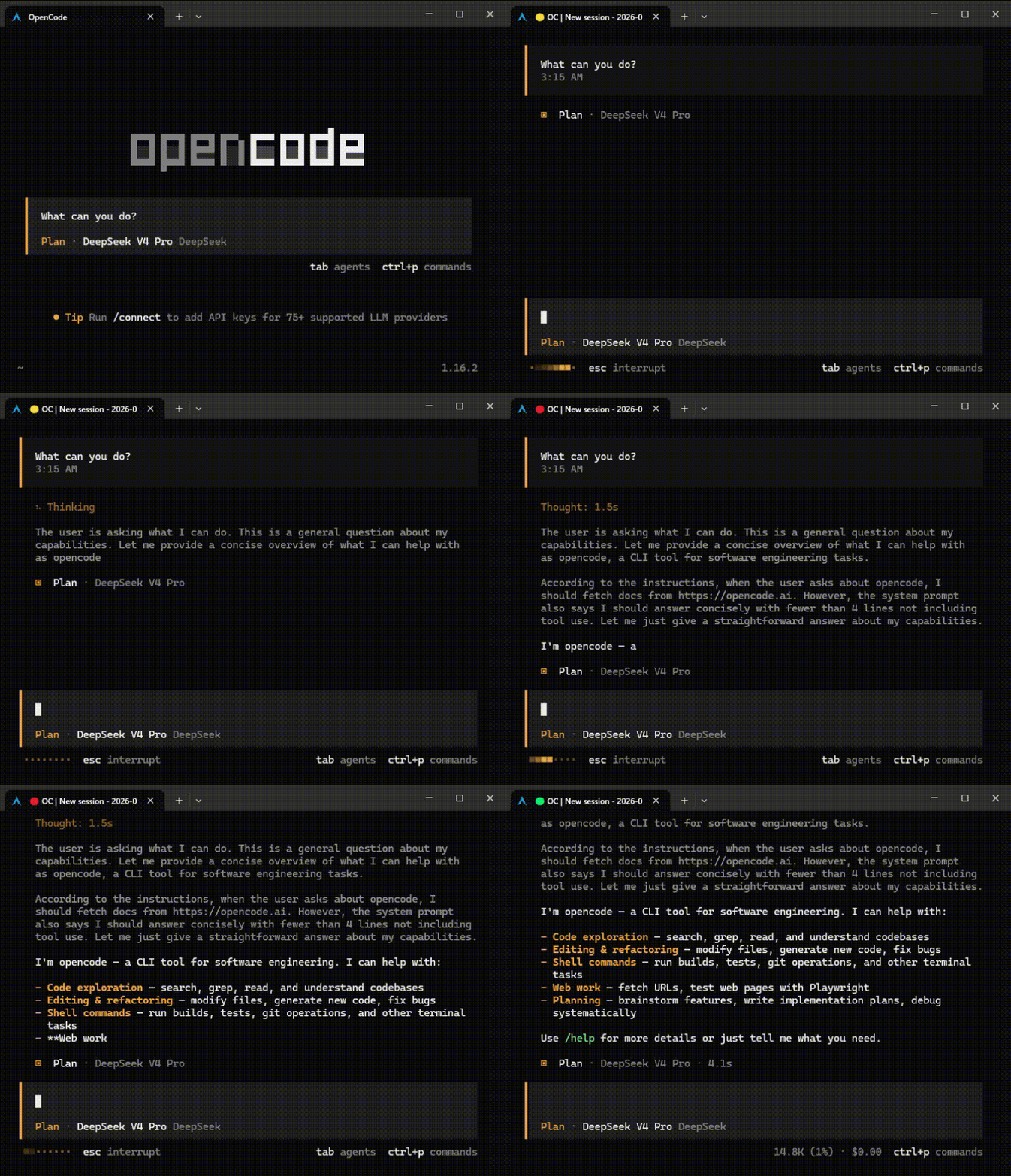
| Color | Meaning |
|---|---|
| 🟢 Green | Idle, waiting for input, or pending permission/question |
| 🟡 Yellow | Busy but no active tool or text output (thinking) |
| 🔴 Red | Running tools or generating text |

Add the plugin to your tui.json:
{
  "plugin": ["opencode-traffic-light"]
}
That's it. OpenCode will automatically install the plugin on next run.
Note: This is a TUI plugin, so it must be configured in
~/.config/opencode/tui.json, notopencode.json.
The traffic light activates automatically. The terminal title will look like:
🟢 OC | My Session— idle🟡 OC | My Session— thinking🔴 OC | My Session— working
Run "Toggle traffic light" from the command palette to enable or disable the traffic light. The preference is persisted across sessions.
Set OPENCODE_DISABLE_TERMINAL_TITLE=1 to prevent the plugin from modifying the terminal title.
MIT