
Find formula prefixes in a vault CSV, inspect the changed text, and write a separate escaped copy. The source stays in place. The free command supports comma-separated UTF-8 files up to 1 MiB. It includes headers in the check and shows logical row and column numbers.
A spreadsheet can treat a cell that starts with a formula prefix as executable input. This tool adds an apostrophe to selected cells. Escaping changes cell text, and spreadsheet behavior differs. Treat the result as a copy to review before you share it.
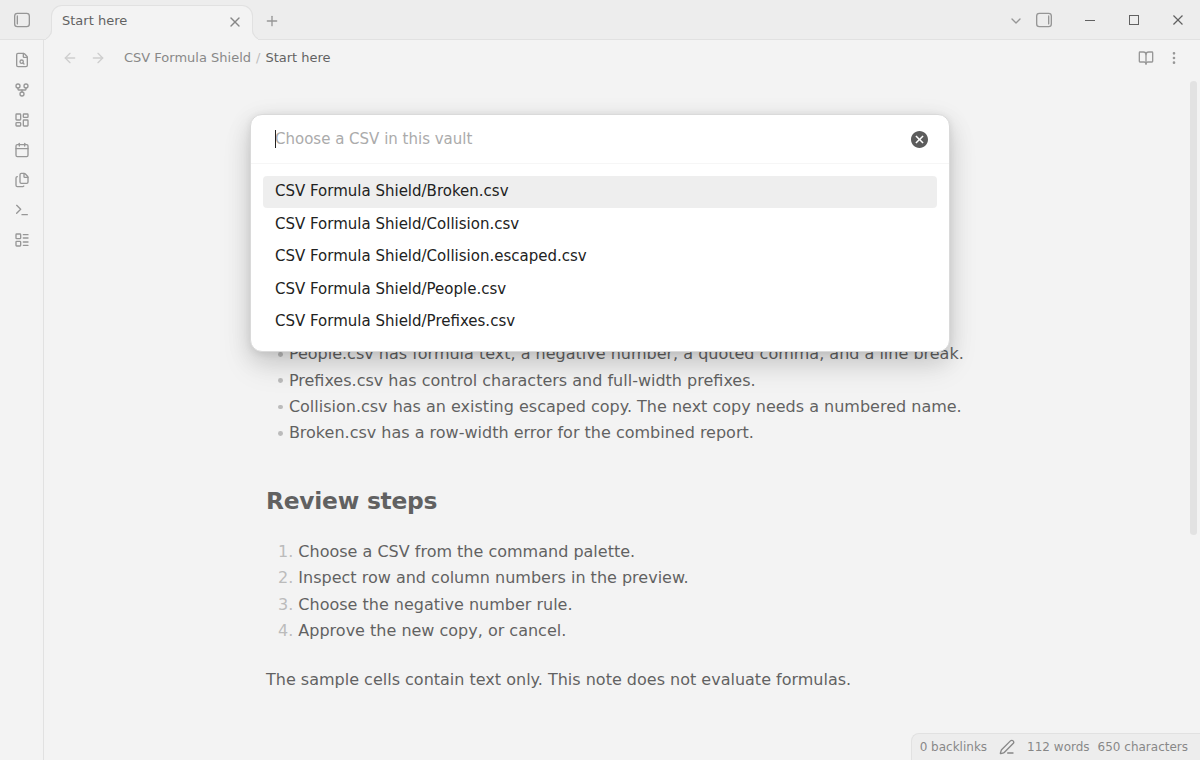
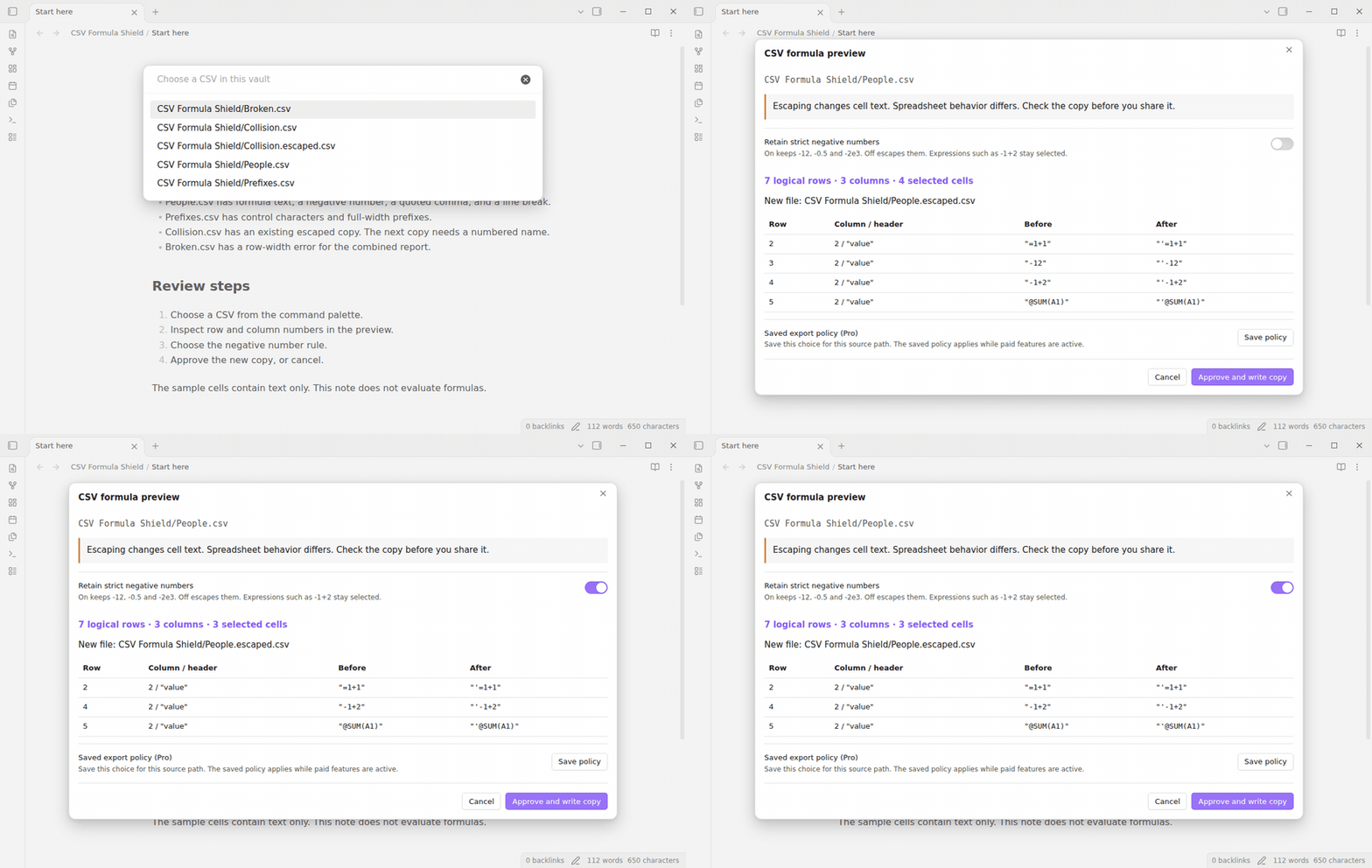
The file picker lists CSV files from the current vault. Type part of a path to narrow the list. The parser accepts a UTF-8 BOM, quoted commas, doubled quotes, and quoted line breaks. It keeps text values as strings. An unclosed quote or a row with a different column count stops the operation.
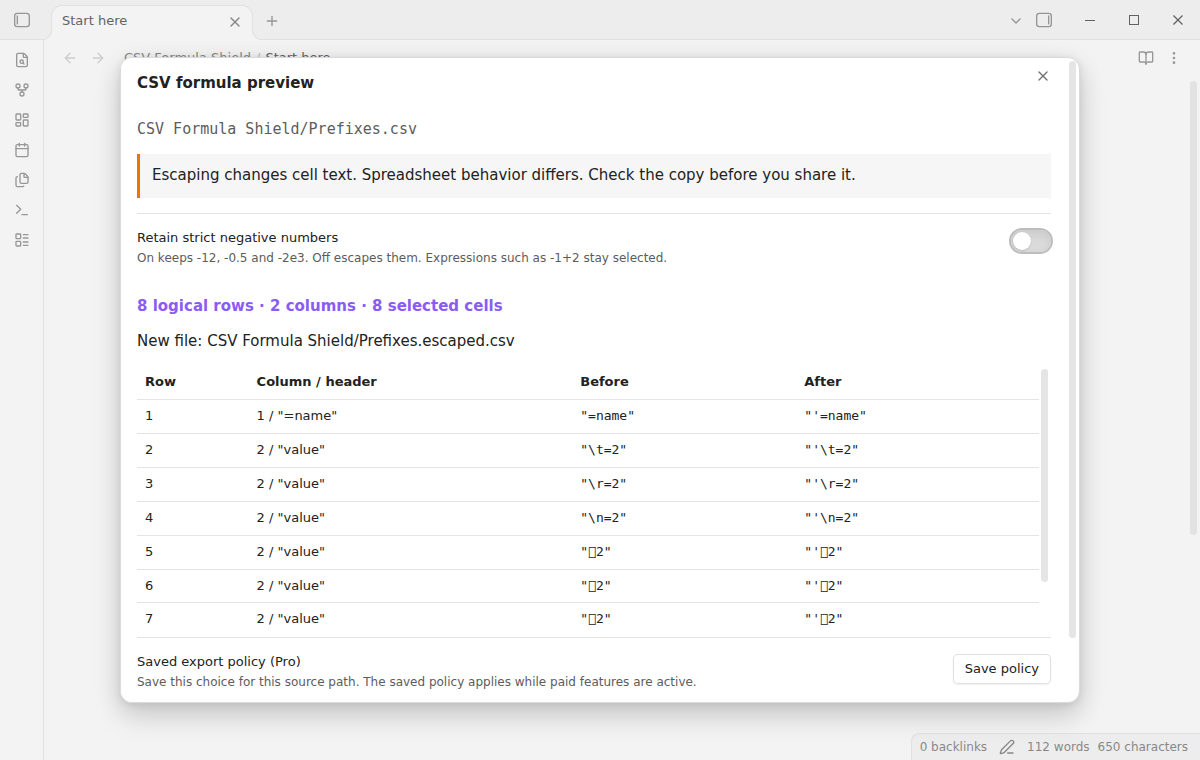
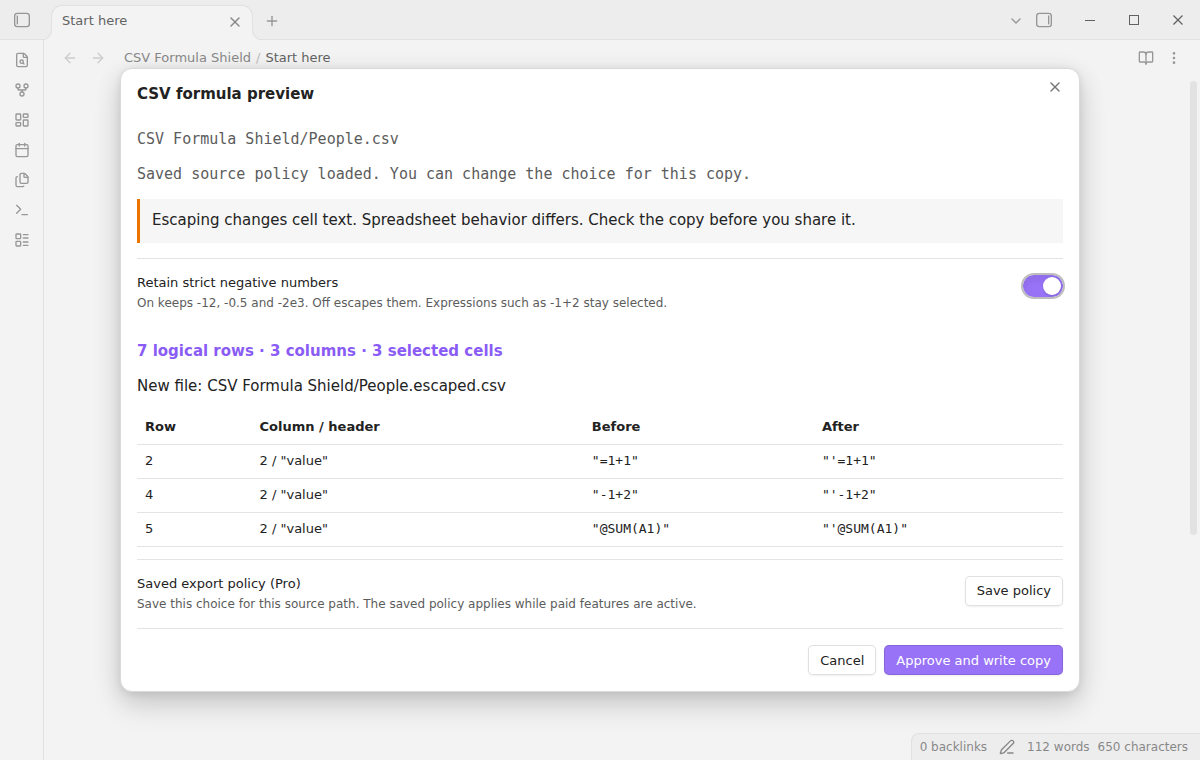
The preview shows row numbers, column numbers, header text, and before-and-after values. Row 1 is the header. A line break inside a quoted field does not add a logical row. Control characters appear as text escapes such as backslash-t. Long values are shortened in the display. The first 200 findings appear in the table; export processes the full file.
The default escapes negative numbers. Turn on Retain strict negative numbers to keep values such as -12, -0.5, and -2e3. A strict number has a minus, an integer without a leading zero except zero itself, an optional decimal fraction, and an optional exponent. Expressions such as -1+2 remain selected. Values such as -.5, -01, and -Infinity also remain selected.
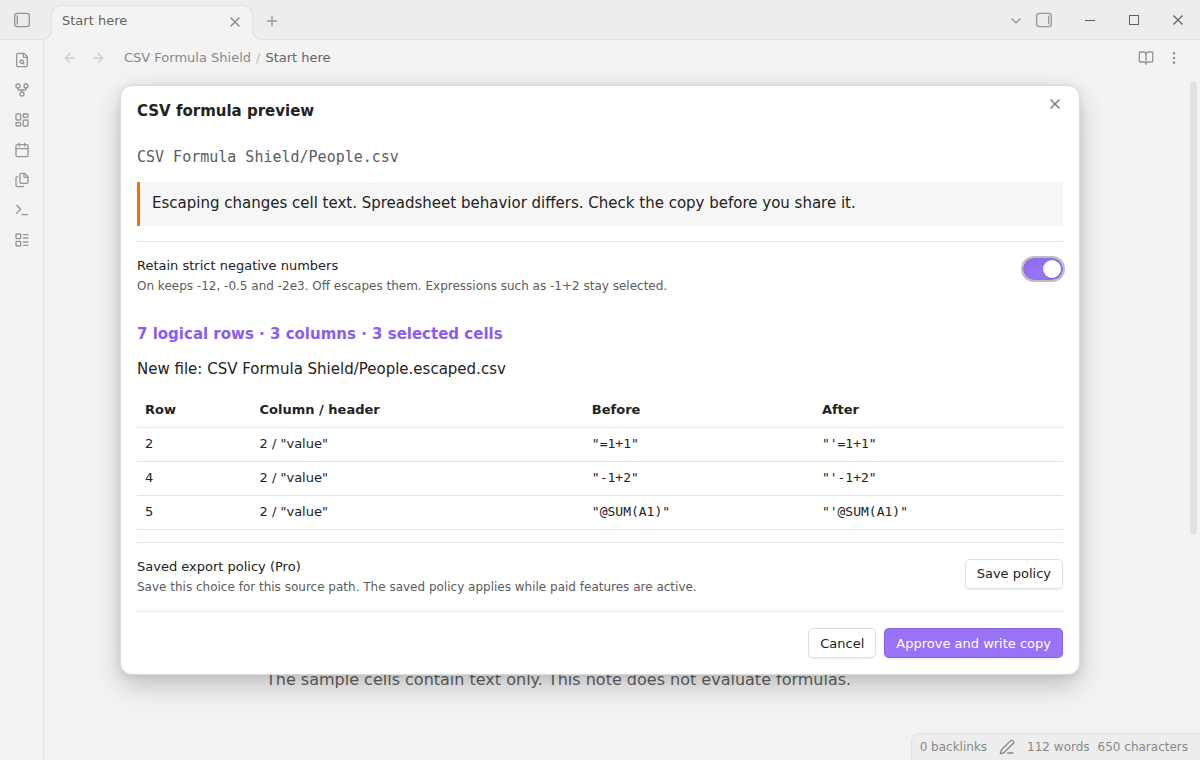
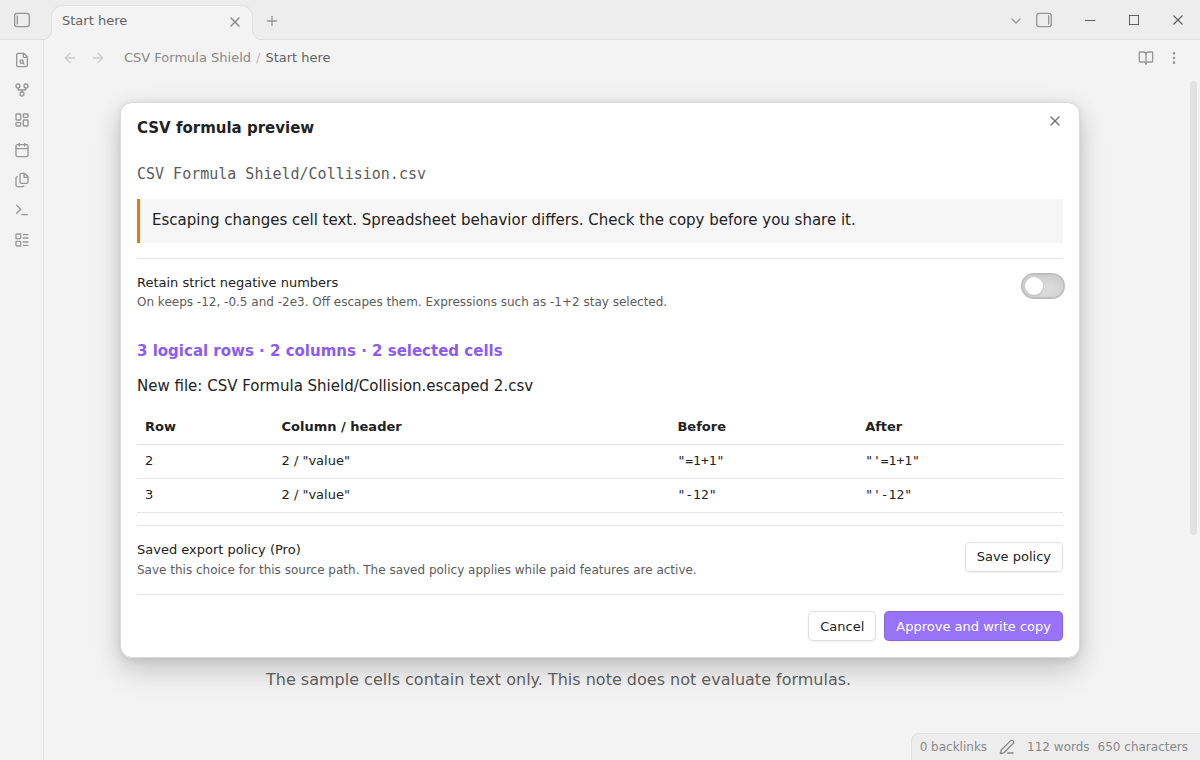
Select Approve and write copy after you review the table. The writer quotes fields, doubles embedded quotes, and uses CRLF between records. Selected values gain one leading apostrophe. Text already beginning with an apostrophe is not selected. The first destination ends in .escaped.csv. An existing destination causes a numbered name, such as .escaped 2.csv.
Save the negative number choice for a source path with Save policy. With Pro active, the next preview of that path uses the saved choice. You can still change the toggle before approval. Up to 200 source policies fit in the plugin settings. A renamed source has a different path. When Pro is off, previews use the free default instead of saved policies.
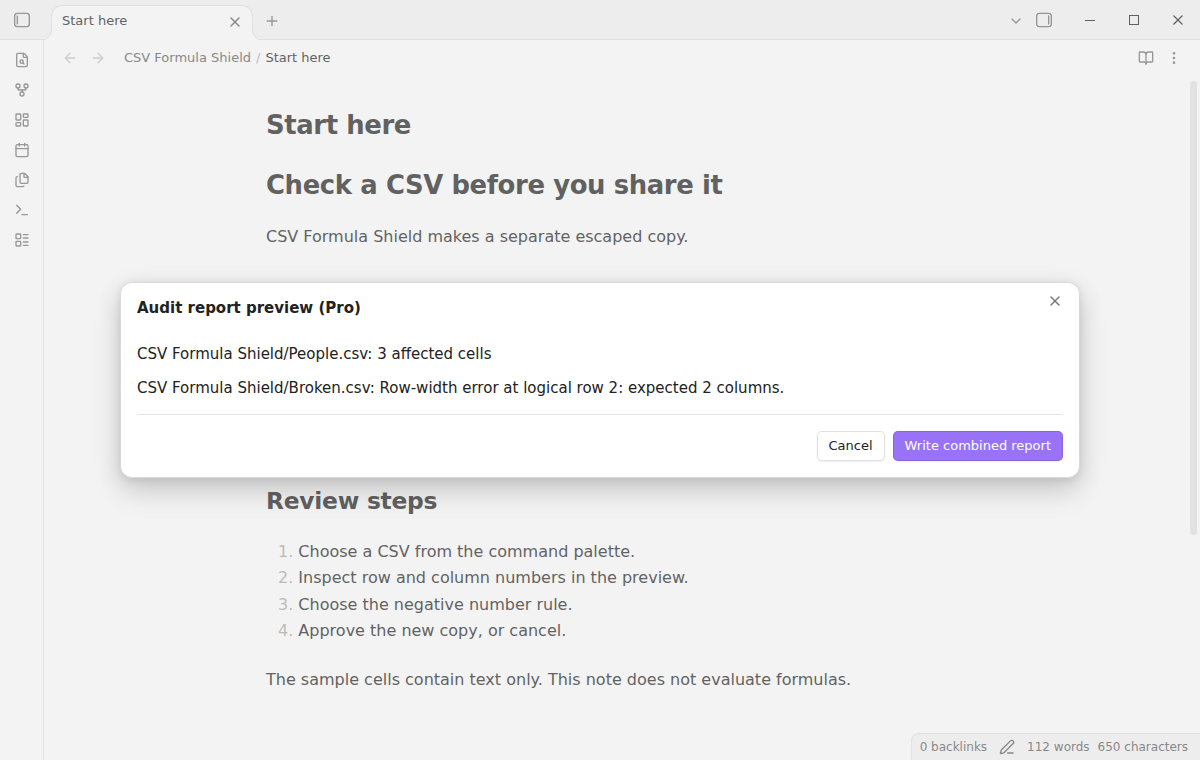
Choose 1 to 20 vault CSV files with Audit chosen CSV files (Pro). The audit lists affected counts and file errors. After you approve the summary, Write combined report creates a local JSON file. It contains source paths, the policy, findings, and errors. A finding includes its original and escaped text. The writer rejects reports over 20 MiB before it creates a file. Long headers repeat in findings and can reach this limit. Choose fewer files or shorten the source headers, then run the audit again. The report uses JSON so its original formula examples are not written as spreadsheet cells. This action does not export escaped CSV copies.
For manual installation, copy main.js, manifest.json, and styles.css from the release bundle into .obsidian/plugins/csv-formula-shield/ in your vault. Reload Obsidian, then enable CSV Formula Shield under Community plugins. Keep the three files in the same folder. The minimum supported desktop release is 1.13.4.
Add your source CSV to the vault before you start. Open the command palette and run CSV Formula Shield: Check a CSV and preview an escaped copy. Choose the file, inspect the table, and set the negative number rule. Check the proposed output path before approval.
Cancel closes the preview without creating an output. Approval reads the source again. If the content changed since preview, the write stops; run the command again to inspect the new content. An approved copy can still differ from the source in quoting, record separators, and its BOM. Source formatting is outside this export.
The fixed prefix set is equals, plus, minus, at, tab, carriage return, line feed, and full-width equals, plus, minus, and at. The check uses the original first character. It does not trim leading spaces or evaluate expressions. A cell containing an equals sign later in its text is outside this rule.
After a minor or major update, this plugin opens one What's new tab in the background. The tab and settings card suggest other NoteMods plugins and Zovo Chat and link to notemods.com for feedback (privacy). The tab sends no data. Turn the tab off in Settings.
Retain strict negative numbers sets the default for new previews. The preview toggle changes only the current operation until you save a source policy. The Pro section provides the sponsorship link, GitHub sign-in, refresh, and sign-out controls. The free check and copy command needs no sign-in.
Does this guarantee spreadsheet safety? No. OWASP describes CSV injection limits, including the risk that a spreadsheet removes escape characters when it saves and reopens a CSV. This release has not been tested in Excel or LibreOffice. Review the receiving application's import behavior before you use an exported copy.
What was not tested? Phone and tablet operation, external spreadsheet imports, live payments, and sign-in with a real sponsoring account were not tested. Linux and Windows app runs were not tested in this build. The Pro tests use a simulated GitHub answer. The code uses browser and public vault APIs, but that does not establish phone compatibility.
Why did the command stop? Empty input, input over 1 MiB, NUL or replacement characters, parser errors, and inconsistent row widths are rejected. Convert another delimiter or encoding before use. Interior blank records can cause a width error. A final record separator is accepted. Semicolon and tab delimiters are outside the supported format.
What data is stored? Saved choices remain in plugin data. The combined report includes cell text and local paths, so treat it with the same care as the source. The plugin does not upload CSV data. Your vault sync service can transfer files according to its own configuration.
The core features are free. Pro features need a GitHub Sponsors sponsorship of theluckystrike: $5 a month or more, or $15 once. A total payment of $15 meets the payment requirement for Pro without further payment. Sign-in and the checks below still apply. Your notes stay readable and editable with or without Pro.
GitHub handles the payment. Sponsor at https://github.com/sponsors/theluckystrike. You need no account for the free features. Pro needs the GitHub account that sponsors.
Until you select "Sign in with GitHub" in the settings, CSV Formula Shield makes no network requests. Sign in uses the GitHub device flow. CSV Formula Shield sends its public client ID and the scope read:user to https://github.com/login/device/code and shows you a code. While you enter the code at https://github.com/login/device, it asks https://github.com/login/oauth/access_token every few seconds to check the sign-in status. The scope permits profile reads only. GitHub needs this access to show the sponsorship tier. It grants no repository scope and no write access.
After sign in, CSV Formula Shield sends one query to https://api.github.com/graphql. It checks if the signed-in account sponsors theluckystrike. It asks for the tier and the total payment to theluckystrike. The plugin reuses a successful check for 7 days. Failed checks can retry after 6 hours. Select Refresh to request an earlier check. It sends no note content, file names or other vault data, and it has no telemetry.
After a successful check, Pro can work offline for up to 14 days. Sign out or a negative sponsorship answer turns Pro off. The plugin stores the GitHub token through the secret storage API of Obsidian. It does not put the token in its saved settings or its local sponsorship data. The local storage of this device keeps your GitHub login, the tier and the time of the last check. Sign out clears the token. You can also revoke the access in your GitHub settings, under Applications.
Use the repository issue tracker for reproducible faults. Include the plugin version, Obsidian version, chosen negative number rule, and a small invented CSV that shows the problem. Remove private cell values and paths before you post. The plugin uses the MIT license and bundles Papa Parse 5.5.3 under MIT; its license notice is included in the repository.