






Agentic GraphRAG is an open source Python framework that connects enterprise knowledge, conversation history, and decision traces in one graph. Agents can find evidence, resume work across sessions, and review decisions when their sources change.
Turn documents into searchable knowledge shaped by your own schema. Give agents tools to follow relationships, read source passages, and cite what they use. Keep decisions linked to the evidence behind them. Use the Python library, connect your agent through MCP, or start with the built-in agent.
The company-briefing workflow uses an annual report as source material. It records task events and steps, then saves decisions with explicit document supports. A correction to a local working copy flags affected decisions for review. See the company-briefing example for the full workflow.
The Boeing FY2022 segment table reports $25,867 million for Commercial Airplanes, $23,162 million for Defense, Space & Security, and $17,611 million for Global Services. It also reports $199 million for Boeing Capital and -$231 million for unallocated items, eliminations, and other, reconciling to total revenue of $66,608 million. The example keeps the full table context and links the commercial-airline risk discussion to the passages that support it.
Use Neo4j or FalkorDB for the graph, embeddings, full-text indexes, and vector indexes. Both support document ingestion, entity resolution, hybrid search, evidence and citations, community summaries, conversation history, and decision traces. No separate vector database is required.
| Backend | Install | Select in Python | Choose it when |
|---|---|---|---|
| Neo4j 5.23+ | uv pip install "agentic-graphrag[neo4j]" |
build_graph_store("neo4j") |
You use Neo4j or Aura, or need rollback across multi-statement writes. |
| FalkorDB 4.22.2+ | uv pip install "agentic-graphrag[falkordb]" |
build_graph_store("falkordb") |
You want a Redis-protocol graph server and can account for partial writes without multi-statement rollback. |
Vectors can instead live exclusively in Weaviate. Install agentic-graphrag[weaviate] alongside the graph driver and pass a WeaviateVectorStore to ingestion and search. The graph still stores nodes, edges, and full-text indexes. Configure Weaviate with a separate collection prefix for each graph. Changing placement requires a new graph and re-ingestion.
Pass the selected store to Graph.open, retrieval, or build_agent. For MCP, set MCP_GRAPH_STORE=neo4j or MCP_GRAPH_STORE=falkordb. The backend setup guide includes server commands and connection settings. The backend comparison explains search and transaction differences. Selecting another backend does not migrate existing data.
To keep vectors exclusively in Qdrant instead of on graph nodes, install the qdrant extra and pass a QdrantVectorStore to ingestion and retrieval. The graph database still holds documents, relations, and full-text indexes. Choose where vectors live to configure a unique collection prefix, use the same placement in MCP, and repair missing vectors.
Source documents, agent activity, and decisions live in one graph, so readers can trace each decision to its evidence.
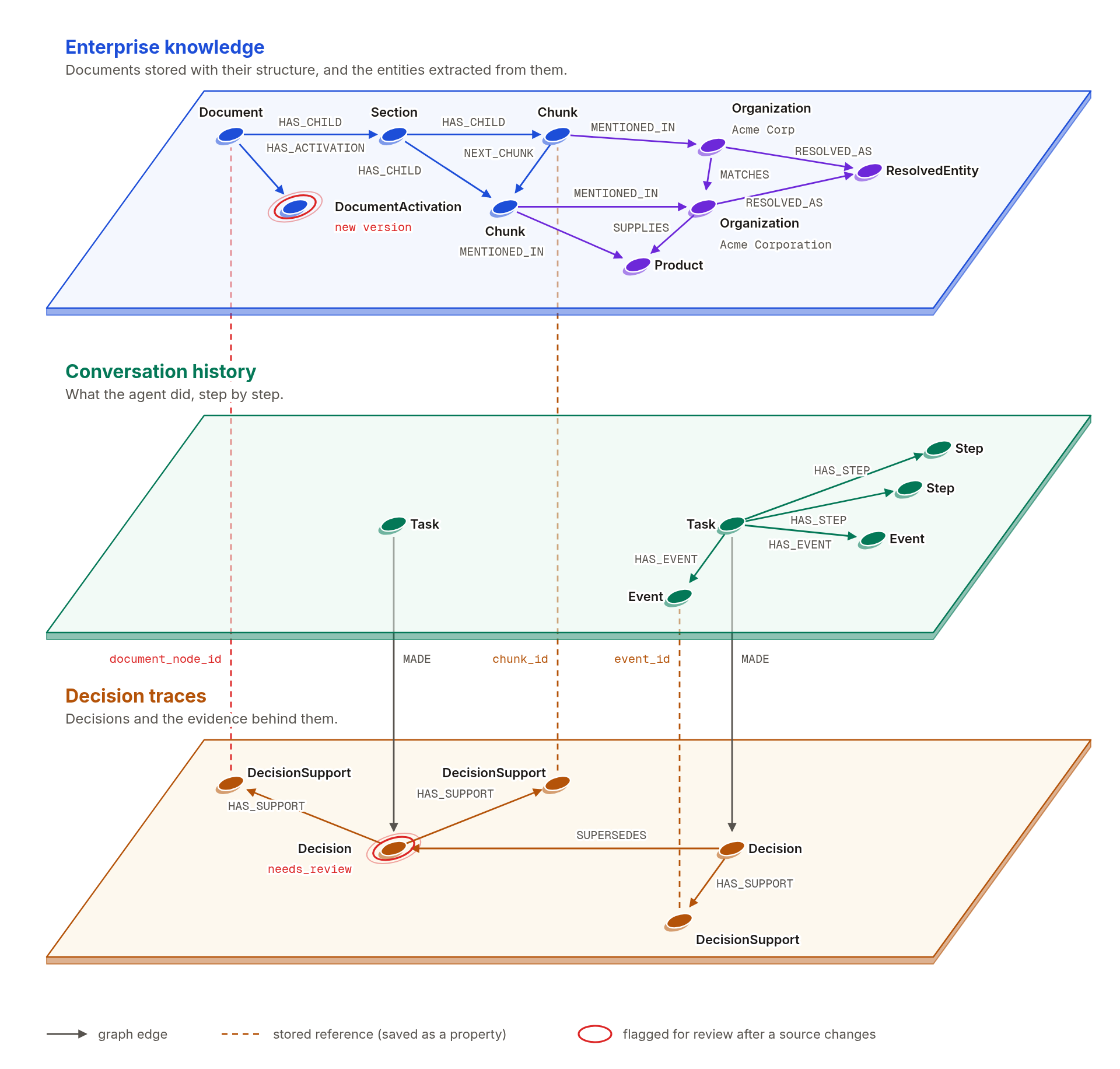
- Enterprise knowledge. The graph stores documents, sections, tables, passages, entities, and relations. Each passage retains its source and location.
- Conversation history. Each task has a goal, an ordered event log, and named steps. The event log includes agent messages, tool calls, and tool results, so it is more than a chat transcript.
- Decision traces. Each decision stores its conclusion, rationale, assumptions, and explicit supports. Supports can point to document passages, task events, or earlier decisions. They are structured records, not hidden model reasoning.
- Every passage knows where it came from. A passage records its document, its place in the document's structure, and the exact version it came from, with page positions for PDFs.
- Relations can point to their evidence. A relation links to the passages that support it when evidence exists, and a decision links to the text it was based on.
- Old citations keep working. The graph keeps the history of each document, so a citation to an older version still leads to the text that was cited.
You decide which things matter, and the graph is built around them.
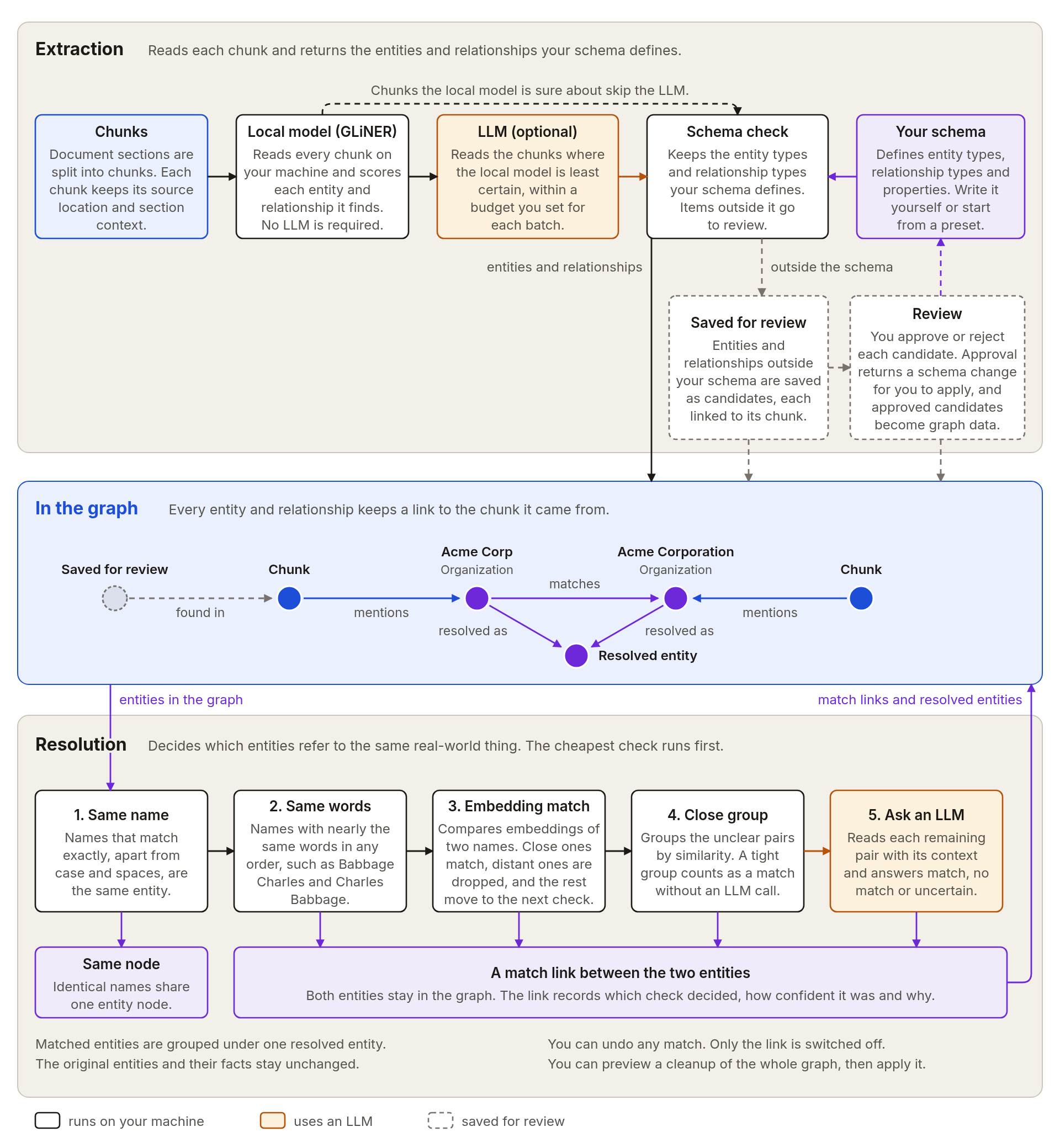
- Describe your own entities and relations. Name the kinds of things that matter to you, such as people, contracts, or products, and the relations between them. Write the schema in code or in a configuration file, or start from a ready-made preset and extend it.
- Extraction runs on your machine first. You can build a graph without an LLM. When the local model is unsure about a passage, an LLM can read it, and you decide how much of each batch the LLM may read.
- Nothing outside your schema is lost. Anything the models find that your schema does not cover is saved for review. Approved items become part of your schema and your graph.
- Duplicates are merged with care. Agentic GraphRAG recognizes that "Acme Corp" and "Acme Corporation" are the same company. It starts with cheap checks and asks an LLM only about the pairs that remain unclear.
- Every match can be undone. A match is stored as a link between two entities, so the originals stay in the graph. You can preview a cleanup of the whole graph before you apply it.
Agents find passages, read the exact text, and move around a document the way a person would.
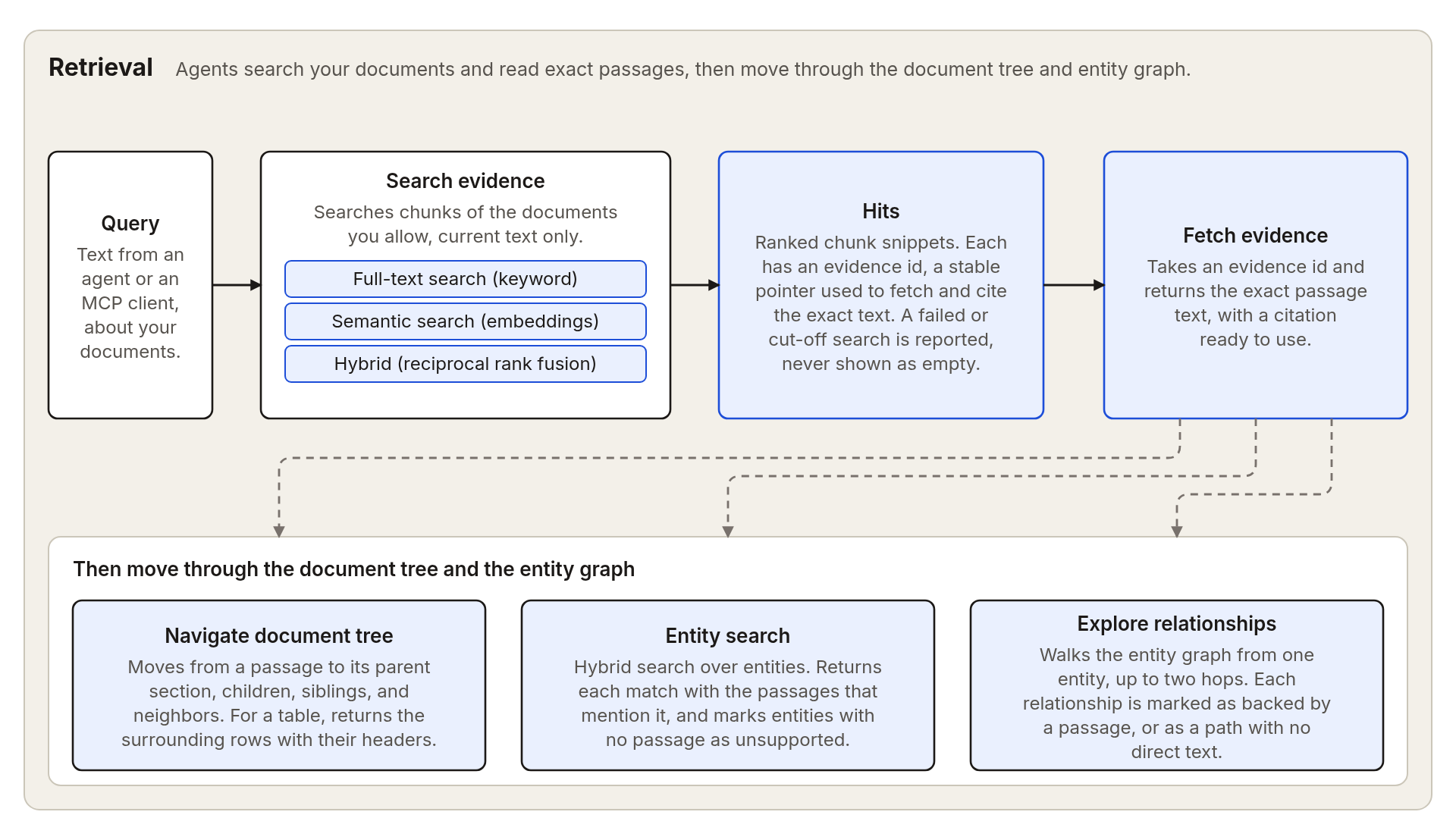
- Full-text, semantic, and hybrid search. Full-text search matches keywords, semantic search compares embeddings, and hybrid search fuses both rankings with reciprocal rank fusion. A search returns short previews, each with an evidence id for its passage, and a separate step fetches the exact text.
- You set the boundary outside the model. You decide which documents an agent may read, and the model can only work inside that choice.
- Source text stays findable. Search reads the passages directly, so a passage is still found when extraction missed the fact it contains.
- Move around a passage. From any passage, an agent can reach the surrounding section, the neighboring passages, or the rows around a table cell, which keep their column headers.
- Follow entities back to text. An agent can look up an entity, see the passages that mention it, and follow its relations a few steps out. Each relation is marked as backed by a passage or as a connection without direct text.
- Incomplete results say so. Every result states when something was cut off or part of the search failed, so an incomplete result is never mistaken for an empty one.
Conversation history records task events and steps. Decision traces link conclusions to the evidence they use and flag decisions for review when sources change.
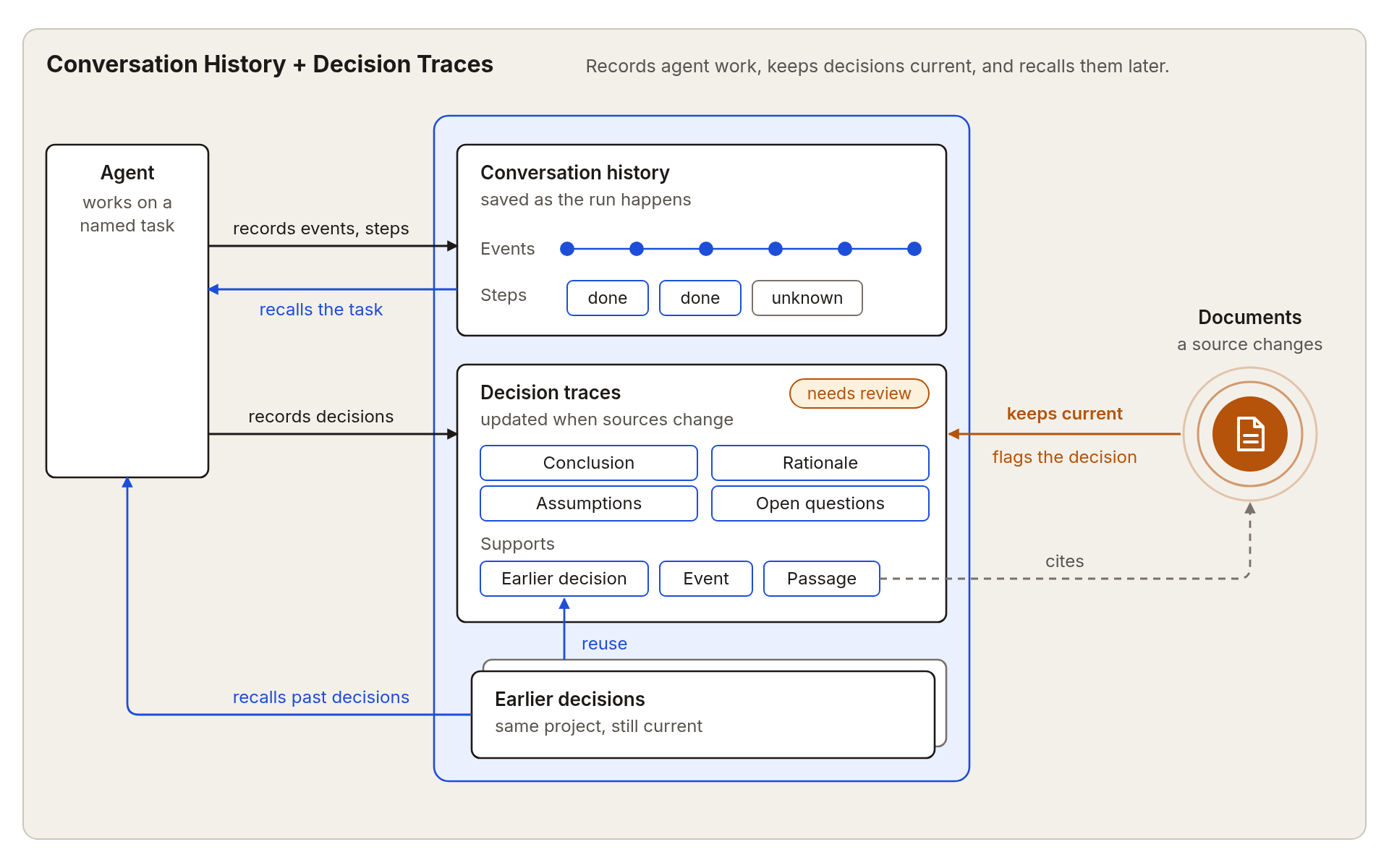
- The agent records its work. The built-in agent saves each message, tool call, and tool result as a task event, and it tracks progress as steps. Request IDs identify repeated writes, but a failed multi-statement write on FalkorDB can leave partial effects. See the retry limits.
- Decisions have explicit supports. A decision records a conclusion, a concise rationale, assumptions, and open questions. Its supports point to passages, task events, or earlier decisions.
- Source changes flag decisions. When a document behind a decision is updated or removed, the decision is flagged for review, and so are the decisions that depend on it.
- Reviews end in a clear action. A reviewer can reaffirm a decision after reading the current text, or replace it with a new one that explains the change. The earlier version stays in the history.
- Tasks resume from recorded state. When a task resumes, the agent sees its goal, events, steps, and decisions, including any that need review. It reuses finished work that is still valid, and marks an interrupted step as unknown so it can run it again.
- Past decisions inform new ones. Agents can search earlier decisions in the same project. The built-in agent's search leaves out decisions that need review, and the agent cannot cite one as support.
Use the Python APIs directly when you need to manage this state outside the built-in agent:
from agrag.history import ConversationHistory
from agrag.decisions import DecisionTraces
ConversationHistory creates tasks, records events, and sets steps. DecisionTraces records supported decisions and manages review. See the Python API reference for the complete contracts.
Use the agent that ships with the library, or connect your own through MCP.
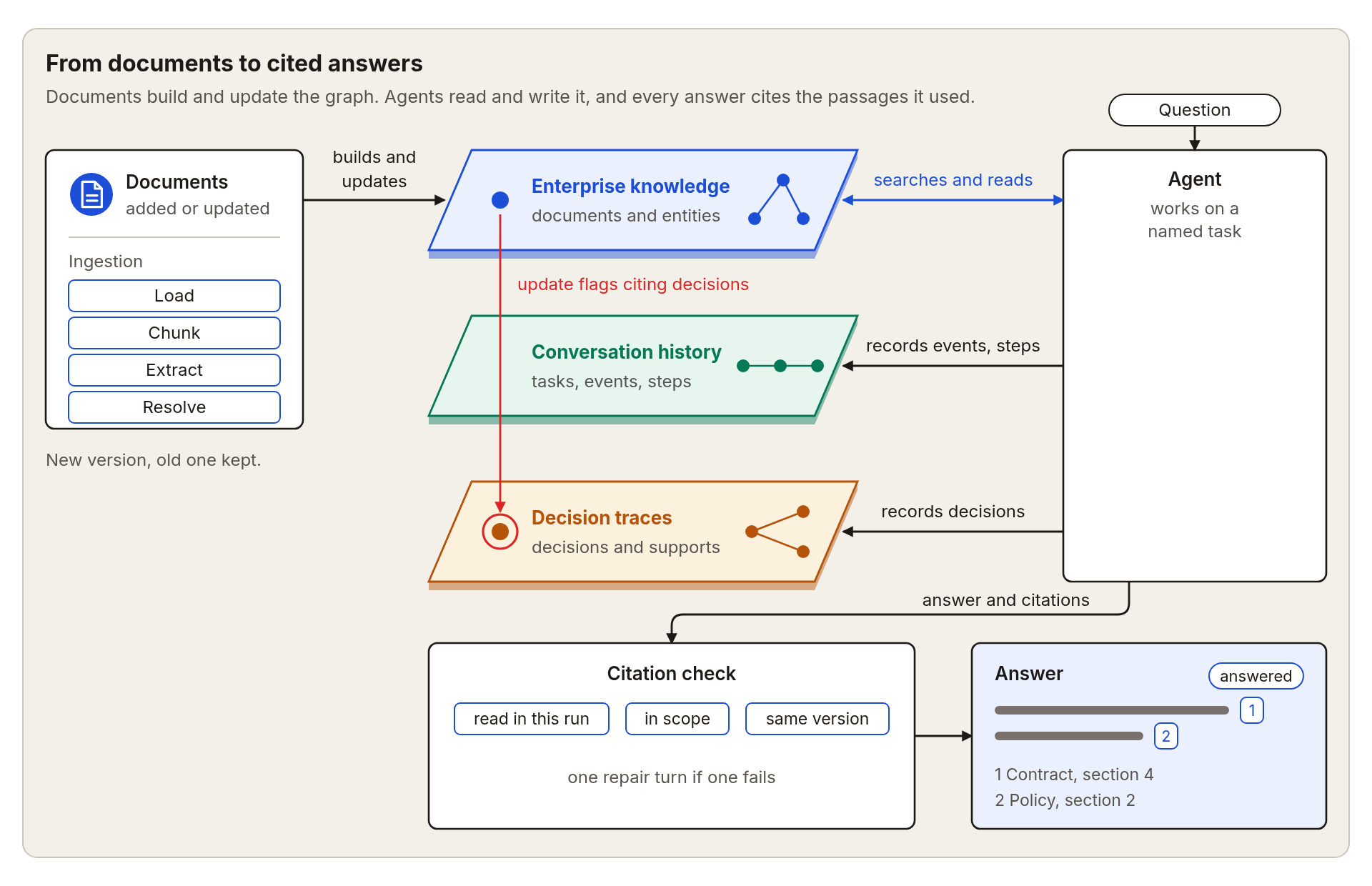
- Answers cite numbered sources. The built-in agent searches your documents, reads passages, and answers with numbered sources.
- Every citation is checked. The passage must have been read during that run, it must belong to the documents the agent may use, and it must match the version cited. If a citation fails the check, the agent gets one chance to fix it.
- Every run ends with a status. The status tells you whether the agent answered, found too little evidence, or reached a limit. You set how many steps and tool calls a run may use.
- Choose your model. Use Anthropic, OpenAI, Google, or any OpenAI-compatible model, with fallback between them.
- The same tools work through MCP. A local MCP server gives other agents the same tools. It starts read-only and shows only the documents you choose. You control whether a client may record conversation history and decisions.
- Trace and evaluate your runs. Runs can be traced with OpenTelemetry, and the evaluation tools score answers, citations, and agent runs on your own questions.
See the features page for supported file formats, chunking, document updates, and community summaries.
In this example you add one document, ask a question about it, and get an answer with numbered sources. You need Python 3.11 or newer, a running Neo4j database, and an OpenAI-compatible LLM endpoint. See the quickstart guide for starting Neo4j with Docker or Neo4j Aura.
To run the example on FalkorDB, follow the FalkorDB setup, replace the neo4j install extra with falkordb, use FALKORDB_* connection settings, and change the store selection to build_graph_store("falkordb").
Install the package from PyPI into a fresh virtual environment:
uv venv
source .venv/bin/activate
uv pip install "agentic-graphrag[neo4j,extract,agents]" --torch-backend=auto
See Installation for other package managers and the optional parts you can add.
Create a file named .env in the folder where you will run the example. Replace the values with your own, and keep the file out of version control.
NEO4J_URI=bolt://localhost:7687
NEO4J_USERNAME=neo4j
NEO4J_PASSWORD=your-neo4j-password
AGENT_LLM_BASE_URL=https://your-endpoint.example.com/v1
AGENT_LLM_API_KEY=your-api-key
AGENT_LLM_MODEL_ID=your-model-id
The last three lines are the address, key, and model of your OpenAI-compatible LLM endpoint. For a Neo4j database on another machine, see Configuration.
Put any Markdown or text file in the same folder and name it your-document.md. Save the following as example.py and run python example.py.
import asyncio
from pathlib import Path

from agrag.agents import AgentLLMSettings, build_agent
from agrag.embedding import build_embedder
from agrag.graphdb import build_graph_store
from agrag.ingestion import ExtractionSettings, Graph

# Any Markdown or text file you have.
DOCUMENT = Path("your-document.md").resolve()


async def main() -> None:
    # Connect to the database and load the model that turns text into vectors.
    store = build_graph_store("neo4j")
    embedder = build_embedder("ibm-granite/granite-embedding-small-english-r2")
    try:
        # Read the document into the graph. This step runs on your machine.
        graph = await Graph.open(
            schema="operations",
            graph_store=store,
            embedder=embedder,
            extraction_settings=ExtractionSettings(mode="gliner"),
            max_llm_pairs=0,
        )
        await graph.add(DOCUMENT)

        # Create an agent that may read only this document.
        agent = build_agent(
            graph_store=store,
            embedder=embedder,
            scope=frozenset({str(DOCUMENT)}),
            project_id="my-project",
            agent_id="researcher",
            llm_settings=AgentLLMSettings.from_openai_compatible_env(),
        )

        # Ask a question about the document.
        result = await agent.ainvoke({
            "task_name": "first-question",
            "question": "What are the main points of this document? Cite your sources.",
        })
        print(result["answer"])
    finally:
        await store.close()


asyncio.run(main())
The script prints an answer that ends with a numbered list of sources. Run it again with the same task name and the agent continues where it stopped.
- See Decision traces to record supported decisions and review them when sources change.
- See Find and cite evidence to search passages and check citations from Python.
- See the features page for other supported features.
Run agrag-mcp to give an MCP client tools that search your documents, read exact passages, check citations, and access conversation history and decision traces.
Install the server in the same virtual environment as before:
uv pip install "agentic-graphrag[neo4j,mcp]"Then add the server to your MCP client. Replace the document path with the full path of a file you added to the graph.
{
  "mcpServers": {
    "agrag": {
      "command": "agrag-mcp",
      "env": {
        "NEO4J_URI": "bolt://localhost:7687",
        "NEO4J_USERNAME": "neo4j",
        "NEO4J_PASSWORD": "your-neo4j-password",
        "MCP_SCOPE_DOCUMENT_KEYS": "/full/path/to/your-document.md",
        "MCP_PROJECT_ID": "my-project",
        "MCP_AGENT_ID": "researcher"
      }
    }
  }
}
If your client cannot find agrag-mcp, use its full path inside the virtual environment, for example /full/path/to/.venv/bin/agrag-mcp. The server starts read-only and reads only the documents you list. The project and agent IDs enable history and decision tools, but writes remain disabled until you change the server settings. See the MCP server guide for the other settings.
For FalkorDB, install agentic-graphrag[falkordb,mcp] instead. In the client configuration, replace the NEO4J_* entries with "MCP_GRAPH_STORE": "falkordb", "FALKORDB_URL": "redis://localhost:6379", and "FALKORDB_GRAPH": "agrag". Use the same graph and embedding model as ingestion.
The built-in agent and the MCP server offer the same evidence tools. Every tool reads only the documents you allow.
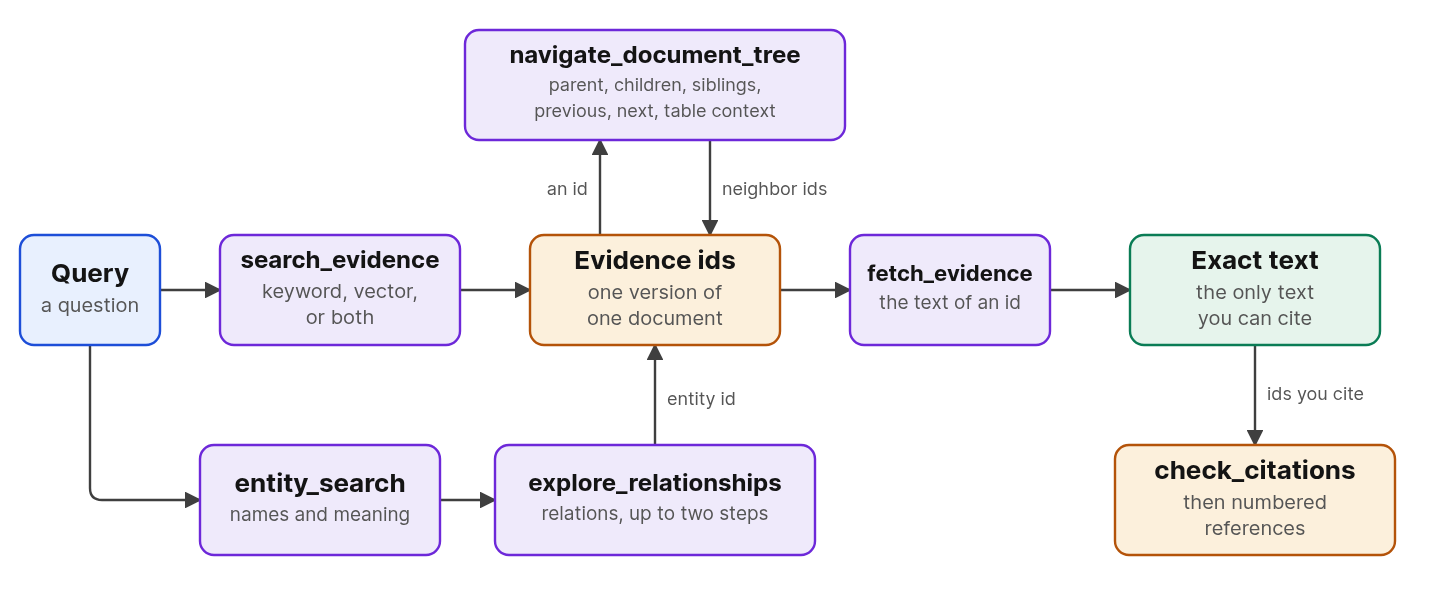
| Tool | What it does | Use it when |
|---|---|---|
search_evidence |
Finds passages by keyword, by meaning, or both. Each hit has an evidence id and a short preview. | You have a question and no passage yet. |
fetch_evidence |
Returns the exact text of an evidence id, with its title, source, and version status. | You are about to quote or cite a passage. |
navigate_document_tree |
Moves from a passage to its section, its neighbors, or the rows around a table cell. | A hit is cut off, or you need its surroundings. |
entity_search |
Finds entities by name or meaning, with the passages that mention them. | The question names a person, product, or clause. |
explore_relationships |
Follows the relations around an entity up to two steps. Each relation is marked as stated by a passage or as only a connection. | The question asks how things connect. |
check_citations |
Checks that each cited id was fetched in scope. | Your answer cites evidence. |
The agent and the MCP server also have tools that record and read tasks and decisions. The tools reference lists every tool with its parameters and limits, and Retrieval compares the search strategies by mechanism and limit.
We welcome bug fixes, new features, documentation improvements, and other contributions. Please read our Contributing guide before submitting a pull request.
Agentic GraphRAG builds on the work behind these papers and projects.
- Graphiti for layered graph search and entity-aware retrieval
- Cognee for data pipelines, graph memory, and consolidation
- FalkorDB GraphRAG SDK for graph-native retrieval and entity resolution
- Neo4j GraphRAG for Neo4j retrieval and vector integration
- GLiNER for generalist zero-shot information extraction
- BAML, Docling, and Chonkie for typed LLM calls, document parsing, and chunk splitting
Agentic GraphRAG is licensed under the Apache License 2.0.