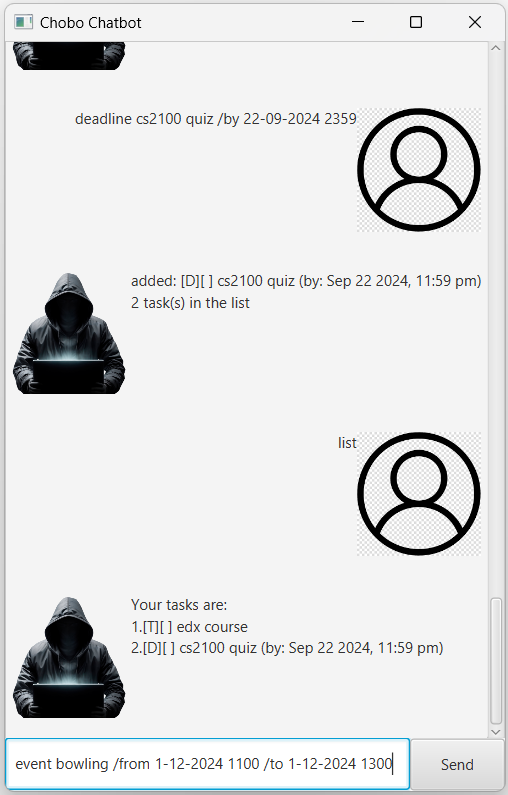
Chobo is a personal chatbot that assists with task management, helping users keep track of various types of tasks including todos, deadlines, and events. It supports adding, listing, marking tasks as complete, and deleting tasks, as well as saving your progress automatically to a file.
This feature allows you to add tasks with specific deadlines to your task list.
Command: deadline [task] /by [DD-MM-YYYY] [time (24 hour format)]
Example: deadline CS2100 quiz /by 23-09-2024 2359
expected output
added: [D][] CS2100 quiz (by Sep 23 2024, 11:59pm)
1 task(s) in the list
This feature allows you to add to do tasks to your task list.
Command: todo [task]
Example: todo EDX course
expected output
added: [T][] EDX course
2 task(s) in the list
This feature allows you to add event to your task list.
Command: event [task] /from [DD-MM-YYYY] [time (24 hour format)] /to [DD-MM-YYYY] [time (24 hour format)]
Example: event Jay's bday party /from 30-09-2024 1100 /to 30-09-2024 1400
expected output
added: [E][] Jay's bday party (from: Sep 30 2024, 11:00 am to: Sep 30 2024, 2:00 pm)
3 task(s) in the list
This feature displays all the current tasks in your list.
Command: list
expected output
Your tasks are:
1.[D][] CS2100 quiz (by Sep 23 2024, 11:59pm)
2.[T][] EDX course
3.[E][] Jay's bday party (from: Sep 30 2024, 11:00 am to: Sep 30 2024, 2:00 pm)
This feature allows you to mark tasks in your task list as complete
Command: mark [task number (as shown on task list)]
Example: mark 1
expected output
Nice! I have marked this task as done:
[D][X] CS2100 quiz (by Sep 23 2024, 11:59pm)
This feature allows you to mark tasks in your task list as complete
Command: unmark [task number (as shown on task list)]
Example: unmark 1
expected output
OK, I have marked this task as not done yet:
[D][] CS2100 quiz (by Sep 23 2024, 11:59pm)
This feature allows you to remove a task from the task list.
Command: delete [task number (as shown on task list)]
Example: delete 1
expected output
deleted: [D][] CS2100 quiz (by Sep 23 2024, 11:59pm)
2 task(s) left in the list
This feature allows you to search for tasks based on keywords.
Command: find [keyword]
Example: find course
expected output
the matching tasks in your list:
1.[T][] EDX course