



The First Open-Source AI Gateway with Two-Way Token Trading
Python package providing convenient access to the Tokligence Gateway - a high-performance LLM gateway written in Go. Bundles pre-compiled binaries for easy installation via pip.
New in v0.3.4: AI-powered configuration assistant via tgw chat command!
Three pillars for the AI-native era:
Your AI agents handle sensitive code, secrets, and business data. Tokligence protects them:
- PII Prompt Firewall - Real-time detection and redaction of sensitive data across 100+ languages
- API Key Protection - Detects 30+ provider keys (OpenAI, AWS, GitHub, Stripe, etc.) before they leak to LLM providers
- Multiple Modes - Monitor, enforce, or redact based on your compliance needs
- Seamless Integration - Works with Codex CLI, Claude Code, and any OpenAI/Anthropic-compatible agent
Think of Tokligence as a buffer for your AI throughput - smoothing capacity like a sponge absorbs water:
- Peak Hours - Buy tokens from the marketplace when internal LLM capacity is maxed out
- Off-Peak - Sell your unused LLM throughput to earn revenue
- Elastic Scaling - No need to over-provision; scale with actual demand
Not just another gateway - the foundation for AI token economics:
- Unified Access - OpenAI, Anthropic, Gemini with bidirectional protocol translation
- Token Ledger - Built-in accounting and audit trail for every token consumed or sold
- Open Source - Apache 2.0, self-hosted, no vendor lock-in
- High Performance - 9.6x faster than LiteLLM with 75% less infrastructure
# Install
pip install tokligence

# Initialize and start
tokligence init
tokligence-daemon start --background

# Your gateway is now running at http://localhost:8081
Now use it with any OpenAI-compatible or Anthropic-native client:
import openai

# OpenAI-compatible API
openai.api_base = "http://localhost:8081/v1"
openai.api_key = "your-gateway-key"

# Use any provider through the gateway!
response = openai.ChatCompletion.create(
    model="claude-3-sonnet-20240229",  # Anthropic model via OpenAI API!
    messages=[{"role": "user", "content": "Hello!"}]
)
Or use Anthropic's native SDK:
from anthropic import Anthropic

client = Anthropic(
    base_url="http://localhost:8081/anthropic",  # Point to gateway
    api_key="your-gateway-key"
)

# Native Anthropic API with gateway routing
response = client.messages.create(
    model="gpt-4",  # OpenAI model via Anthropic API!
    max_tokens=1024,
    messages=[{"role": "user", "content": "Hello"}]
)Tokligence Gateway delivers exceptional performance with minimal resource footprint.
Based on LiteLLM's official benchmarks on 4 CPU, 8GB RAM:
| Metric | LiteLLM (4 instances) |
Tokligence v0.3.4 (1 instance) |
Improvement |
|---|---|---|---|
| Throughput | 1,170 RPS | 11,227 RPS | 9.6x faster ✨ |
| P50 Latency | 100 ms | 49.66 ms | 2x faster ⚡ |
| P95 Latency | 150 ms | 78.63 ms | 1.9x faster 🚀 |
| P99 Latency | 240 ms | 93.81 ms | 2.6x faster |
| Infrastructure | 4 instances | 1 instance | 75% reduction 💰 |
| Error Rate | N/A | 0% | Perfect stability |
Peak Performance (100 concurrent):
- 12,908 RPS - absolute maximum throughput
- P50: 7.75ms, P95: 16.47ms, P99: 21.15ms - sub-100ms latencies
- 774,571 requests in 60 seconds with 0% errors
Cost Efficiency:
- 38.4x better performance per dollar than LiteLLM
- 1/4 infrastructure cost (1 instance vs 4 instances)
- 9.6x higher throughput with 75% fewer resources
See tokligence-gateway benchmarks for complete methodology.
- 🛡️ PII Prompt Firewall - Real-time detection and redaction of sensitive data
- Detects PII across 100+ languages (3-5ms latency, CPU-only)
- API Key Detection for 30+ providers (OpenAI, AWS, GitHub, Stripe, etc.)
- Three modes: Monitor, Enforce, or Redact based on compliance needs
- Built-in regex filters + optional Presidio sidecar for NLP-based detection
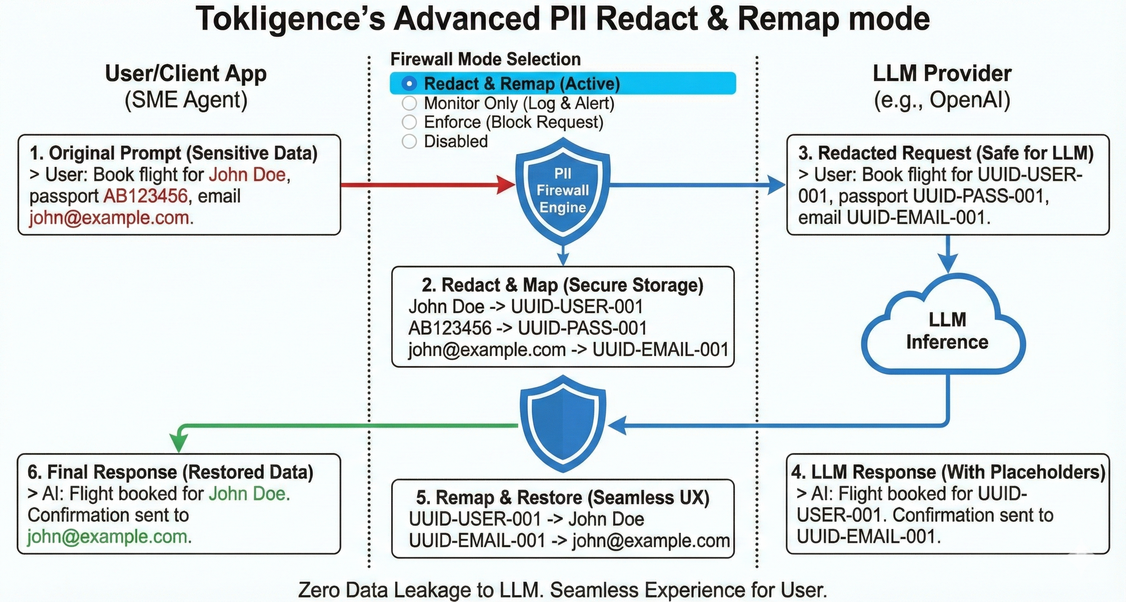
PII Prompt Firewall in Redact Mode — automatically detects and masks sensitive information before sending to LLM providers.
-
🔄 Dual Native Protocol Support - Both OpenAI and Anthropic APIs running simultaneously
- OpenAI-compatible:
/v1/chat/completions,/v1/responses - Anthropic-native:
/anthropic/v1/messages - Google Gemini:
/v1beta/models/*(native) and/v1beta/openai/chat/completions(compatible) - Full bidirectional translation - Use OpenAI SDK to call Claude, or Anthropic SDK to call GPT!
- OpenAI-compatible:
-
🛠️ Advanced Tool Calling - Complete function calling support
- OpenAI-style function calling
- Automatic conversion between OpenAI and Anthropic tool formats
- Intelligent duplicate detection to prevent infinite loops
- Verified with Codex CLI v0.55.0+ and Claude Code v2.0.29
-
🎯 Intelligent Work Modes
- Auto mode (default): Smart routing based on model patterns and endpoints
- Passthrough mode: Direct delegation to upstream providers
- Translation mode: Cross-protocol translation for testing
-
🗄️ Unified Token Ledger - Built-in usage tracking
- Per-user ledger with SQLite (dev) or PostgreSQL (production)
- Complete audit trail for billing and transparency
- Model performance tracking to detect silent degradation
-
📊 Production-Ready Features
- Prometheus metrics endpoint
- Health checks with dependency monitoring
- Rate limiting with distributed support
- Connection pooling for databases
- 🐍 Zero Go Dependencies - Pre-compiled binaries bundled for all platforms
- 🌍 Cross-Platform - Linux (amd64/arm64), macOS (Intel/Apple Silicon), Windows
- 🔧 Pythonic API - Native Python wrappers for gateway operations
- 📦 Easy Installation - Single
pip install tokligencecommand - 🤖 AI Configuration Assistant - Interactive
tgw chatcommand with LLM support
Freedom from vendor lock-in Switch providers with a configuration change. No code rewrites, no migration pain.
Privacy and control Keep sensitive prompts and data on your infrastructure. You decide what goes where.
Cost optimization Route requests to the most cost-effective provider for each use case. Track spending in real-time.
Reliability and failover Automatic fallback to alternative providers when your primary goes down. No single point of failure.
Transparency and accountability Every token logged, every request tracked, every cost verified. Full audit trail protects against billing errors.
| Feature | Tokligence Gateway | LiteLLM | OpenRouter | AWS Bedrock |
|---|---|---|---|---|
| PII Prompt Firewall | ✅ 100+ languages, API key detection | ❌ | ❌ | ❌ |
| Protocols | Bidirectional OpenAI ↔ Anthropic with dual native APIs |
OpenAI-style routed to many providers |
OpenAI-style managed gateway |
AWS Converse API for Bedrock models |
| Routing | Model-first auto mode with intelligent selection |
Flexible routing (cost, latency, weight) |
Managed routing and fallbacks |
Regional routing integrated with AWS |
| Performance | 9.6x faster than LiteLLM Go binary, low overhead |
Python service with runtime overhead |
Extra network hop variable latency |
Optimized for AWS regions |
| Deployment | Self-hosted, open-source Docker, binary, pip, npm |
Self-hosted Python service |
Fully managed SaaS |
Managed service inside AWS |
| Token Marketplace | ✅ Two-way trading Buy and sell unused capacity |
❌ Consumption only | ❌ Consumption only | ❌ Consumption only |
| Ledger & Audit | ✅ Built-in token ledger for usage and audit |
Usage tracking via metrics |
Dashboard analytics |
CloudWatch metrics |
| Open Source | ✅ Apache-2.0 | ✅ MIT | ❌ Closed | ❌ Closed |
pip install tokligencepip install "tokligence[chat]"uv add tokligencegit clone https://github.com/tokligence/tokligence-gateway-python
cd tokligence-gateway-python
pip install -e .# Point Codex to gateway
export OPENAI_API_BASE="http://localhost:8081/v1"
export OPENAI_API_KEY="your-gateway-key"
# Use Anthropic models through OpenAI API
codex chat --model claude-3-sonnet-20240229 "Write a Python function"Gateway automatically translates OpenAI Chat Completions/Responses API to Anthropic Messages API with:
- Full tool calling and streaming support
- Automatic duplicate detection (prevents infinite loops)
- Protocol-specific SSE envelope handling
Verified with Codex CLI v0.55.0+
# Point Claude Code to gateway
export ANTHROPIC_API_BASE="http://localhost:8081/anthropic"
export ANTHROPIC_API_KEY="your-gateway-key"

# Use OpenAI models through Anthropic API
# Gateway translates Anthropic requests to OpenAI Chat Completions
Gateway streams Anthropic-style SSE back to client with correct message format.
Verified with Claude Code v2.0.29
import openai

# Change SDK base URL to gateway
openai.api_base = "http://localhost:8081/v1"
openai.api_key = "your-gateway-key"

# Central logging, usage accounting, and routing
# No code changes required!# config.yaml
model_provider_routes:
"claude*": anthropic
"gpt-*": openai
"gemini-*": google
# Switch providers via configuration
# No agent code changes needed# Run daemon for shared team access
tokligence-daemon start --background
# Team members connect to shared gateway
# Per-user ledger tracks usage
# Small CPU/RAM footprintGet AI-powered help with configuration and troubleshooting:
# Install with chat support
pip install "tokligence[chat]"

# Start the AI assistant
tgw chat

# Or specify a model
tgw chat --model gpt-4
tgw chat --model claude-sonnet-4.5
tgw chat --model gemini-2.0-flash-exp
The assistant can:
- ✨ Answer questions about configuration
- 🛠️ Execute configuration commands
- 📚 Search official documentation
- 🔍 Troubleshoot issues
- 🔐 Safely handle sensitive data (masks API keys automatically)
Supported LLM Providers:
- OpenAI API (set
TOKLIGENCE_OPENAI_API_KEY) - Anthropic API (set
TOKLIGENCE_ANTHROPIC_API_KEY) - Google Gemini API (set
TOKLIGENCE_GOOGLE_API_KEY) - Local LLMs via Ollama, vLLM, or LM Studio (no API key needed)
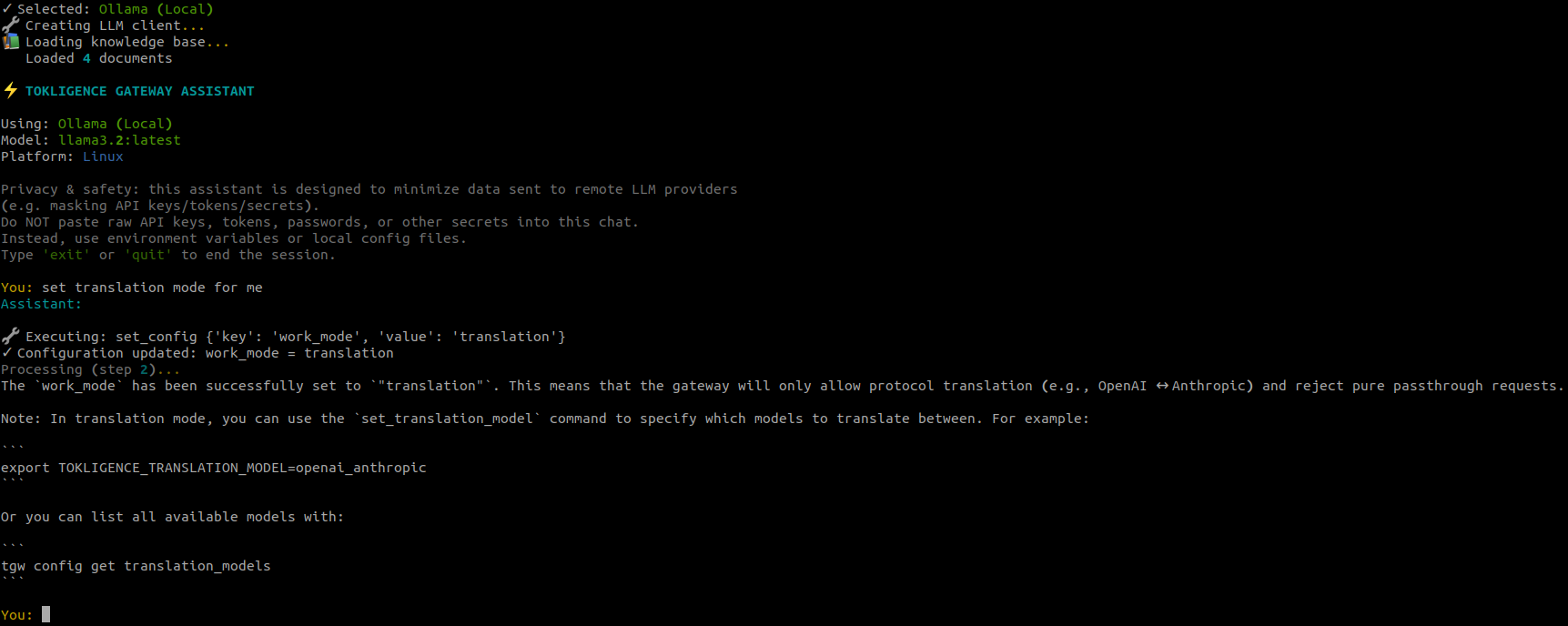
# Initialize gateway configuration
tokligence init

# Or with custom config path
tokligence --config ~/myconfig.yaml init# Start in foreground
tokligence-daemon start
# Start in background
tokligence-daemon start --background
# Start on custom port (or use short alias)
tokligenced start --port 8080# Create a user
tokligence user create alice --email alice@example.com
# List users
tokligence user list
# Create API key for user
tokligence apikey create <user-id> --name "Production Key"Once running, the gateway provides both OpenAI and Anthropic APIs:
OpenAI-compatible API:
import openai

openai.api_base = "http://localhost:8081/v1"
openai.api_key = "your-gateway-key"

# Use any provider's models!
response = openai.ChatCompletion.create(
    model="claude-3-sonnet-20240229",  # Anthropic via OpenAI API
    messages=[{"role": "user", "content": "Hello!"}]
)
Anthropic-native API:
from anthropic import Anthropic

client = Anthropic(
    base_url="http://localhost:8081/anthropic",
    api_key="your-gateway-key"
)

# Use any provider's models!
response = client.messages.create(
    model="gpt-4",  # OpenAI via Anthropic API
    max_tokens=1024,
    messages=[{"role": "user", "content": "Hello"}]
)from tokligence import Gateway, Daemon
# Initialize gateway
gateway = Gateway()
gateway.init()
# Create a user
user = gateway.create_user("alice", email="alice@example.com")
print(f"Created user: {user['id']}")
# List users
users = gateway.list_users()
for user in users:
print(f"User: {user['username']} ({user['email']})")
# Start daemon
daemon = Daemon(port=8081)
daemon.start(background=True)
# Check status
status = daemon.status()
print(f"Daemon status: {status['status']}")
# Stop daemon
daemon.stop()from tokligence import Config, load_config
# Load configuration
config = load_config()
# Get values
port = config.get('gateway.port', 8081)
auth_enabled = config.get('gateway.auth.enabled', False)
# Set values
config.set('gateway.port', 8080)
config.set('providers.openai.api_key', 'sk-...')
# Update multiple values
config.update({
'gateway': {
'port': 8080,
'auth': {'enabled': True}
}
})
# Save configuration
config.save()
# Convert to environment variables
env_vars = config.to_env_vars()
# Returns: {'TOKLIGENCE_GATEWAY_PORT': '8080', ...}from tokligence import Gateway, Daemon, Config
import time
def setup_team_gateway():
"""Set up a gateway for team use with authentication."""
# Configure gateway
config = Config()
config.update({
'gateway': {
'port': 8081,
'auth': {
'enabled': True,
'type': 'api_key'
}
},
'providers': {
'openai': {
'enabled': True,
'api_key': 'your-openai-key'
},
'anthropic': {
'enabled': True,
'api_key': 'your-anthropic-key'
}
}
})
config.save()
# Initialize gateway
gateway = Gateway()
gateway.init()
# Create team users
team_members = [
('alice', 'alice@team.com'),
('bob', 'bob@team.com'),
('charlie', 'charlie@team.com')
]
for username, email in team_members:
user = gateway.create_user(username, email)
api_key = gateway.create_api_key(
user['id'],
name=f"{username}'s API Key"
)
print(f"User: {username}")
print(f" ID: {user['id']}")
print(f" API Key: {api_key['key']}")
print()
# Start daemon
daemon = Daemon(port=8081)
print("Starting gateway daemon...")
daemon.start(background=True)
# Wait for startup
time.sleep(2)
# Check status
status = daemon.status()
if status['status'] == 'running':
print(f"✅ Gateway running on port {status['port']}")
print(f" PID: {status['pid']}")
else:
print("❌ Failed to start gateway")
return daemon
if __name__ == '__main__':
daemon = setup_team_gateway()
# Run until interrupted
try:
print("\nGateway is running. Press Ctrl+C to stop.")
while True:
time.sleep(1)
except KeyboardInterrupt:
print("\nStopping gateway...")
daemon.stop()# Initialize configuration
tokligence init
# User management
tokligence user create <username> [--email <email>]
tokligence user list [--json]
# API key management
tokligence apikey create <user-id> [--name <name>]
# Usage statistics
tokligence usage [--user <user-id>] [--json]
# Version info
tokligence version# Start daemon (use either command)
tokligence-daemon start [--port <port>] [--background]
tokligenced start [--port <port>] [--background]
# Stop daemon
tokligence-daemon stop
# Restart daemon
tokligence-daemon restart [--port <port>]
# Check status
tokligence-daemon status# Start AI assistant (short form)
tgw chat
# Specify model
tgw chat --model gpt-4
tgw chat --model claude-sonnet-4.5
tgw chat --model gemini-2.0-flash-expConfiguration can be managed through:
- Configuration file (
~/.config/tokligence/config.yaml) - Environment variables (prefix:
TOKLIGENCE_) - Command-line arguments
gateway:
  host: localhost
  port: 8081
  work_mode: auto  # auto, passthrough, or translation
  auth:
    enabled: true
    type: api_key
  logging:
    level: info
    file: /var/log/tokgateway.log

database:
  type: sqlite  # or postgresql
  path: ~/.config/tokligence/gateway.db
  # For PostgreSQL:
  # host: localhost
  # port: 5432
  # database: tokligence
  # username: tokligence
  # password: ${DB_PASSWORD}

providers:
  openai:
    enabled: true
    api_key: ${OPENAI_API_KEY}
    base_url: https://api.openai.com/v1
    models:
      - gpt-4
      - gpt-4-turbo
      - gpt-3.5-turbo

  anthropic:
    enabled: true
    api_key: ${ANTHROPIC_API_KEY}
    base_url: https://api.anthropic.com
    models:
      - claude-3-opus-20240229
      - claude-3-sonnet-20240229
      - claude-3-haiku-20240307

  google:
    enabled: true
    api_key: ${GOOGLE_API_KEY}
    models:
      - gemini-2.0-flash-exp
      - gemini-1.5-pro

# Model-to-provider routing
model_provider_routes:
  "gpt-*": openai
  "claude-*": anthropic
"gemini-*": googleAll configuration options can be set via environment variables:
# Gateway settings
export TOKLIGENCE_GATEWAY_PORT=8080
export TOKLIGENCE_GATEWAY_WORK_MODE=auto
export TOKLIGENCE_GATEWAY_AUTH_ENABLED=true

# Provider API keys
export TOKLIGENCE_PROVIDERS_OPENAI_API_KEY=sk-...
export TOKLIGENCE_PROVIDERS_ANTHROPIC_API_KEY=sk-ant-...
export TOKLIGENCE_PROVIDERS_GOOGLE_API_KEY=...

# Database settings
export TOKLIGENCE_DATABASE_TYPE=postgresql
export TOKLIGENCE_DATABASE_HOST=localhost
export TOKLIGENCE_DATABASE_PORT=5432The gateway exposes both OpenAI and Anthropic APIs simultaneously:
Clients (OpenAI SDK / Anthropic SDK / Codex CLI / Claude Code)
            ↓
    Tokligence Gateway (Facade :8081)
    - OpenAI-Compatible: POST /v1/chat/completions, /v1/responses
    - Anthropic-Native: POST /anthropic/v1/messages
    - Gemini-Compatible: POST /v1beta/openai/chat/completions
    - Gemini-Native: POST /v1beta/models/*
            ↓
    Router Adapter (Model-based routing)
            ↓
    OpenAI Adapter ↔ Anthropic Adapter ↔ Gemini Adapter
            ↓
    Upstream APIs (OpenAI, Anthropic, Google)
Auto mode (default, recommended):
- Infer provider from requested model via
model_provider_routes- e.g.,
gpt*→ openai,claude*→ anthropic
- e.g.,
- Look at endpoint to decide passthrough vs translation
- Smart routing combines both strategies
Passthrough mode:
- Direct delegation to upstream providers
- No protocol translation
- Fastest performance, lowest overhead
Translation mode:
- Cross-protocol translation only
- For testing and debugging translation logic
- Full SSE streaming support for all protocols
- Streaming translation maintains protocol-specific envelope format
- Handles complex stateful flows (tool calling, multi-turn conversations)
- Intelligent duplicate detection prevents infinite loops
| Platform | Architecture | Status |
|---|---|---|
| Linux | amd64 | ✅ Supported |
| Linux | arm64 | ✅ Supported |
| macOS | amd64 (Intel) | ✅ Supported |
| macOS | arm64 (Apple Silicon) | ✅ Supported |
| Windows | amd64 | ✅ Supported |
If you encounter "Binary not found" errors, ensure:
- The package was installed correctly
- Your platform is supported (see table above)
- Try reinstalling:
pip install --force-reinstall tokligence
On Unix-like systems, the binaries should be automatically made executable. If you encounter permission issues:
# Find the package location
python -c "import tokligence; print(tokligence.__file__)"

# Make binaries executable
chmod +x /path/to/tokligence/binaries/*Check if the port is already in use:
# Check port 8081
lsof -i :8081  # macOS/Linux
netstat -ano | findstr :8081 # WindowsIf tgw chat fails:
# Ensure chat dependencies are installed
pip install "tokligence[chat]"

# Check if LLM endpoint is available
# For Ollama:
curl http://localhost:11434/api/tags

# For remote APIs, check environment variables
echo $TOKLIGENCE_OPENAI_API_KEYContributions are welcome! Please see the main Tokligence Gateway repository for contribution guidelines.
Apache License 2.0 - see LICENSE file for details.
- Issues: GitHub Issues
- Documentation: Tokligence Gateway Docs
- Email: cs@tokligence.ai
- Tokligence Gateway - The core Go implementation
- Tokligence Gateway npm - Node.js package
- Tokligence Marketplace - Token marketplace integration (coming soon)
If you find Tokligence Gateway useful, please consider giving it a star on GitHub!