Souls Vision adds a customizable overlay to the top-right corner of the screen (by default), showing additional information about the currently targeted enemy, including HP, Stamina, Stance, Buildup bars for effects (like Poison and Frostbite) and the best damage types to use against the enemy (Magic, Fire, etc.). The overlay is draggable and can be customized to show only the information you want.
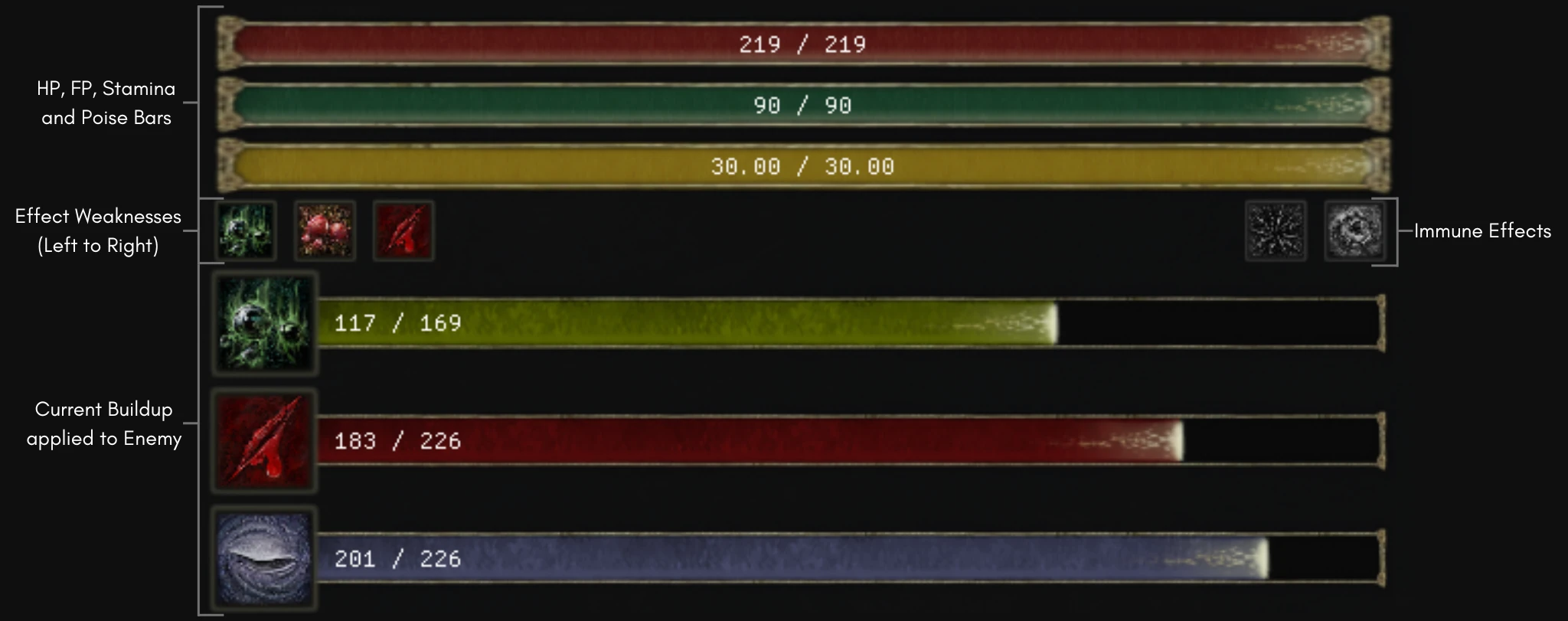
- Stat Bars: Shows the current and maximum HP, FP, Stamina, and Stagger/Poise of the targeted enemy.
- The FP bar usually only appear to "player-like" enemies
- Best Effects: Shows the best effects to use against the targeted enemy, based on the lowest value necessary to trigger them.
- Immune Effects: Shows the effects that the targeted enemy is immune to in gray at the right of the best effects.
- Damage Types: Shows the damage types that the targeted enemy is weak to, resistant to, or neutral to with icons highlighting how good or bad they are.
- The neutral damage types are hidden by default, but can be shown by changing the config file.
- Buildup Bars: Shows the current buildup of effects like Poison, Scarlet Rot, Hemorrhage, Death Blight, Frostbite, Sleep, and Madness.
- Only appear if the enemy has some effect being applied to it.
- Customizable: Highly customizable, with options to change the positions, sizes, and visibility of the components.
- The config file is generated the first time the game is opened with the mod, and it is reloaded automatically every time it is edited.
- Draggable Overlay: The overlay can be dragged around the screen by clicking and dragging it.
- The parameter
dragOverlaymust be set totruein the config file to enable this feature. - I recommend enabling entering a menu (like Equipment) to show mouse cursor to make it easier to drag the overlay. (I'm working on a better way to do this)
- The parameter
Config file details
The first time the game opens with the mod it will generate a default sv_config.json placing the bars at the top-right of the screen. Every time the config file is edited, it will be reloaded automatically.dragOverlay: bool - If set totrue, the overlay can be dragged around the screen by clicking and dragging it.debug: bool - Enables or disables debug mode. If set totrue, a console window will open with the game, showing the same information as the one found in thesouls_vision.log.opacity: float - Opacity of the overlay, from 0.0 (fully transparent) to 1.0 (fully opaque). This option requires the game to be restarted to take effect.delay: int - Delay in milliseconds before initializing the overlay. Default is0.bestEffects: int - How many of the best effects to show on the overlay. The effects are sorted (left to right) by the lowest value necessary to trigger them. Default is2.bestEffectIconSize: int - Size of the best effect icons. Default is33.dmgTypeIconSize: int - Size of the damage type icons. Default is30.fontSize: float - Font size of the text displayed on the bars. Default is18.0.statBarSpacing: int - Spacing between the bars, the space used around the "bestEffect" will be half of this. Default is0.maxEffectBars: int - Maximum number of effect bars to show. Default is7.hideBlightMadness: bool - If set totrue, the Death Blight and Madness bars will be hidden for common enemies. Default isfalse.statBar: object - Configuration related to the bars.position: object - Determines the bar’s on-screen position from top-left to bottom-right.x: int - Horizontal position of the bar in pixels.y: int - Vertical position of the bar in pixels.
size: object - Defines the bar’s dimensions.width: int - Width of the bar in pixels.height: int - Height of the bar in pixels.
components: object - Configuration for the components of the overlay.hp|fp|stamina|stagger|poison|scarletRot|hemorrhage|deathBlight|frostbite|sleep|madness: object - Bar configuration.visible: bool - If set tofalse, the bar will be hidden. Default istrue.hideText: bool - If set totrue, hides the text displayed on the bar (e.g. “90/219”).
bestEffects: bool - If set tofalse, the Best Effects against the enemy will be hidden. Default istrue.immuneEffects: bool - If set tofalse, the effects that the enemy is immune to will be hidden. Default istrue.dmgTypes: bool - If set tofalse, the Damage Type information will be hidden. Default istrue.neutralDmgTypes: bool - If set totrue, the Neutral Damage Type information will be shown. Default isfalse.
Souls Vision was developed and tested on version 1.16, it is expected to work with previous and future versions as long as the game’s internal structures remain unchanged since it relies on memory reading. Some incompatibilities with mods that deal with game's FPS are expected as Souls Vision is tied to the game's rendering methods. Either way, let me know if any kind of error occurs.
Although Souls Vision is expected to work with all versions of the game (like stated above), unofficial versions of the game (not original copies) have unpredictable behavior and may not work as expected. Support for these versions is not guaranteed.
- Elden Ring Reforged (ERR) and Elden Ring Tarnished Edition Overhaul (ERTE)
- These mods remove the cooldown before an effect can be re-applied, enabling stacking of effect buildups. This can lead to minor inconsistencies in the overlay's effect buildup tracking.
- The overlay will still work normally, but the buildup bars will not be as accurate as they are in the base game.
- Compatibility with this mechanic is planned for a future update.
- Seamless Coop
- In Seamless Coop some things (like the effect buildup) are done on the client side.
- When the effect bar is filled and the effect is applied, this information is then communicated to other players. This can cause discrepancies in the overlay, as the buildup bars may differ between players.
- The overlay will still function normally, but effects applied by one player may not always be reflected correctly for others.
- While fixing this issue is part of my plans, I currently don’t know how to address it, and sadly I don't have a timeline for a fix.
- In Seamless Coop some things (like the effect buildup) are done on the client side.
- MSI Afterburner (and other similar overlay software)
- MSI Afterburner can cause the game to crash at startup when Souls Vision is installed.
- This issue is caused by the overlay's DirectX hooking conflicting with MSI Afterburner's overlay.
- Disabling MSI Afterburner's overlay should resolve the issue.
Download the latest version of the mod from one of the following sources:
Add the souls_vision.dll to the mods folder from Elden Mod Loader(or any other mod loader you prefer that supports DLL loading).
- [v0.5.5] - 16-01-2025
- Fixed a bug where the game's module wasn't being found
- [v0.5.4] - 16-01-2025
- Added stricter verification for the game pointers to prevent crashes.
- [v0.5.3] - 16-01-2025
- Fixed a bug that caused the game to crash at startup
- The crash was happening because CSMenuManImp was
nullptrat initialization
- The crash was happening because CSMenuManImp was
- Fixed a bug that caused the game to crash at startup
- [v0.5.2] - 05-01-2025
- Added a delay parameter to the config file to aid fixing crashes at startup
- [v0.5.1] - 21-12-2024
- Fixes a bug that caused the game to crash at startup
- The crash was caused by an incorrect handling of the resources
- Fixes a bug that caused the game to crash at startup
- [v0.5.0] - 19-12-2024
- Completely reworked the config file to be more user-friendly
- [v0.4.2] - 17-12-2024
- Added unique options to hide the text for each bar
- [v0.4.1] - 16-12-2024
- Added option to hide DeathBlight and Madness bars for common enemies
- [v0.4.0] - 16-12-2024
- Bundled the textures within the DLL to avoid distributing them in a separate folder
- [v0.3.3] - 10-12-2024
- Fixed a bug making the overlay shift infinitely to the left when
dragOverlayis set totrue
- Fixed a bug making the overlay shift infinitely to the left when
- [v0.3.2] - 10-12-2024
- Fixed the bug where the horizontal position of the overlay was being shifted when switching between targets
- [v0.3.1] - 08-12-2024
- Fixed build bug where the assets were not being updated
- [v0.3.0] - 07-12-2024
- Added the Weak, Neutral and Resistant damage types to the overlay
- Added more customization to the overlay components
- It's possible to control the visibility of more components individually
- Added a config parameter to control the font size of the overlay
- The
opacityparameter no longer requires the game to be restarted to take effect
- [v0.2.2] - 28-11-2024
- Changed the overlay to use ER font
- [v0.2.1] - 28-11-2024
- Added a way to load textures in grayscale
- Added the effects that the enemy are immune to the overlay
- Tweaked the size of the icons and the opacity of the bars bg
- [v0.2.0] - 27-11-2024
- Added a config parameter to customize the vertical space between the bars
- Added a config parameter to customize the size of the "best effect" icon
- Removed the condition that prevented the stamina bar from rendering
- Completely reworked the way the bars are rendered to be tied to a
ImGuiwindow- This change allows the overlay to be dragged around the screen
- This "drag" mode can be toggled on the config file
- [v0.1.5] - 25-11-2024
- Added icons to show best effects to use against the targeted enemy
- [v0.1.4] - 25-11-2024
- Added custom visibility config to all the bars
- [v0.1.3] - 25-11-2024
- Fixed the position of the bars that were overlapping as their size increased
- [v0.1.2] - 24-11-2024
- Allow configurable opacity to the overlay
- [v0.1.1] - 24-11-2024
- Fixed the space between the Buildup Bars
- [v0.1.0] - 24-11-2024
- First working version of the mod
Boss Checklist Overlay: A lot of the code here helped me with the DirectX hooking.
Posture Bar: The concept of showing additional "bars" gave me the initial idea.
Hunter Pie: This is first contact that I had with this idea of Overlay. If you're a Monster Hunter player, I highly recommend it.