
A context harness for AI agents — and for building them: one unified workspace over your code, memory, skills, docs, messages, and every data source.










Modern AI agents run on a huge amount of context — and it's sprawling, scattered, and siloed across dozens of sources and formats. That makes it hard to manage and harder to locate: for any given task, which slice of all that context is the part that actually matters? It piles up in:
- Code & repos — every repo the agent reads or writes
- Memory & skills — past-session transcripts, memory
.mdfiles, reusableSKILL.mdskills - Docs & knowledge — PDFs, design specs, Notion, crawled web pages
- Chat & mail — Slack, Discord, Gmail, Feishu
- Issues & CRM — Jira, Linear, HubSpot, Zendesk
- Databases & object stores — Postgres, Mongo, BigQuery, Snowflake, S3, Drive
MFS gathers it under one shell: every source becomes a file-like tree under a stable URI, driven by two skills your agent loads:
- 🗂️ mfs-ingest — the skill that bundles the commands for bringing sources
in:
mfs addregisters and indexes any connector (re-run to re-sync), andmfs connectorlists, inspects, and removes them. - 🔎 mfs-find — the skill that bundles the commands for finding across
what's ingested, in two families:
- Search —
searchandgrepfind things fast across huge volumes. - Browse —
ls,cat,tree,head,tailgive progressive, precise navigation down to the exact bytes.
- Search —

Install the skills once:
# every project + every supported agent (drop -g for the current project only)
npx skills add zilliztech/mfs --all -g
Install to a specific agent
Pass one or more -a <agent>:
npx skills add zilliztech/mfs -a claude-code -a codex -g<agent> can be claude-code, codex, cursor, windsurf, github-copilot,
gemini-cli, opencode, zed, cline, continue — 70+ agents in all.
Check for updates
npx skills check
npx skills update
For project-level installs, re-run the npx skills add command to update.
Prefer the shell, no agent?
Run a local server, install the CLI, and drive the same loop directly:
# server — install once as a uv tool, then run
uv tool install mfs-server && mfs-server run

# CLI — `cargo install mfs-cli`, or the installer on the releases page
mfs add /tmp/hello-mfs
mfs search "where the greeting is printed" /tmp/hello-mfs
macOS: run
xattr -d com.apple.quarantine $(which mfs)once if prompted about an unidentified developer.
📥 Then open your agent (Claude Code, Codex, …) and ask in plain language. First, ingest something:
Use the mfs-ingest skill to spin up a tiny hello-world project in /tmp/hello-mfs
and ingest it
🔍 Then search and read across it:
Use the mfs-find skill to find where the greeting is printed in the hello-mfs
project, and show me the exact lines
🎉 That's it — you're up and running. From here, point MFS at your real sources.
🛠️ The first run is a one-time setup, and the agent walks you through it: it installs the
mfsCLI, helps you start a local server, and downloads a ~600 MB local embedding model into~/.mfs/. Give it a minute. After that the whole stack runs locally and offline — no API key, no GPU, no cloud account.Don't want the model download? If you already have an embedding-service API key (OpenAI, …), point the server at it instead — see Configure the server.
Past-session memory files (.md, .jsonl) and reusable
skills become one searchable namespace — the prompt you tuned last week or a
decision logged three sessions ago, one query away.
The
mfsline is the CLI; the trailing#comment is the same request to an agent (/mfs-ingestor/mfs-find— Codex uses$mfs-ingest/$mfs-findinstead of/).
mfs add path/to/memory     # /mfs-ingest index my session memory
mfs add path/to/skills     # /mfs-ingest index my skills
mfs search "the prompt I tuned for refund disputes" --all   # /mfs-find the refund-dispute prompt
Output
file://local/.agents/memory/2026-05-31.jsonl  score=0.88
  {"role":"note","text":"refund-dispute prompt: lead with the order ID, then ..."}

file://local/.agents/skills/support-triage/SKILL.md  score=0.74
  ## Refund disputes — confirm the order ID first, then check the gateway log ...
Open the hit — mfs cat file://local/.agents/memory/2026-05-31.jsonl:
{"role":"note","text":"refund-dispute prompt: lead with the order ID, then ask
for the gateway transaction id; never promise a timeline before the dispute
window is confirmed."}
Index the repos your agent reads or writes and grep them by meaning — find the helper by what it does, not the name you've forgotten.
mfs add path/to/repo   # /mfs-ingest index my repos
mfs search "where do we retry failed webhook deliveries?" path/to/repo   # /mfs-find our webhook retry logic
Output
file://local/repos/payments/webhooks/deliver.go  score=0.84
  87  // cap exponential backoff at 6 attempts, then dead-letter
  88  func (d *Dispatcher) retryDelivery(ev Event) error {

file://local/repos/payments/webhooks/deliver_test.go  score=0.69
  TestRetryDelivery_DeadLettersAfterMaxAttempts ...
Open the matching lines — mfs cat file://local/repos/payments/webhooks/deliver.go --range 80:110:
// retryDelivery re-sends a webhook with capped exponential backoff.
func (d *Dispatcher) retryDelivery(ev Event) error {
    for attempt := 1; attempt <= maxAttempts; attempt++ {
        if err := d.post(ev); err == nil {
            return nil
        }
        time.Sleep(backoff(attempt))
    }
    return d.deadLetter(ev)   // give up after maxAttempts
}
PDFs, Word docs, Markdown, screenshots — MFS converts each to text locally (PDF / docx → Markdown, no API key), and with a vision model on it describes images too. One search spans every format.
mfs add path/to/docs           # /mfs-ingest index my design docs
mfs add path/to/screenshots    # /mfs-ingest index my screenshots
mfs search "audit-log retention and the dashboards that show it" --all   # /mfs-find audit-log retention + dashboards
Output
file://local/design-docs/data-governance.pdf  score=0.86
  ... Audit logs are retained for 400 days, then moved to cold storage; access
  beyond 90 days requires a break-glass approval ...

file://local/screenshots/grafana-2026-06-02.png  score=0.71
  A Grafana dashboard; the p99 latency panel climbs to ~800 ms around 14:10,
  well above the 200 ms band on the other panels ...
Open the hit — mfs cat file://local/design-docs/data-governance.pdf:
# Data Governance — Audit Logs

Audit logs are retained for **400 days**, then moved to cold storage. Access
beyond 90 days requires a break-glass approval recorded in the change log.
Mount a Google Drive or S3 bucket; its files become searchable text alongside your local ones — no syncing, no downloads.
mfs add gdrive://my-drive --config ./gdrive.toml   # /mfs-ingest add my google drive
mfs add s3://acme-exports --config ./s3.toml       # /mfs-ingest add our s3 exports bucket
mfs search "the Q3 board deck" --all               # /mfs-find the Q3 board deck
Output
gdrive://my-drive/Board/2026-Q3-review.pdf  score=0.87
  ... Q3 highlights: net revenue retention 118%, two enterprise logos closed ...

s3://acme-exports/finance/2026-q3-summary.csv  score=0.70
  quarter,net_revenue,nrr,churn  2026Q3,4.2M,1.18,1.4% ...
Open the hit — mfs cat gdrive://my-drive/Board/2026-Q3-review.pdf:
# 2026 Q3 Board Review

- Net revenue retention: 118%
- New enterprise logos: Globex, Initech
- Gross margin: 79% (+2 pts QoQ)
Crawl a docs site or mount a GitHub repo with its issues — remote content lands in the same namespace as your local files.
mfs add web://docs.your-product.com                          # /mfs-ingest crawl our docs site
mfs add github://your-org/your-repo --config ./github.toml   # /mfs-ingest add our github repo
mfs search "how do we rotate signing keys?" --all            # /mfs-find signing-key rotation
Output
web://docs.your-product.com/security/key-rotation  score=0.88
  ... Signing keys rotate every 90 days. Trigger an early rotation from the
  admin console; the previous key stays valid for a 24-hour overlap ...

github://your-org/your-repo/issues.jsonl  score=0.75
  #312  "Automate signing-key rotation"  state=open  labels=[security]
Open the hit — mfs cat web://docs.your-product.com/security/key-rotation:
# Rotating signing keys

Signing keys rotate automatically every 90 days. To rotate early, open
Admin → Security → Keys and click "Rotate now"; the previous key stays valid
for a 24-hour overlap so in-flight tokens keep verifying.
Mount Slack, Gmail, Jira, Linear and pull the thread, the ticket, and the email behind a decision into one answer.
mfs add slack://acme --config ./slack.toml   # /mfs-ingest add our slack
mfs add jira://acme  --config ./jira.toml    # /mfs-ingest add our jira
mfs search "why did we revert the burst guard?" --all   # /mfs-find why we reverted the burst guard
Output
slack://acme/channels/platform/messages.jsonl  score=0.90
  [Tue 09:40] @carol: reverting the burst guard — it dropped healthy traffic
  [Tue 09:42] @dave:  agreed, reopening PLAT-491 to re-tune the window

jira://acme/teams/PLAT/issues.jsonl  score=0.81
  PLAT-491  "rate-limit guard misfires under burst"  state=Reopened
Read the ticket — mfs cat jira://acme/teams/PLAT/issues.jsonl --locator '{"id":"PLAT-491"}':
PLAT-491  rate-limit guard misfires under burst   state=Reopened
assignee: dave   priority: high
The burst guard dropped healthy traffic during the Tuesday spike; reverted in
PR #604. Re-tuning the window before re-enabling.
Pull your CRM and help desk together — the account, its open tickets, and the call notes behind a customer issue in one query.
mfs add hubspot://acme --config ./hubspot.toml   # /mfs-ingest add our hubspot crm
mfs add zendesk://acme --config ./zendesk.toml   # /mfs-ingest add our zendesk
mfs search "why is Globex unhappy with onboarding?" --all   # /mfs-find Globex onboarding issues
Output
zendesk://acme/tickets.jsonl  score=0.88
  #5821  "Onboarding blocked on SSO setup"  status=open  priority=high
  requester ops@globex.com — "third week without working SSO ..."

hubspot://acme/companies/globex/notes.jsonl  score=0.74
  call note: Globex renewal at risk; onboarding friction flagged by the CSM ...
Read the ticket — mfs cat zendesk://acme/tickets.jsonl --locator '{"id":5821}':
#5821  Onboarding blocked on SSO setup   status=open  priority=high
requester: ops@globex.com
"Third week without working SSO — the SAML metadata upload keeps failing with a
500. This is blocking our rollout."
Point MFS at Postgres, Mongo, or BigQuery and search rows as text — each row is a
file-like object, so mfs cat pulls back the full record.
mfs add postgres://prod/orders --config ./pg.toml                         # /mfs-ingest add the prod orders table
mfs search "refunds stuck in pending over 7 days" postgres://prod/orders  # /mfs-find stuck pending refunds
Output
postgres://prod/orders  score=0.79
  {"id":"ord_8842","status":"pending","refund_requested_at":"2026-05-30",
   "amount":129.00,"gateway":"stripe","note":"customer disputed, awaiting ..."}
Read the full row — mfs cat postgres://prod/orders --locator '{"id":"ord_8842"}':
id                   ord_8842
status               pending
refund_requested_at  2026-05-30
amount               129.00
gateway              stripe
note                 customer disputed, awaiting gateway confirmation
With a few sources registered, --all fans one query across all of them — files,
databases, trackers, chat — in a single result shape, so any hit copies straight
into mfs cat.
mfs search "rate-limit guard misfires under burst" --all # /mfs-find the burst rate-limit bugOutput
slack://acme/channels/oncall/messages.jsonl  score=0.91
  [Mon 22:14] @alice: ratelimiter pegged 500ms p99 tail, dump attached
  [Mon 22:18] @bob:   smells like the burst guard from PR #418

jira://acme/teams/PLAT/issues.jsonl  score=0.83
  PLAT-491  "rate-limit guard misfires under burst"  state=In Progress

file://local/repo/src/throttle.go  score=0.71
  42  func handleRateLimit(req Request) error {
Copy any hit into a read — same locators everywhere:
mfs cat ./repo/src/throttle.go --range 42:78
mfs cat jira://acme/teams/PLAT/issues.jsonl --locator '{"id":"PLAT-491"}'
First time adding a source and unsure what its TOML needs? Don't write it by hand — just tell your agent which source you want to index, and the mfs-ingest skill walks you through which credentials to grab (and where), then writes the config and registers it for you.
| Group | Command | What it does |
|---|---|---|
| Ingest & manage | mfs add <path|uri> [--config x.toml] |
register a source and index it; re-run to re-sync |
mfs connector probe <uri> --config x.toml |
dry-run a connection before registering | |
mfs connector list · inspect · remove |
see and manage what's registered | |
| Search | mfs search "<query>" [<path|uri>] [--all] |
hybrid semantic + keyword; scope to a path/URI, or --all |
mfs grep <pattern> <path> |
exact keyword / full-text | |
| Browse & read | mfs ls <uri> · mfs tree <uri> |
list one level, or a whole subtree |
mfs cat <uri> [--range a:b] [--locator '{...}'] |
read the exact bytes, or one structured record | |
mfs head <uri> · mfs tail <uri> |
sample the first / last entries | |
| Operate | mfs status |
server, connectors, and jobs at a glance |
mfs job list · show <id> · cancel <id> |
track indexing jobs | |
mfs config show |
resolved endpoint / profile / token | |
mfs serve start · stop |
manage a local server process |
Browse and search are complementary — no fixed order:
- Browse (
ls·cat·tree) — no index, fast and exact; best for walking a small or local tree. - Search (
search·grep) — needs an upfront index, then finds things fast across huge volumes with fuzzy matching; best for rough filtering.
Through an agent it's the same set in natural language, split across two skills:
mfs-find— search + browse:search·grep·ls·cat·tree·head·tail.mfs-ingest— register + manage:add·connector probe / list / inspect / remove.
Local files are only the start. MFS speaks to a growing catalog of sources —
object stores, databases, code hosts, issue trackers, CRMs, chat, mail, docs —
and mounts each one as a URI tree you ls / cat / grep / search like a
local directory. Same verbs, same result shape, everywhere.
| Category | Source | URI prefix | What you search |
|---|---|---|---|
| 📁 Files & objects | Local files | file:// |
any folder — text, Markdown, code, PDF, docx, images |
| Amazon S3 (& R2 / GCS / MinIO) | s3:// |
bucket objects, converted to text | |
| Google Drive | gdrive:// |
Docs, Sheets, PDFs and files in a Drive | |
| 🗄️ Databases | PostgreSQL | postgres:// |
tables and rows as searchable records |
| MySQL | mysql:// |
tables and rows as searchable records | |
| MongoDB | mongo:// |
collections and documents | |
| BigQuery | bigquery:// |
datasets and tables | |
| Snowflake | snowflake:// |
databases and tables | |
| 💻 Code & issues | GitHub | github:// |
repo files, issues, and PRs |
| Jira | jira:// |
projects, issues, comments | |
| Linear | linear:// |
teams, issues, comments | |
| 🧑💼 CRM & support | HubSpot | hubspot:// |
contacts, companies, deals, notes |
| Zendesk | zendesk:// |
support tickets and comments | |
| 💬 Chat & mail | Slack | slack:// |
channels and message history |
| Discord | discord:// |
servers, channels, threads | |
| Gmail | gmail:// |
mail threads and messages | |
| Feishu / Lark | feishu:// |
docs and messages | |
| 🌐 Docs & web | Notion | notion:// |
pages and databases |
| Web | web:// |
crawled pages, converted to Markdown |
New connectors slot in behind the same interface, so the catalog keeps growing. Each needs a small TOML (credentials + what to expose) — three ways to get it right:
- Ask your agent — describe the source in plain language; the
mfs-ingestskill finds the credentials, says where to get them, and writes the TOML. - Probe first —
mfs connector probe <uri> --config x.tomldry-runs a config, no registration and no writes. - Read the reference — each connector documents its exact fields and auth.
The connector TOML never holds a raw secret — it carries a reference (
env:VARorfile:/path), and the actual token, password, or credential file lives on the server (its process env or a mounted file). So the CLI and your agent never touch raw credentials, and a hosted MFS can have each user supply their own through the service instead of a file on disk.
Everything above runs the simplest way — client and server on one machine. The same MFS also scales to production; here's how it's put together.
MFS is a thin client over a stateful server, talking over one HTTP /v1 API:
- Client — the
mfsCLI, the SDKs, and the agent skills (mfs-find/mfs-ingest). Stateless, so re-creating it on a laptop, a CI runner, or an agent runtime is free. - Server — the setup wizard, all config / credentials / env vars, the queue
- workers, and the data backends. Everything that matters lives here, so
env:/file:secret references always resolve on the server, never the client.
- workers, and the data backends. Everything that matters lives here, so
┌────────────────┐                 ┌────────────────────────────────────────┐
│ CLIENT         │                 │ SERVER · mfs-server                    │
│ ────────────── │                 │ ────────────────────────────────────── │
│ mfs CLI        │                 │ setup wizard                           │
│ SDKs           │                 │ queue + workers                        │
│ skills         │                 │ config · env vars · credentials        │
│   · mfs-find   │ ── HTTP /v1 ──▶ │                                        │
│   · mfs-ingest │                 │ backends (scale up as needed):         │
└────────────────┘                 │   vector    Milvus Lite → Zilliz Cloud │
                                   │   metadata  SQLite → Postgres          │
                                   │   caches    local filesystem           │
                                   └────────────────────────────────────────┘
The only real deployment choice is where the server runs. Move it onto its own host (a VM or a single container), or scale it out across a Docker Compose stack or a Kubernetes cluster — the CLI and skills stay with you either way. The table below is a recommended layout per mode; for how to actually set each piece, see Configure the server.
| Piece | Local (one machine) | Single host (its own VM or container) | Distributed (Compose / Kubernetes) |
|---|---|---|---|
mfs CLI |
your machine | your machine | your machine |
| Agent skills | your machine | your machine | your machine |
mfs-server + workers |
your machine | the server host | the server cluster (api + worker pods) |
mfs-server setup wizard |
your machine | the server host | the server cluster |
server.toml |
your machine | the server host | the server cluster (ConfigMap / mounted file) |
| Connector credentials + secret files | your machine | the server host | the server cluster (Docker / k8s secrets) |
env: / file: ref values |
your machine | the server host | the server cluster (pod env / mounted files) |
| Vector DB | Milvus Lite (local file) | self-hosted Milvus or Zilliz Cloud | Zilliz Cloud |
| Metadata DB | SQLite (local file) | Postgres | Postgres |
file:// ingest |
server reads the path in place | CLI bundles + uploads the tree | CLI bundles + uploads the tree |
That last row is automatic: on a shared filesystem the server reads local paths directly; otherwise the CLI bundles and uploads them — no flags needed.
Through an agent you don't think about any of this — the skills already encode it. The agent detects whether client and server share a machine and adjusts (local read vs upload) on its own, so there's nothing about deployment mode to spell out in a prompt. Just use MFS normally.
For a split deployment, point the CLI at the server and you're set:
export MFS_API_URL=https://mfs.your-corp.internal
export MFS_API_TOKEN=...
mfs status
Docker images, a Compose file, and a Helm chart for split api / worker
deployments live under deployments/.
🏭 Built for production. MFS was built for production from day one — not a weekend demo. The split design scales to production-scale data: pair the vector backend with Zilliz Cloud's Vector Lakebase and MFS indexes and searches massive corpora, with the reliability and design choices below.
Almost all configuration lives on the server — the embedding provider, the
vector backend, the metadata database, caches, auth, and every connector's
credentials all sit in the server's server.toml. The client barely has any
config: a tiny TOML that just says which server to talk to (endpoint + token),
so pointing the CLI at a local or a remote server is the whole client story.
There are two ways to configure the server, and they write the same server.toml:
- The wizard —
mfs-server setupis a convenient interactive walk through the common choices (embedding provider, vector DB, database, cache, auth). Defaults are self-contained, so you can press Enter through to a working local server and opt into hosted backends (OpenAI, Zilliz Cloud, Postgres, …) only where you need them. - The TOML — everything the wizard writes, plus the advanced knobs it
doesn't surface (cache size / eviction, chunker thresholds, namespace, worker
counts, per-connector tuning), lives in
~/.mfs/server.toml. Edit it directly for anything beyond the basics.
Both run on the server's machine or container, not on the client — they write the server's
server.toml. In local mode (client and server on the same machine), that's simply your local machine.

mfs-server setup                      # full interactive walkthrough
mfs-server setup --section embedding  # re-run just one section
What each section of server.toml configures:
| Section | Configures | Default | Swap in |
|---|---|---|---|
[embedding] |
embedding provider · model · dim | local ONNX (BGE-M3 int8, no key) | openai · gemini · voyage · ollama · local — needs that provider's key/extra |
[milvus] |
vector store | Milvus Lite (file under ~/.mfs/) |
self-hosted Milvus or Zilliz Cloud — set uri + token |
[database] |
metadata + transformation-cache DB | SQLite (file) | Postgres — set dsn |
[artifact_cache] |
converted-blob cache | local fs under ~/.mfs/cache |
size / eviction knobs |
[description] |
image descriptions (vision LLM) | off | openai · anthropic · gemini — needs key |
[summary] |
directory / file summaries | off | provider + model, dir / file scope |
auth_token |
API auth | auto-generated server.token |
a fixed token, or - to disable |
Secrets never sit in the TOML as plaintext — the TOML carries a reference
(env:VAR or file:/path) and the real value lives on the server (its
process env or a mounted credential file), resolved at runtime. The same holds
for every connector's credentials, so secrets stay on the server, never on the
client.
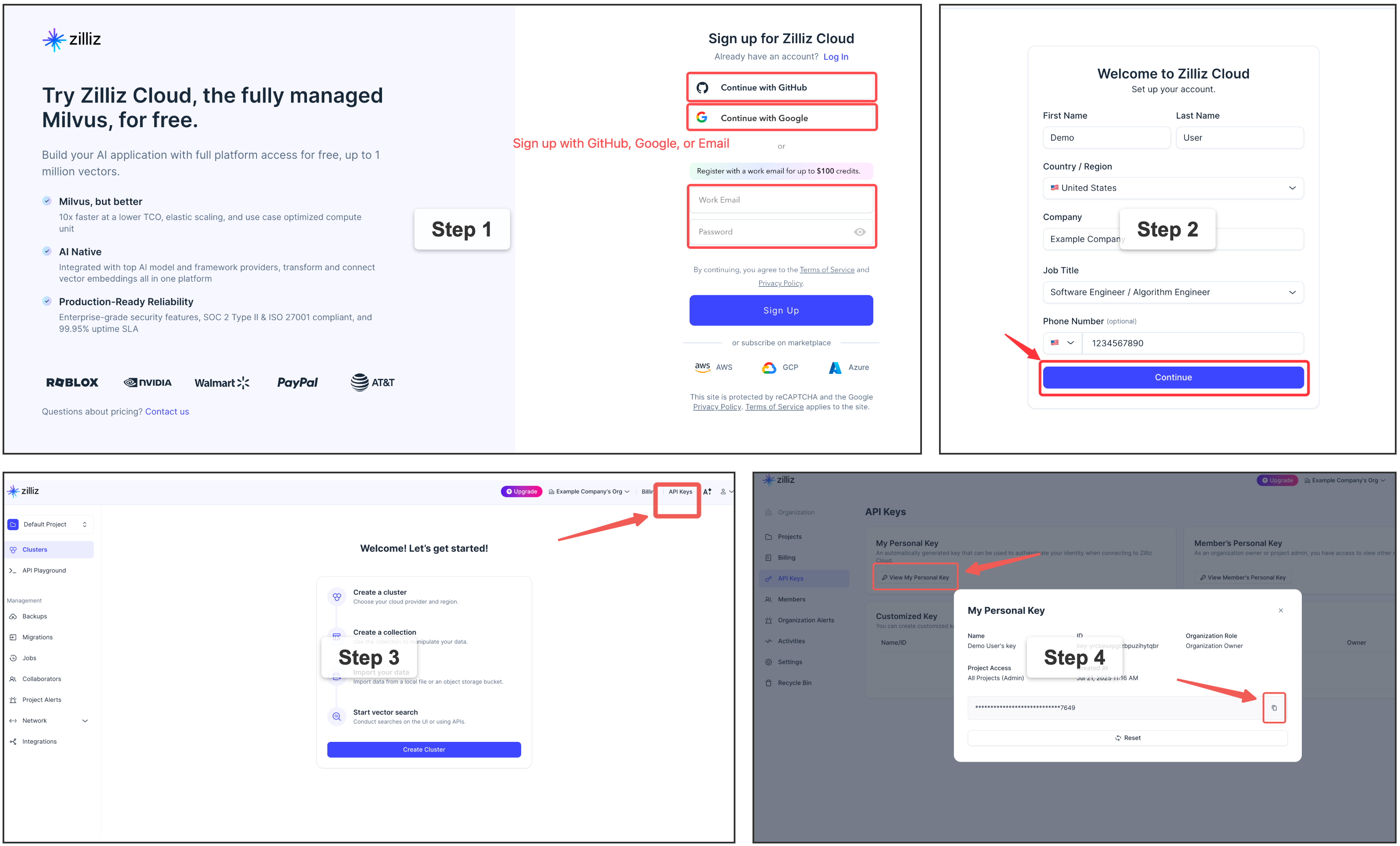
⭐ Get a free Zilliz Cloud cluster (URI + token)
For a fully managed vector backend,
sign up
for a free Zilliz Cloud cluster — the console gives you the public endpoint
(URI) and an API key (token). Put them in [milvus] as uri + token,
keeping the key out of the TOML with an env: ref.
Use OpenAI instead of the local model?
Set the embedding provider to OpenAI and export your key — no model download:
[embedding]
provider = "openai"      # instead of the default local "onnx"
export OPENAI_API_KEY=sk-...- 🗂️ One file-like interface, any source. Whatever the source or format, it becomes a single file-like tree under a stable URI. Agents already speak shell, so there's no new query language and no per-source SDK — the same handful of verbs reach everything, and what you learn once carries across every connector.
- 🌐 Your whole workspace, one interface. Stop wiring a separate context harness for every scenario. Memory, code, docs, chat, tickets, databases — MFS unifies your entire working context, with its history and state, into one search-and-browse interface.
- 🔍 Search and browse, two legs of one loop. Hybrid semantic + keyword search locates fast across huge volumes; progressive browse then narrows to the exact bytes or rows. Together they lift precise recall and cut token spend — you pull in only what matters, and never trust a hit until you've reopened it.
- 🛡️ Local and production, equally at home. Run fully local and offline, or at production scale — neither is an afterthought. Every component is swappable and independently scalable, so the same MFS moves between the two by configuration alone. The index is derived and crash-safe: upstream stays the source of truth, so you can delete it and rebuild from the original sources, losing nothing.
- 🤖 Agent-native. Built for how agents actually work — especially context and memory management — so it slots into any agent setup. And when you're building an agent of your own, you can build it on top of MFS too.
Beyond using MFS through an agent in your daily work, you can build on it — treat MFS as the retrieval/context base layer your own agent application sits on. The robust index pipeline and the broad connector catalog are already handled: you never touch embeddings, the vector store, or per-source plumbing — you point at MFS and focus on the app on top.
┌──────────────────┐   ┌──────────────────┐   ┌──────────────────┐
│ agents           │   │ your app code    │   │ your skills/MCP/ │
│ → skills + CLI   │   │ → SDK (Py / TS)  │   │ plugins → CLI    │
│ (use directly)   │   │ (BUILD ON IT)    │   │ (BUILD ON IT)    │
└────────┬─────────┘   └────────┬─────────┘   └────────┬─────────┘
         │                      │                      │
         └──────────────────────┼──────────────────────┘
                                ▼
┌────────────────────────────────────────────────────────────────┐
│ MFS  —  CLI · SDK · HTTP /v1                                   │
└───────────────────────────────┬────────────────────────────────┘
                                │
                                ▼
┌────────────────────────────────────────────────────────────────┐
│ index pipeline · chunking · embedding · vector DB · caches     │
│ a catalog of source connectors  (MFS owns all of this)         │
└────────────────────────────────────────────────────────────────┘
- SDK — call the generated Python / TypeScript clients under
sdks/straight from your application code (long-running daemons, services, language runtimes without a shell). - CLI — call the
mfscommand to build your own skills, MCP servers, or plugins on top of the same surface.
- Multiple processing profiles — run different sources through different pipelines from one server: a code-tuned embedding model for your repos, a multilingual one for your docs. Because models differ in dimension and vector space, each profile maps to its own collection (a single one can't mix them), and you search within a profile or across all.
- Multi-user credentials and access control — per-user secrets and permissions, so a shared or hosted MFS can serve many users safely.
- A wider connector catalog — the set of sources keeps growing.
MFS is shaped by several related projects:
- claude-context and memsearch — earlier Zilliz code-search and memory-search efforts whose community feedback shaped MFS's agent-facing direction.
- VKFS — a sister exploration of a Unix-like interface for agent access to vector-backed knowledge.
Apache-2.0. See LICENSE.