TypeToken Tutorial
As the flowchart 1 below shows, the typeToken workflow is subdivided in three parts: one for generating token/type frequency dictionaries, one for creating the type vectors and one for creating token vectors. The token-level workflow partially relies on output from the type-level workflow. Therefore, I will first discuss the workflow to create type-level word spaces and then the workflow for the token-level. Since some functions are shared between the two workflows, I will occasionally refer back to the type-level discussion in the section on the token-level workflow.
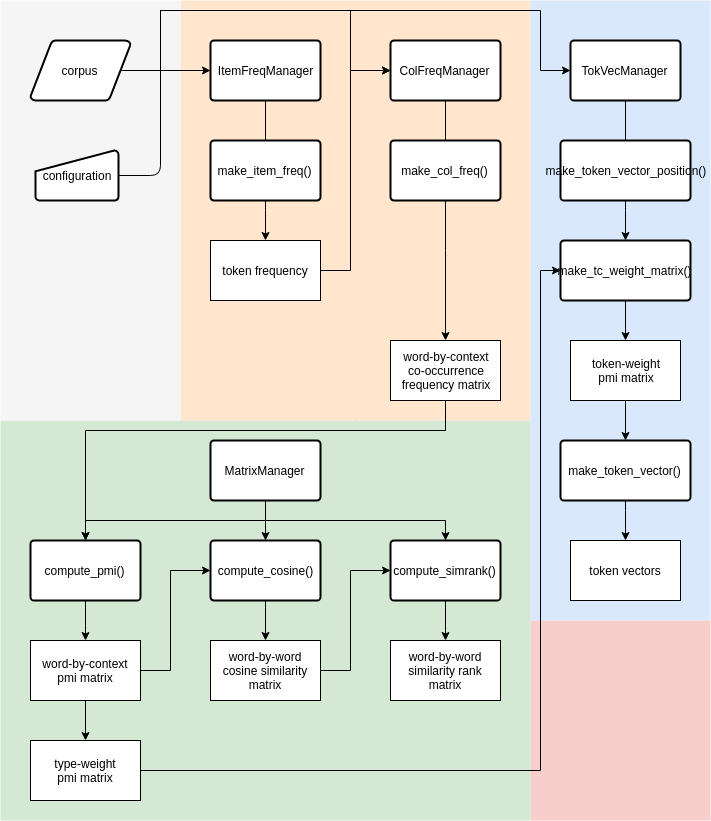
This section describes how to build a type-level Word Space. Code examples will be displayed in boxes as if executed in an interactive session. As a convention, we use $ as the prompt symbol for Linux command line, and >>> as the prompt symbol for python sessions.
The typetoken package has been cloned from QLVL github repository as typetokenQLVL to differentiate with the typeToken directory. Go to the directory /home/aardvark/code/typetokenQLVL/, you can find a pdf file of this tutorial.
$ ls /home/aardvark/code
tokenclouds typeToken typetokenQLVL
$ ls /home/aardvark/code/typetokenQLVL/*.pdf
tutorial.pdf
Since many required packages such as scipy have not been installed for the default python on r2d2 and robin servers, you can use the python provided by a python virtual environment. Python virtual environments are provided in /home/aardvark/tools/VENV directory. This directory includes two virtual environments respectively for Python 2 and 3. The following code box shows the procedure to use. First you should activate the environment by source command. And then there would be an indicator (PY_VENV) before your command line. This means you are now working in a python virtual environment. The python you used here is different with the default python of server. To leave this virtual environment, you can use command deactivate.
$ source /home/aardvark/tools/VENV/PY_VENV/bin/activate
(PY_VENV) [...]$ python --version
Python 2.7.13
(PY_VENV) [...]$ deactivate
[...]$ python --version
Python 2.6.6
$ source /home/aardvark/tools/VENV/PY3_VENV/bin/activate
(PY3_VENV) [...]$ python --version
Python 3.6.4
(PY3_VENV) [...]$ deactivate
[...]$ which python
/usr/bin/python
Currently the module only supports Python 2. After activating virtual environment, we can also use commands to start Jupyter notebook on this remote server and use it on your local computer. There is another small tutorial about how to use Jupyter notebook on a remote server. And there is also an ipython snippets file /home/aardvark/code/typetokenQLVL/snippets.ipynb in typetoken folder. To run your own code, you can create a new ipython file or copy a snippets.ipynb file in your own folder, use Python console to code line by line, or create a new python file or copy a snippets.py file. All the codes presented below could be executed the same on Jupyter notebook as on Python.
Use the python of virtual environment to go to python interactive console. The following code add your typetokenQLVL package to system paths. The path is the father directory of the real typetoken package. Then we can import modules of typetoken package.
>>> import sys
>>> sys.path.append("/home/aardvark/code/typetokenQLVL")
The "config.ini" file in the package/folder (current useful package is typetoken3) consists of the default parameter settings, including basic information on the format of a corpus. In your real research, some parameter settings should be modified. A good way to change settings is that copy the "config.ini" file ("/home/aardvark/code/typetokenQLVL/typetoken3/config.ini") to your working directory and modify it based on your requirements. You should change those settings in the new "config.ini" file if they are different from the default settings and remove other redundant parameters:
file-encoding=utf-8
As mentioned before, the default character encoding for files is UTF8.
word-line-machine=([^\t]+)\t([^\t]+)\t([^\t]+)
The default format of a corpus file is 1 word per line. A word-line consists of three tab-delimited columns in the format wordform+TAB+part-of-speech+TAB+lemma. This three column format is set in the configuration file under the key "word-line-machine" through a regular expression. If the word-lines in your corpus are different, for example with four columns and whitespace-separated values (e.g. linenumber + SPACE + wordform + SPACE + part-of-speech + SPACE + lemma), then you can reset the regular expression in the settings dictionary accordingly (please do keep the round brackets as grouping feature for extracting the column values later on):
word-line-machine=(\S+)\s(\S+)\s(\S+)\s(\S+)
The corpus can also have other, non-word lines (e.g. sentence or article delimiters), but they CANNOT have the same format as a word-line.
separator-line-machine=</artikel>
One of the other line types in a corpus file can be a separator line that is a hard boundary for any context window used by the distributional models. The default format of a separator line is < /artikel > (derived from the article boundaries in our Dutch news paper corpora), but again, this can be re-set based on your corpus format.
get-node=3,2
The default format for a target word (or node in Corpus Linguistic parlance) is lemma+/+part-of-speech. This information is retrieved from the columns on the word-line by the lambda-function, stored in settings[”get-node”], which access the match-object created by matching the regular expression stored in settings[”word-line-machine”] with a word-line: In the get-node setting 3 refers to the 3rd column with the lemma and 2 is the 2nd column with the part-of-speech. Again, this can be re-set based on your corpus’ word-line format and corresponding regular expression stored in settings[”word-line-machine”]
get-colloc=3,2
The default format for a context word (or collocate in Corpus Linguistic parlance) is also lemma+/+part-of-speech.
You should also set in the configuration file your corpus-path and output-path. The corpus-path is the directory where your corpus file is stored. The output-path is the directory where you want to put your output data.
corpus-path=/home/aardvark/corp/en/BROWN_family/Brown_wpr-art
output-path=/path/to/your/output
Of course you can change the values in your code and this would be a better choice when you only have a few settings to change. However, when you have to change many settings, it is better for you to set them correctly in your configuration file before you start coding. After modifying the settings in "config.ini" file, you can import ConfigLoader class and use it to load default configuration file. And then given your configuration file, method updateConfig could update default settings.
>>> from typetoken.Config import ConfigLoader
>>> default_conf = '/home/aardvark/code/typetokenQLVL/typetoken/config.ini'
>>> conf = ConfigLoader(default_conf)
>>> new_conf = '/path/of/your/config.ini'
>>> settings = conf.updateConfig(new_conf)
>>> corpus_name = 'Brown_wpr-art'
>>> corpus_path = settings['corpus-path']
>>> output_path = settings['output-path']
The corpus_name variable is a name that you named for your corpus or your project. You can set it different to the real corpus name. And the corpus_path is the directory of corpus. For example, if your corpus file directory is "/home/tao/corpus/en/BROWN_family/Brown_wpr-art", then the corpus_path should be the same to that and the corpus_name could be Brown_wpr-art or Brown, etc.
Before we start collecting co-occurrence data, we may want to generate a simple frequency list from our corpus. If you already have a fnames file for all selected file names of corpus files, you can provide it for make_item_freq() method. Otherwise the method will process all files in corpus directory.
>>> from typetoken.Manager import ItemFreqManager
>>> form = 'node'
>>> fnames = "/home/enzocxt/Projects/QLVL/typetoken_workdir/typetokenQLVL/test_data/Brown_wpr-art/Brown_wpr-art.fnames"
>>> ifman = ItemFreqManager(corpus_name, settings)
>>> itemDict = ifman.make_item_freq(fnames=fnames, form=form)
Making item frequency dict: Brown_wpr-art (node frequency)
  corpus: 100%|███████████████████████████████████████| 500/500 [00:25<00:00, 19.34file/s]

************************************
function      = make_item_freq
  arguments = [<class 'typetoken.Manager.ItemFreqManager'>] {'fnames': '/home/tao/test_typetoken/Brown_wpr-art.fnames', 'form': 'node'}
  time      = 26.067284 sec
************************************
The function will make a list of all word types that occurred in the corpus. Different parameter settings allow the word types to be counted on the word-form or lemma level, and with or without part-of-speech disambiguation. The words can be sorted alphabetically or by frequency. The output file has the extensions .nodefreq, .tokfreq and .colfreq. As you can see above, the standard output first shows the progress bar of the process and then, after the processe is completed, it shows the time cost of the process including the function name and its arguments.
You could also print information about this frequency dict.
>>> itemDict.describe()
               freq
count  57737.000000
mean      18.805584
std      446.208395
min        1.000000
25%        1.000000
50%        2.000000
75%        5.000000
max    69735.000000
Write the item frequency list to file in json format.
>>> filename = "/path/to/output/file"
>>> itemDict.save(filename)
The output json file looks like:
{
    "Tarzan/NP0": 4,
    ...
}And co-occurrence data needs target words and context words. To get these two files, you can open a separate terminal in parallel and also go to your tutorial working directory. There, we'll make an ad hoc selection target words and context words.
$ cd /home/tao/workdir/output
$ grep -P "^[a-z][a-z]+/N.*\t\d\d+" Brown_wpr-art.nodefreq > Brown_wpr-art.NounsLowercase.minfreq10.nodefreq
$ grep -P "\w+\t\d\d+" Brown_wpr-art.nodefreq > Brown_wpr-art.minfreq10.nodefreq
$ tail -1239 Brown_wpr-art.minfreq10.nodefreq > Brown_wpr-art.minfreq10.without50mostfreq.nodefreq
And you can also generate them in the python session. The FrequencyDict class provides methods for filtering item frequency dict.
>>> target_words_fname = "{}/Brown_wpr-art.NounsLowercase.minfreq10.nodefreq".format(output_path)
>>> fd1 = freqDict[freqDict.match('item', '^[a-z][a-z]+/N.*'), freqDict.freq >= 10]
>>> fd1.save(target_words_fname)
>>> context_words_fname = "{}/Brown_wpr-art.minfreq10.without50mostfreq.nodefreq".format(output_path)
>>> fd2 = freqDict[freqDict.freq >= 10][50:]
>>> fd2.save(context_words_fname)The first step in building a type-by-context frequency matrix is to collect all co-occurrence frequencies between target words and context words from your corpus files, given a specific context window.
The parameters that you may need to change in config.ini file are:
- corpus format: in word-line-machine and separator-line-machine
- window size: values of left-span and right-span
- word format: values of get-colloc and get-node
>>> from typetoken.Manager import ColFreqManager
>>> corpus_name = 'BrownNouns'
>>> wordDict = CollocDict.load(target_words_fname, encoding=settings['file-encoding'])
>>> contextDict = CollocDict.load(context_words_fname, encoding=settings['file-encoding'])
>>> cfman = ColFreqManager(corpus_name, settings, wordDict=wordDict, contextDict=contextDict)
>>> freqMTX = cfman.make_col_freq()
Making col frequency matrix: BrownNouns
  corpus: 100%|███████████████████████████████████████| 501/501 [00:50<00:00,  9.82file/s]
Building sparse matrix from python dict of dict...
  Rows: 3752, cols: 9022
  Done... Num of data: 1131186

************************************
function    = make_col_freq
  arguments = [<class 'Manager.ColFreqManager'>] {}
  time      = 53.995048 sec
************************************
The method make_col_freq(), returns a wordtype-by-contextfeature matrix with as rows the word types, as the columns the context features, and as the cells the raw co-occurrence frequencies between wordtypes and contextfeatures. The wordDict and contextDict were provided for row and column words. The sorted dicts (by order) of them are stored in the rowDict and colDict attributes of this matrix object freqMTX. As a default, the function will include ALL the wordtype-contextfeature pairs.
The function will treat all different word types as possible target or context words and will record all co-occurrences in a dict attribute named matrix of this cfman object. Then inside the method make_col_freq(), the method make_WCMatrix of cfman is executed to create a matrix object. You can also show the description information of the matrix.
>>> freqMTX.describe()
********Matrix Description********
matrix shape:	3752 X 9022
matrix format:	freq
is sparse:	True
num of eles:	1131186
density:	3.34%
**********************************
By the following method, you can save the matrix to a file with file name that you provide or automatically generated. The wordtypes-contextfeatures matrix is a WCMatrix matrix. The auto generated file name would be "{output_path}/{corpus_name}.wcmx.{fmt}.json" with fmt "freq" (for wordtype-by-contextfeature frequency matrix saved by json format).
>>> freqMTX.save()
Saving CSR sparse matrix to file...
/home/tao/workdir/Brown_wpr-art/BrownNouns.wcmx.freq.jsonThere is a MatrixManager class which has methods for calculations. These methods are class methods of MatrixManager class, which means you can directly use these methods by class name. Except for printing out description information, you can directly print the matrix. The row ids and column ids are replaced by corresponding word types and context features.
>>> from typetoken.Manager import MatrixManager
>>> pmiMTX = MatrixManager.compute_pmi(freqMTX)
>>> print(pmiMTX)
[3752, 9022]  that/DTQ  what/PNQ  no/DT0   &/CJC  its/PNP  say/VVD  than/CJS  ...
quote/NN0     -0.4540   0.9846    0.2122   0.4373     -1.2334  2.3517   -0.7945   ...
head/NN0      -0.6727   -0.5642   -0.5868  -0.6120    -0.3959  -0.4296  -0.2536   ...
time/NN0      -0.2061   0.0405    0.3019   -1.0683    -0.4562  -0.0931  -0.0052   ...
man/NN0       -0.1445   0.4057    0.5893   -0.5626    -0.8511  0.5751   0.0186    ...
formulum/NN0  -0.9514   -2.4306   -0.7100  3.4460     -0.7883  -3.5675  -0.3015   ...
year/NN2      0.0300    -0.5737   -0.7849  -2.5034    -0.2624  -0.4942  0.6849    ...
way/NN0       0.2361    0.2363    0.5706   -0.7126    0.2227   0.0927   -0.1604   ...
...           ...       ...       ...      ...        ...      ...      ...       ...
>>> pmiMTX.save()
Saving matrix to file...
/home/tao/workdir/Brown_wpr-art/BrownNouns.wcmx.pmi.json
These matrices have same format of default output filename.
/output-path/corpus_name.wcmx.freq.json: the wordtype-by-contextfeature frequency matrix
/output-path/corpus_name.wcmx.pmi.json: the wordtype-by-contextfeature PMI weighted matrix
/output-path/corpus_name.wwmx.cos.meta: the meta data file of the wordtype-by-wordtype cosine similarity matrix
/output-path/corpus_name.wwmx.cos.npy: the wordtype-by-wordtype cosine similarity matrix (numpy file)
/output-path/corpus_name.wwmx.simrank.meta: the meta data file of the wordtype-by-wordtype similarity rank matrix
/output-path/corpus_name.wwmx.simrank.npy: the wordtype-by-wordtype similarity rank matrix (numpy file)
>>> cosMTX = MatrixManager.compute_cosine(pmiMTX)
>>> print(cosMTX)
[3752, 3752]  quote/NN0  head/NN0  time/NN0  man/NN0  formulum/NN0  year/NN2  way/NN0  ...
quote/NN0     1.0000     0.0653    0.2098    0.2766   -0.0447       0.0717    0.1884   ...
head/NN0      0.0653     1.0000    0.0757    0.0306   0.0791        0.1055    0.0124   ...
time/NN0      0.2098     0.0757    1.0000    0.2467   0.0462        0.2102    0.2215   ...
man/NN0       0.2766     0.0306    0.2467    1.0000   0.0238        0.1691    0.2368   ...
formulum/NN0  -0.0447    0.0791    0.0462    0.0238   1.0000        0.0491    0.0589   ...
year/NN2      0.0717     0.1055    0.2102    0.1691   0.0491        1.0000    0.1554   ...
way/NN0       0.1884     0.0124    0.2215    0.2368   0.0589        0.1554    1.0000   ...
...           ...        ...       ...       ...      ...           ...       ...      ...
>>> cosMX.save()
Saving matrix...
Stored in files:
	/home/tao/workdir/Brown_wpr-art/BrownNouns.wwmx.cos.meta
	/home/tao/workdir/Brown_wpr-art/BrownNouns.wwmx.cos.npy
Cosine similarity matrix and similarity rank matrix have similar operations as pmi matrix.
>>> simrankMTX = MatrixManager.compute_simrank(cosMTX)
>>> print(simrankMTX)
[3752, 3752]  quote/NN0  head/NN0  time/NN0  man/NN0  formulum/NN0  year/NN2  way/NN0  ...
quote/NN0     1          84        4         2        2471          67        5        ...
head/NN0      27         1         18        123      16            9         317      ...
time/NN0      6          173       1         2        580           5         3        ...
man/NN0       2          1641      6         1        2002          28        7        ...
formulum/NN0  3748       232       455       828      1             427       344      ...
year/NN2      302        85        3         11       708           1         21       ...
way/NN0       12         3254      5         2        690           29        1        ...
...           ...        ...       ...       ...      ...           ...       ...      ...
>>> simrankMX.save()
Saving matrix...
Stored in files:
	/home/tao/workdir/Brown_wpr-art/BrownNouns.wwmx.simrank.meta
/home/tao/workdir/Brown_wpr-art/BrownNouns.wwmx.simrank.npyThe type of distributional semantic model used by QLVL on the token level, is an adaptation of the approach by [Schütze1998]. The model constructs a token vector by averaging over the type vectors of the context words around the target token. As a first step, we have to collect information about the context words that co-occur with specific occurrences (tokens) of a word. This token-by-context information will be stored in a boolean matrix which will then be the input for the averaging over context type vectors.
Firstly, generate a file that lists the types for which token information should be recorded. The file should be in json format. The json file stores a dict of type name and its frequency.
>>> type_list = ['person/NN0', 'person/NN2', 'morning/NN0', 'morning/NN2', 'solution/NN0', 'solution/NN2']
>>> out_fname = "{}/{}.typeSelection.json".format(output_path, project_name)
>>> itemDict.make_type_file(type_list, out_fname)
The method make_type_file() could generate a json file based on a list of types whose token information should be recorded. It keeps the frequencies of these types. The type selection file looks like:
{
    "person/NNO": 175,
    "person/NN2": 119,
    ...
}
And optionally set the file name that lists the valid context words. As a default, ALL context words within the window will be taken into account. NOTE that the next step in the workflow assumes that type-level vectors are available for the context words. It is therefore logical, to use the target word selection (wordFile) of 3.3.
>>> from typetoken.Manager import TokVecManager
>>> typeFile = '{}/{}.typeSelection.json'.format(output_path, corpus_name)
>>> featureFile = '{}/{}.NounsLowercase.minfreq10.nodefreq'.format(output_path, corpus_name)
>>> tvman = TokVecManager(corpus_name, settings, type_fname=typeFile, feature_fname=featureFile)
>>> tvman.make_token_context_position()
This function make_token_context_position records the context words that co-occur with a token in a specified window. For position, the relative position to the target token is used, e.g. -1 for the first word to the left of the token. And this position matrix is stored in tvman manager object. You can generate an encapsulated matrix object of this position values by function make_token_context_matrix. And you can also save it to a file for later usage. The cell value is 0 if the token does not co-occur with the context feature and the position if the context feature does occur with the token.
>>> tcMTX = tvman.make_token_context_matrix()
>>> tcMTX.save()
Saving matrix to file:
/home/tao/workdir/Brown_wpr-art/BrownNouns.tcmx.position.json
Following [Schütze1998], we construct a token vector by taking the average of the context words’ type vectors. This results in a so-called second-order co-occurrence vector: a token is modelled by the co-occurrences of its own co-occurring words. This also means that we need a type-level word-by-contextfeature matrix (wcmx) for those words that we want to take into account as potential context words for the tokens. Now it also becomes clear why the rows of this type-level matrix need to correspond to the columns of the boolean token-by-context matrix: We will use the boolean values to know which context word vectors we need to average over. The most straightforward way of averaging is to do a pointwise addition of all context word vectors and then divide the vector by the total number of context words observed for the token. However, there are 2 parameters we can vary:
- the vector operation: Instead of pointwise addition, we can also per-form pointwise multiplication of the context vectors. (See [Mitchell and Lapata2010] for a comparison of addition and multiplication)
- weighting of context words: Instead of giving all context words equal weight, we can give a higher weight to more important context words
Before describing the actual function for constructing token vectors, we first explain how to get the context word weights.
Not all context words observed in a window around the token are equally informative for the token’s meaning. Say we have token of dog in the sentence While walking to work, the teacher saw a dog chasing a cat and barking at it. In this case, bark and cat are much more indicative of the meaning of dog than teacher or work. We want to increase the contribution of these words’ type vectors to the average vector. One measure of informativeness is the pointwise mutual information measure (PMI) we used in the type-level matrix. We therefore extract from the type-matrix the PMI values between all context words and the types, whose tokens we want to model. The context words are the rows in the type-level matrix.
In last step, we get a token-by-contextfeature boolean matrix. And then we need to set the type words file and context words file of of type weight matrix. Except for type weight matrix, we need the second order co-occurrence matrix which we get in type-level workflow. So we should set the type words file and context words file for this second order co-occurrence matrix. NOTE that the type words file of type weight matrix should be the same as the type words file of second order co-occurrence matrix. Since the whole process could be seen as token-by-context boolean matrix multiply transposed type weight matrix multiply SOCC matrix.
>>> soccMatrix_file = '{}/{}.wcmx.pmi.npz'.format(output_path, corpus_name)
>>> typeWeight_file = '{}/{}.wcmx.pmi.npz'.format(output_path, corpus_name)
>>> soccMTX = WCMatrix.load(soccMatrix_file)
>>> twMTX = WCMatrix.load(typeWeight_file)
>>> twMTX = twMTX.transpose()
We can load these two matrices which have been created in type-level workflow. And then you can use method make_tc_weight_matrix to make the token-context weight matrix based on the token-context position matrix and the transposed type weight matrix.
>>> tcWeightMTX = tvman.make_tc_weight_matrix(twMTX)Then, we use the method make_token_vector to get token vectors. The vectors are stored in an encapsulated matrix object which is easier to operate. Then the matrix operations are similar as the word-by-contextfeature matrix which has been showed in type-level workflow.
>>> tokvecs = tvman.make_token_vector(soccMTX, tcWeightMTX)
>>> print(tokvecs)
[583, 9022]            that/DTQ  what/PNQ  no/DT0   &/CJC  its/PNP  say/VVD   than/CJS  ...
solution/NN2/J80/678   -0.0947   -0.5914   0.0915   -2.3793    0.5428   -3.8075   0.0010    ...
solution/NN2/J51/1966  0.2752    8.0538    6.0027   -3.1528    3.9740   5.3207    0.3070    ...
solution/NN2/J51/1744  0.6531    5.3588    0.7572   -4.9064    0.6550   -0.8103   4.4451    ...
solution/NN2/J47/422   4.0102    2.3170    5.7120   -11.4624   10.5593  -1.8972   9.0527    ...
solution/NN2/J37/1566  8.6344    -6.7005   -1.5710  -18.4661   -7.1649  -9.8780   2.0714    ...
solution/NN2/J18/2246  -1.7007   -8.1422   -0.6722  21.9267    -1.6415  -12.0352  -1.0886   ...
solution/NN2/J18/2216  -1.7412   -7.6107   -1.3890  22.7778    -1.2382  -11.9318  -1.7604   ...
...                    ...       ...       ...      ...        ...      ...       ...       ...